ENGLISH
(Original instructions)
5
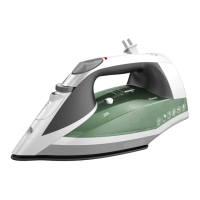
BXIR2401E–BXIR2411E Use:
♦ Unroll the cable completely before plugging it in.
♦ Connect the appliance to the mains.
♦ Once plugged in, the product will start to heat up, during
this heating period, do not press the steam button, wait
for the green light to come on,
♦ Do not use temperatures higher than those indicated on
the garments to be ironed.
♦ SMART:
♦ The product adapts to all types of fabric.
- Temperature for synthetic bres (Polyester, Nylon…).
Setting ●
- Temperature for silk, wool.
Setting ●●
- Temperature for cotton. Y linen.
Setting ●●● and Max
♦ Wait until indicator (G) lights green, this means that
the appliance has reached temperature, after its rst
warm-up.
♦ During use of the appliance, indicator (G) will change
colour (red, green) to indicate when it is using power and
heating.
Dry ironing:
The appliance has a steam control trigger (C) which, when
set to off, allows dry ironing (without steam) or with steam
depending on whether the trigger is pressed.
Steam Ironing:
It is possible to iron with steam whenever the tank is lled
with water and the correct temperature is selected.
Vertical ironing:
♦ It is possible to iron hanging curtains, items of clothing
on their own hanger, etc. To do so, follow these
instructions:
♦ Iron from top to bottom,.
♦ . Important: for cotton and linen, it is recommended to
put the base of the iron in contact with the material. For
other more delicate fabrics, it is recommended to keep
the base of the iron a few centimetres away.
Auto-off function (stand-by): BXIR2411E;
BXIR2401E
♦ For the purpose of saving energy, the appliance switches
to auto-off mode (stand-by) after 8 minutes in the upright
position or 30 seconds if left at, assuming the user has
not performed any action during this period. 3 beeps
will sound and the indicator will ash RED GREEN
alternately
♦ To resume ironing just touch the trigger or move the iron.
Once you have nished using the
appliance:
♦ Unplug the appliance from the mains.
♦ Drain the water out of the appliance.
♦ Clean the appliance.
CLEANING
♦ Disconnect the appliance from the mains and allow it to
cool before undertaking any cleaning task.
♦ Clean the equipment with a damp cloth with a few drops
of washing-up liquid and then dry.
♦ Do not use solvents, or products with an acid or base pH
such as bleach, or abrasive products, for cleaning the
appliance.
♦ Never submerge the appliance in water or any other
liquid or place it under running water.
How to deal with lime scale incrustations:
♦ For the appliance to work correctly it should be kept free
of limescale or magnesium incrustations caused by the
use of hard water.
♦ To avoid this kind of problem it is advisable to use
distilled water.
♦ To prevent this kind of problem, we recommend the use
of water with low lime or magnesium mineralisation.
♦ To de-scale, we recommend the use of the specic
product for this kind of appliance, which can be found in
specialised shops and authorised technical services.
♦ A specic anti-lime scale product should be used on this
kind of product.
♦ Home-made solutions, such as the use of vinegar, are
not recommended for descaling this appliance.
ANOMALIES AND REPAIR
♦ Take the appliance to an authorised technical support
service if product is damaged or other problems arise.
Do not attempt to disassemble or repair the appliance
yourself as this may be dangerous.
For EU product versions and/or if


 To Next Page