ENGLISH
4
EMPTYING AND CLEANING THE PRODUCT
WARNING: Turn vacuum off before
emptying the dust bin orcleaning.
Removing the dust bin and filter
(Fig. G–J)
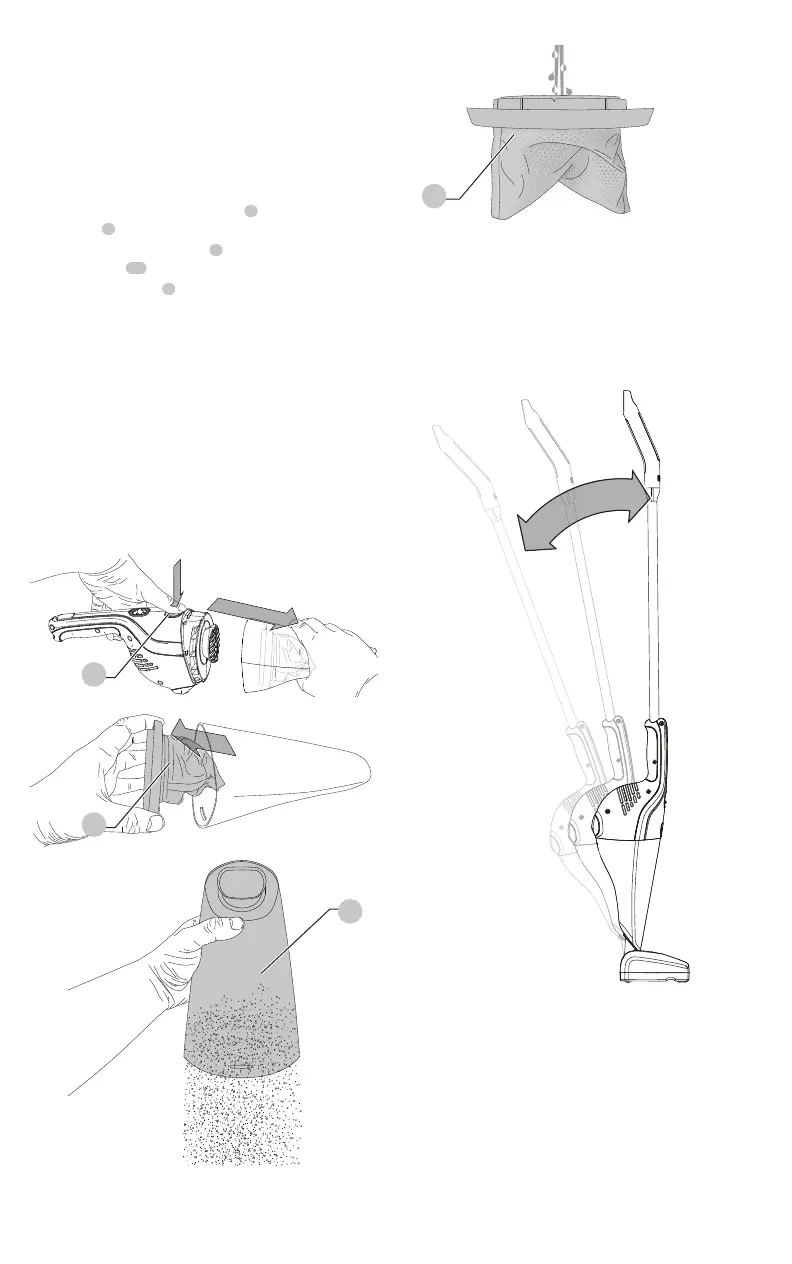
1. Press the dust bin release button
3
and remove the
dust bin
4
from the power head as shown in Fig.G.
2. While holding the dust bin
4
over a garbage can, pull
out the filter
11
.
3. Shake the dust bin
4
over a garbage can to empty the
contents as shown in Fig.I.
4. To replace the filter, push it back onto the bin unit until
it locks firmly intoposition.
WARNING: Never use the appliance
without the filterinstalled.
5. Optimum dust collection will only be achieved with a
cleanfilter.
6. The dust bins and filter can be washed in warm soapy
water as shown in Fig.J.
7. Make sure that the filter and the dust bin are dry
beforereinstalling.
Fig. G
3
Fig. H
11
Fig. I
4
Fig. J
11
Storage - Fig. K
Your BLACK+DECKER HHS315J can be stored upright, on
a level surface, by pushing the unit forward into the floor
head until it clicks into place, as shown in Fig. K. It can also
be hung from a wall fitting (not supplied) by using the hole
in thehandle.
Fig. K
MAINTENANCE
Use only mild soap and damp cloth to clean the vacuum.
Never let any liquid get inside the vacuum; never immerse
any part of the vacuum into aliquid.
WARNING: Make sure the vacuum is
completely dry before usingit.




 To Next Page