EasyManua.ls Logo

Blackstar DEPT. 10 DUAL DRIVE - User Manual

Blackstar DEPT. 10 DUAL DRIVE
14 pages
Print Icon
To Next Page IconTo Next Page
Loading...
21
Blackstar Amplification Ltd, Beckett House, 14 Billing Road, Northampton, NN1 5AW, UK
For the latest information go to: www.blackstaramps.com
Whilst the information contained herein is correct at the time of publication, due to our policy of constant improvement
and development, Blackstar Amplification Ltd reserves the right to alter specifications without prior notice.
Designed and Engineered by
Blackstar Amplification UK
Owner’s Manual
195401M-VB-1 10/21
Question and Answer IconNeed help?

Do you have a question about the Blackstar DEPT. 10 DUAL DRIVE and is the answer not in the manual?

Summary

Important Safety Instructions

Safety Symbols and Explanations

Explanation of warning symbols indicating important operation and potential electric shock risks.

Introduction

Features

Top View Controls

Input Jack

Connect your guitar to the input jack using a screened guitar lead.

Gain 1 Control

Adjusts overdrive/distortion for Channel 1, increasing gain for more overdriven tones.

Level 1 Control

Sets overall volume for Channel 1, used with Gain 1 for desired drive and volume.

Channel 1 Mode Switch

Switches Channel 1 between Clean and Crunch modes, offering versatile tone options.

Bass Control

Adjusts low-end frequencies for tight, cutting, or warm, thumping tones.

Middle Control

Adjusts mid-frequencies for tone 'body', from scooped rhythm to sustained lead tones.

Treble Control

Fine-tunes treble frequencies for warm, dark, or bright, cutting sounds.

ISF Control

Infinite Shape Feature adjusts tone signature between American and British characteristics.

Gain 2 Control

Adjusts overdrive/distortion for Channel 2, from crunch to screaming lead tones.

Level 2 Control

Sets overall volume for Channel 2, used with Gain 2 for desired drive and volume.

Cab Rig Switch

Selects one of three Cab Rig speaker environments for detailed sound shaping.

Valve Guard

View of ECC83 valve; warning against removing guard as there are no user serviceable parts.

Channel 2 Mode Switch

Sets Channel 2 between Crunch (dynamic) and Overdrive (higher gain, presence).

Output Jack

Connects to other pedals or amp inputs; recommended first in effects chain for tone preservation.

Cab Rig Output

DSP speaker simulator output for cabinet detail, edit via Architect software.

Channel 1 Status LED

Indicates if Channel 1 is active (WHITE LED on) or inactive (LED off).

Channel 1 Footswitch

Toggle Channel 1 on or off with this footswitch.

Channel 2 Status LED

Indicates if Channel 2 is active (RED LED on) or inactive (LED off).

Channel 2 Footswitch

Toggle Channel 2 on or off with this footswitch.

Rear View Connections

FX Loop Send

Connects the input of an external effects unit to keep signal clean.

FX Loop Return

Connects the output of an external effects unit.

DC Inlet

Input for the 9V DC / 500mA power adaptor. Only use the included supply.

USB Audio Output

Connects to PC/Mac for audio capture, with Cab Rig preset applied or DI signal.

XLR Line;DI Output

Balanced output for PA, mixing desk or interface, with Cab Rig preset or DI signal.

Specifications

Overview

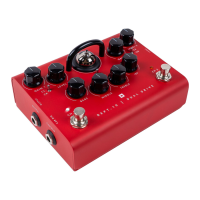
The Blackstar DEPT. 10 DUAL DRIVE is a high-voltage valve effects pedal designed to offer extensive overdrive flexibility for guitarists. It is the result of meticulous research and development by Blackstar's R&D team, DEPT. 10, based in Northampton, UK. The pedal aims to provide guitarists with ultimate tools for self-expression, ensuring reliability, quality, and superior tone through extensive laboratory and road testing.

Function Description:

The DEPT. 10 DUAL DRIVE pedal features two channels, each offering distinct drive characteristics. Channel 1 provides Clean and Crunch modes, allowing users to transition from a clean boost to a full overdrive. Channel 2 extends the tonal range, moving from a super crunch to a screaming lead. At its core, the pedal utilizes an ECC83 valve, visible through a protective guard, to deliver authentic valve tone.

A key feature of this pedal is its unique switching operation, which can transform a single-channel vintage amplifier into a three-channel tone machine. This expands the versatility of a guitarist's setup without needing multiple pedals or a complex rig.

The pedal also incorporates Blackstar's patented ISF (Infinite Shape Feature) control. This allows for continuous adjustment of the tone signature, effectively blending characteristics from American-style amplifiers (tight bottom end, aggressive mids) to British-style amplifiers (woody, less aggressive). This feature works in conjunction with the traditional Bass, Middle, and Treble controls, providing comprehensive tonal sculpting.

For recording and direct connection, the DEPT. 10 DUAL DRIVE includes a Cab Rig output. This is a next-generation DSP speaker simulator that meticulously reproduces the sound and feel of a mic'd guitar cabinet. Users can select from three Cab Rig environments directly on the pedal or delve into deep editing and create custom patches using the free Architect software via USB. The Cab Rig output is a stereo 6.35mm connection, suitable for headphones, studio monitors, and front-of-house systems, and features a low-noise, low-distortion headphone driver circuit for silent practice. Additionally, an XLR Line/DI Output provides a balanced connection for PA systems, mixing desks, or recording interfaces, also benefiting from the selected Cab Rig preset. A DI signal can be chosen within the Cab Rig software to bypass cabinet simulation for both the USB and XLR outputs.

Usage Features:

The pedal's top view features several controls for intuitive operation:

  • Input: For connecting your guitar using a good quality screened guitar lead.
  • Gain 1: Adjusts the amount of overdrive/distortion for Channel 1, ranging from crunch tones to a full crunch at maximum.
  • Level 1: Sets the overall volume for Channel 1, used in conjunction with Gain 1 to achieve the desired drive type. Higher gain typically requires lower volume, and vice versa.
  • Channel 1 Clean/Crunch Mode Switch: Toggles Channel 1 between Clean and Crunch modes. The Crunch mode can also serve as a clean boost when running high level and low gain, adding saturation to an already overdriven amplifier.
  • Bass: Controls the low-end frequencies, allowing for tones from tight and cutting (counter-clockwise) to warm and thumping (clockwise). This advanced tone-shaping circuit is shared by both channels.
  • Middle: Adjusts the mid-range frequencies, crucial for the 'body' of your tone. Minimum settings (fully counter-clockwise) produce an aggressive, scooped sound ideal for rhythm, while increasing it (clockwise) adds 'body' suitable for sustained lead tones.
  • Treble: Provides precise adjustment of high frequencies. Lower settings (counter-clockwise) result in a warm, darker sound, while higher settings (clockwise) make the sound brighter and more aggressive.
  • ISF (Infinite Shape Feature): Works with the Bass, Middle, and Treble controls to continuously vary the tone from an American characteristic (tight bottom, aggressive mids) to a British characteristic (woody, less aggressive). It's recommended to start with ISF at halfway and adjust Bass, Middle, and Treble to taste, then fine-tune ISF.
  • Gain 2: Adjusts the overdrive/distortion for Channel 2, progressing from crunch tones to a full overdriven tone at maximum.
  • Level 2: Sets the overall volume for Channel 2, used with Gain 2 to achieve the desired drive type. Similar to Channel 1, lower gain settings typically require higher volume.
  • Cab Rig Switch: Selects one of three Cab Rig environments.
  • Channel 2 Crunch/Overdrive Mode Switch: Toggles Channel 2 between Crunch and Overdrive modes. Crunch mode offers dynamic light to medium breakup, while Overdrive mode provides more gain, saturation, and a slight presence lift.
  • Output: Designed for connection to other pedals or the input of various amplifiers (valve, solid-state, digital, hybrid). For optimal noise performance, it's recommended to place the overdrive pedal first in the effects chain. The built-in buffer/line driver helps preserve tone with long cables or large pedalboards.
  • Footswitches and LEDs: Dedicated footswitches (Channel 1 On/Off Footswitch, Channel 2 On/Off Footswitch) and LEDs (Channel 1 On/Off LED - white, Channel 2 On/Off LED - red) allow for easy channel activation and deactivation.

The rear view of the pedal offers additional connectivity:

  • FX Loop Send: Connects to the mono input of external effects units (reverb, delay, modulation) that you want to keep clean.
  • FX Loop Return: Connects to the mono output of external effects units.
  • DC Inlet: For the supplied 9V DC / 500mA adaptor. Only the included power supply should be used.
  • USB Audio Output: Connects via USB cable to a Windows PC or Mac, appearing as an audio capture device. This output applies the selected Cab Rig preset, with an option to select a DI signal to bypass cabinet simulation via Architect software.
  • XLR Line/DI Output: A balanced output for connecting to PA systems, mixing desks, or recording interfaces. This output also applies the selected Cab Rig preset, with an option for a DI signal via Architect software.

Maintenance Features:

The manual emphasizes several important safety and maintenance instructions to ensure the longevity and safe operation of the DEPT. 10 DUAL DRIVE pedal:

  • General Care: Read and follow all instructions and warnings. Clean the apparatus only with a dry cloth.
  • Environmental Considerations: Do not use near water. Avoid blocking ventilation openings. Do not install near heat sources. Protect the power cord from being walked on or pinched. Unplug during lightning storms or long periods of disuse.
  • Power Supply: Only use the supplied 9V DC / 500mA adaptor. Handle the power supply adaptor carefully and replace if damaged. Never break off the earth (ground) pin. Ensure the power adaptor is connected to an earthed socket/outlet.
  • Internal Components: The equipment case should not be opened as there are no user-serviceable parts inside. All servicing should be referred to qualified service personnel. Do not attempt to remove the fixing screws or guard for the valve.
  • Moisture and Liquids: Do not expose the apparatus to rain, liquids, or moisture. Avoid placing liquid-filled vessels on top of the amplifier. Condensation can form if moved from a cold to a warm environment; allow the unit to reach room temperature before switching on.
  • Safety Plugs: Do not defeat the safety purpose of polarized or grounding-type plugs.
  • Ventilation: Do not cover or block ventilation slots or openings.
  • Troubleshooting: If the product does not operate normally despite following instructions, refer it to a qualified service engineer.
  • Hearing Protection: High loudspeaker levels can cause permanent hearing damage. Avoid direct vicinity of loudspeakers operating at high levels and wear hearing protection if continuously exposed.
  • Disposal: All electrical and electronic products should be disposed of separately from municipal waste, using designated collection facilities.
  • Unauthorized Modification: Unauthorized modification of this equipment is expressly forbidden by Blackstar Amplification Ltd.

The pedal is designed for safe use under non-tropical climate conditions, with a maximum ambient temperature of 35°C, and evaluated for safety at a maximum altitude of 2000m.

Blackstar DEPT. 10 DUAL DRIVE Specifications

General IconGeneral
TechnologyAnalog
TubesNo
Channels2
MIDINo
USBNo
Weight0.5 kg
TypeOverdrive
SwitchesBypass
Inputs1 x 1/4" Instrument Input
Outputs1 x 1/4" Output
Power Supply9V DC (Power Supply Included)

Related product manuals