87
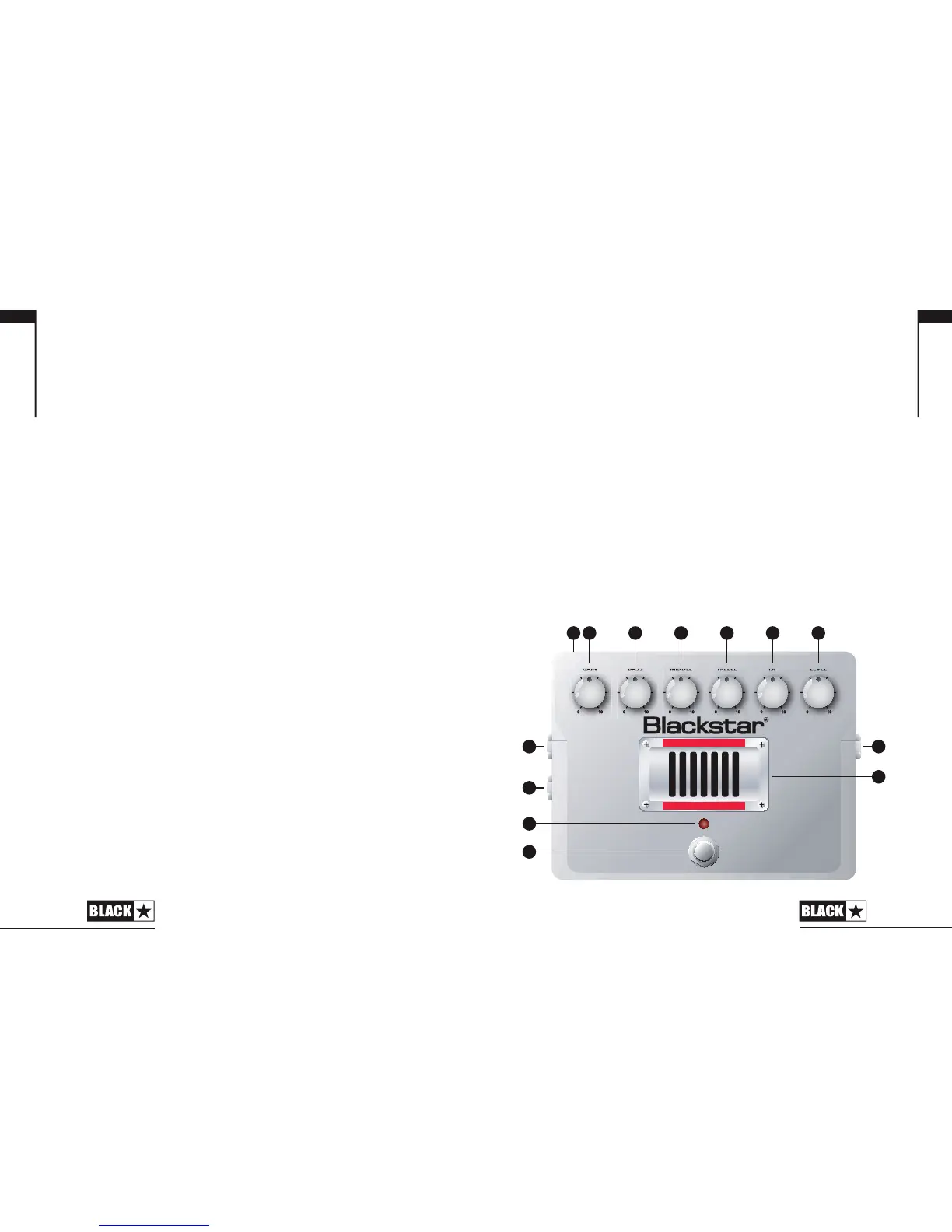
10. Valve Viewing Window
Through this grille you can see the ECC83 valve at the heart of your
pedal.
WARNING: Do not attempt to remove the xing screws or grille. No
user serviceable parts inside.
11. Effect On/Off LED
When the RED LED is on the pedal is on. When the LED is not on
the pedal is off.
12. Effect On/Off Switch
Press this switch to turn the effect on or off.
13. DC Inlet
For the input of the 22V DC / 1.1A adapter supplied. Always use a
Blackstar approved adapter.
Technical Specication
Power: 22V DC
Maximum Current Draw: 1.1A
Controls: Gain, Bass, Middle, Treble, ISF, Level
Valve: ECC83 / 12AX7
Switches: On/Off Switch
Indicators: Effect On/Off, Power On/Off (Valve Backlight LED)
Jacks: Input, Output, Emulated Output
Input Impedance: 1MΩ
Output Impedance: < 1KΩ
Dimensions (mm): 160 x 119 x 80
Weight: 1.2kg
DC Adaptor: ADA Series supplied
TREBLEBASS
MIDDLE
ISFGAIN LEVEL
100 100 100 100 100 100
PURE VALVE FILTH
HT-DISTX
113
7
8
12
11
9
10
2 3 4 5 6
English
English








 To Next Page