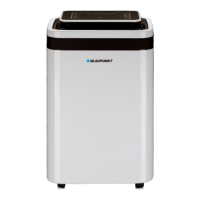
ADH701
7
Your products is designed a manufactured with high quality materials and components,
which can be recycled and reused.
Maximum power consumption: 510W (32°C, 90%)
Tank volume: 5,5l
Maximum current: 2,4A (32°C, 90%)
Maximum evaporation pressure: 1,5 Mpa
TECHNICAL SPECIFICATIONS
Maximum condensation pressure: 3,3,3,2MPa
Rated power: 390W(27°C, 60%)
Voltage: 220-240V ~50Hz
Air-flow rate: 195m³/h
Refrigerant: R290/75g
Recommended air filter: Blaupunkt ACC032
Maximum noise level: ≤47dB(A)
1. Control panel
1a. Display
1b. Power on/off button
1c. MODE button
1e. + and – buttons
1d. TIMER button
1f. Oscillation button
1h. Full-water-tank indicator
1i. Operating-mode indicators
(Silent/Strong/Continuous/Auto)
1j. Defrosting-mode indicator
5. Handle
8. Lateral display with LED indicator
1k. Timer and oscillation indicators
2. Air outlet
4. Water tank
4a. Water-tank handle
6. Water outlet
7. Tube for continuous water drainage (12 mm)
3. Air inlet grille
Automatic mode: the target humidity level is set at 55%; the fan speed depends on the ambient
humidity level.
Silent mode: the fan speed is at its lowest - you can set the target humidity level.
2. Shutdown procedure
Press the power on/off button (1b). The unit will switch on in the last selected mode.
Fast-drying mode: the fan speed is at its highest, and the drying process goes on in continuous mode.
6. Full-tank indicator: if the tank is full of water, the dehumidifier will terminate the drying process and
Continuous-drying mode: the fan speed is at its lowest, and the drying process goes on in continuous
mode.
1. Start-up procedure
5. Oscillation of the air-outlet fins: the oscillation mode can be activated or deactivated using the
oscillation button (1f ).
INSTRUCTIONS FOR USE
Press the power on/off button (1b). The unit will switch off after a while. Do not interrupt the shutdown
procedure by removing the plug from the electrical outlet.
3. To change the operating mode: press the MODE button (1c). Each time you press the button, the
mode will change in the following sequence: Auto (automatic mode), Silent (silent mode), Strong (fast-
drying mode), Continuous (continuous-drying mode). Press again to return to the Auto mode. The
operating mode indicators (1i) show the current operating mode.
4. Adjustment of the target humidity level: set the target air-humidity level using the + and –
(1e) buttons: 35%-80% (at 5% increments). The target humidity level can only be set in the silent mode.


 To Next Page