
 Need help?
Do you have a question about the Blaupunkt BREMEN SQR 49 and is the answer not in the manual?
Details potential connections and a critical safety warning about speaker outputs.
Explains the removable unit feature and its installation/operation.
Discusses FM reception quality, Codem IV concept, and aerial mounting.
Covers On/Off/Volume, Balance, LD, DNR, and Fader for sound adjustment.
Explains waveband selection, station tuning, presets, ARI, and SCAN.
Details SRC, PS, station buttons, and search tuning.
Covers CLEAN, SCAN, fast winding, ejection, BLS, and Dolby NR.
Explains RM (Radio Monitor), CPS (Super-CPS), and track switching.
Details On/Off, Volume, Treble, Bass, Balance, Fader, and Loudness adjustments.
Explains selecting wavebands and stations via scan, presets, and manual tuning.
Covers automatic search tuning and manual tuning for station storage.
Details storing stations via preset buttons, travel store, and manual tuning.
Explains mono switching for better reception and adjusting search sensitivity.
Guides on inserting cassettes, playback position, and using red-lettered controls.
Covers automatic reverse play and tape type detection (METAL, CrO2, Fe2O3).
Explains using Dolby B/C NR and switching between tracks (TR1/TR2).
Details title skipping (CPS), track scanning, and blank skip (BLS) functions.
Allows listening to the radio while fast winding tape.
Switches between audio sources like cassette, radio, CD/DAT player, or CD changer.
Identifies and receives local traffic messages, with alert signals.
Adjusts ARI volume and enables listening to cassettes during traffic announcements.
Automatically tunes to another traffic station when reception is difficult.
Sets a 4-digit code to render the radio unusable to thieves.
Allows entering up to 2x8 digits for owner identification.
Procedures for erasing the personal code and setting a new one.
Guide to updating the entered car registration number.
Explains data display after power loss and code entry prompts.
Allows selection of display background colour between red and green.
Monitors operating time of cassette mechanism and indicates cleaning needs.
Provides specifications for Output power, FM, and Cassette functions.
Diagram showing power and antenna connections for the car radio.
Illustrates speaker wiring for left/right front/rear and power supply.
This document provides a comprehensive guide to the Blaupunkt Bremen SQR 49 car radio, covering its functions, operation, and maintenance.
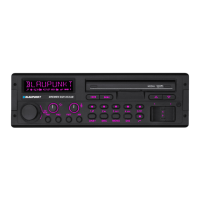
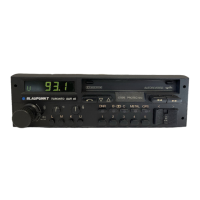
The Bremen SQR 49 is a car radio with a cassette player, designed to offer a range of audio and radio functionalities. It supports FM, MW, LW, and SW wavebands, allowing users to tune into various radio stations. The cassette player is equipped with features like Dolby B/C NR for noise reduction, Super-CPS for track selection, and autoreverse for continuous playback. The device also includes an ARI (Automatic Radio Information) function for receiving traffic messages, which can be prioritized even during cassette playback.
The device offers extensive sound control options. The volume control is integrated with the on/off knob. Bass and treble can be adjusted by depressing and turning their respective rotary controls. The balance control (left/right volume selector) is adjusted by pulling and turning a knob, which then locks back into place. The fader control adjusts the front/rear volume, and its knob can be pressed to unlock it for adjustment.
The Loudness (LD) function compensates for the human ear's reduced sensitivity to bass at low volumes. It can be switched on/off by pressing the LD button, indicated by "LD" on the display. The desired loudness level (1-6) can be adjusted by holding the LD button for approximately 8 seconds until "LEVEL" flashes, then using the rocker switch to set the level.
The DNR™ (Dynamic Noise Reduction) button reduces noise during cassette and radio operation, indicated by "DNR" on the display.
Selecting a waveband is done by pressing the U 1-3, U TS, M L K, or ARI buttons. The display shows the active waveband (n) and FM memory bank (m).
Selecting a station can be done in several ways:
Storing a station involves tuning to the desired station and then holding down the appropriate preset button (1-6) until the audio returns (approx. 3 seconds). The preset indicator (l) shows which button was used.
Travel Store allows automatic storage of the six strongest stations in the current reception area by pressing the U-TS button for approx. 2 seconds. The unit mutes during this process.
Mono switching: The radio automatically switches from stereo to mono in areas of weak signal strength or multipath reception. Users can manually switch to mono by pressing the m button to suppress background noise, which turns off the stereo indicator (k).
Setting search tuning sensitivity: The m button allows adjustment of search tuning sensitivity (o). "Normal sensitivity" stops at good reception, while "high sensitivity" stops at minor reception. Manual tuning activates "mono." The sensitivity level (1-3) can be further adjusted via software by holding the m button for approx. 8 seconds until "LEVEL" flashes, then using the rocker switch.
Insert a cassette (side A or 1 facing upwards) into the compartment. Playback starts automatically in the last used direction. The display shows the current track (TR1 or TR2).
Tape type switching is automatic (METAL, CrO2, Fe2O3), indicated by "MTL" on the display (h).
Dolby NR (Noise Reduction): The unit supports Dolby B NR and Dolby C NR. These can be switched on/off using buttons 20 or 19, with the active mode shown on the display (f).
Track switching (Autoreverse): The unit automatically reverses direction at the end of the tape. The track can be manually switched by pressing the 23 button.
Super-CPS (Cassette Program Search): This function allows skipping up to 9 music tracks in both forward and backward directions. Activate CPS by pressing the CPS button (g). Use the rocker switch (13, 14) to select the number of tracks to skip, shown on the display (b).
SCAN (scanning mode): When activated, the unit plays each track for approx. 8 seconds before skipping to the next. Activate by pressing the SCAN button (11), indicated by "SCAN" on the display (a). Press SCAN again to stop the scan and play the current track continuously.
Automatic fast forward at blanks (BLS): This function skips pauses longer than 15 seconds by fast-forwarding the tape to the end or the next track. Activate BLS by pressing the BLS button (8), indicated by "BLS" on the display (d).
Radio Monitor (RM): During fast winding (SCAN, CPS, BLS), the unit is usually muted. Pressing the RM button (21) allows radio operation during fast winding, indicated by "RM" on the display (i).
Switching audio sources (SRC): The SRC button (15) switches between cassette and radio operation. If an external CD or DAT player is connected, its playback has priority. If a Blaupunkt CD-Changer is used, SRC can select between CD, cassette, and radio.
Cassette ejection: Press button 17 to eject the cassette.
Checking frequency/tuning during cassette operation: Press the rocker switch (16) to display the tuned station's frequency for approx. 3 seconds. Press it a second time to start search tuning to the next receivable station.
ARI traffic messages: Activate ARI by pressing the ARI button (7), indicated by "ARI" on the display (p). All non-traffic information stations are muted. If no traffic information station is received, an alert sounds, and "NO ARI" is displayed. The volume for traffic messages and the alert signal can be adjusted by holding the ARI button for approx. 8 seconds until "LEVEL" flashes, then using the rocker switch. When a traffic message is broadcast during cassette playback, the cassette is automatically stopped, and the message is transmitted.
The device features a four-digit anti-theft code and allows entry of an 8-digit car registration number.
Care of cassettes and unit: Use C60/C90 cassettes. Protect cassettes from dirt, dust, and extreme temperatures. Clean the tape head, rubber pressure rolls, and capstan shaft with a cotton pad dipped in alcohol after approximately 50 hours of operation.
CLEAN timer: The unit has a Clean-Timer that tracks the operating time of the cassette mechanism. After 50 hours, "CLEAN" appears on the display for 5 seconds each time a cassette is inserted, indicating that cleaning by an expert is recommended. To reset the timer to "0" after cleaning, press the CLEAN button (8) for about 5 seconds.
Changing the display colour: To change the display's background color between red and green, switch the radio off. Press and hold the right part of the rocker switch for red, or the left part for green. Then, switch the unit on before releasing the rocker switch.
 General
| Type | Car Receiver |
|---|---|
| Tuner bands | FM, AM |
| FM Radio | Yes |
| AM Radio | Yes |
| Equalizer | Yes |
| DIN size | 1 DIN |
| Display type | LCD |
| AUX in | Yes |
| USB port | Yes |
| Bluetooth | Yes |
| Pre-amp output | Yes |
| Color | Black |
| Power Output | 4 x 50 W |
| Display | LCD |
| SD Card Slot | Yes |
| Equalizer Bands | 5 |
| Weight | 1.2 kg |






 To Next Page