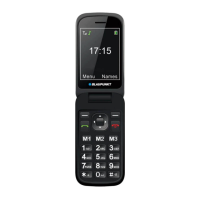
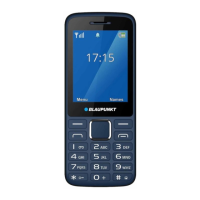
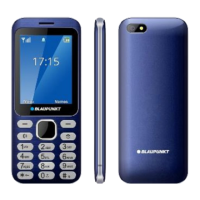
The Blaupunkt BS 06 is a mobile phone designed for ease of use, featuring a clamshell design and a focus on essential communication functions. It supports GSM 900/1800 MHz networks and uses a nanoSIM card.
Function Description
The BS 06 serves primarily as a communication device, allowing users to make and receive calls and send/receive SMS messages. It includes a phonebook for storing contacts, a call history to track missed, dialed, and received calls, and an emergency SOS function. Beyond communication, it offers basic multimedia capabilities such as a camera for taking photos and an image viewer, as well as an FM radio. Additional tools include a calculator, calendar, tasks reminder, and alarm clock. Bluetooth connectivity is also available for wireless data transfer.
Important Technical Specifications
- Network Type: GSM 900/1800 MHz
- SIM Card: nanoSIM
- Power Supply:
- Input: (AC) 100-240 V, 50/60 Hz, 0.15 A
- Output: (DC) 5V, 1A, 5W
- Battery: Li-ion, 3.7V, 800 mAh
- SAR Values:
- Head: 0.452 W/Kg
- Body: 0.773 W/Kg
- Phonebook Capacity: Up to 100 contacts in phone memory (SIM card capacity varies).
Usage Features
The phone features a physical alphanumeric keypad for dialing and text input, along with dedicated navigation keys and soft keys for menu interaction.
- Power On/Off: Press and hold the Call End button.
- Making Calls: In Idle mode, enter the number and press the Call (Dial) button. For international calls, press the
* key twice for the + sign before entering the country code and number.
- Receiving Calls: The device displays the caller's number or name (if saved). Calls can be answered by opening the cover (if active), pressing the dial key, or the left soft key [Answer]. The "Anykey" function allows answering with any key except the Right softkey and End/Off button. If a headset is connected and "Auto answer" is active, calls are received automatically after 5 seconds. To reject a call, press the End/Off button or the Right softkey.
- Volume Control: During a call, use the volume keys on the side of the phone to adjust the loudspeaker volume.
- Emergency Call (SOS): Pressing the SOS button (on the back of the device) alarms pre-set contacts. The alarm chain continues until one contact answers. A short audio message can be set to play when the SOS call is received (requires a memory card).
- Family Numbers: Three dedicated buttons (M1, M2, M3) can be programmed with frequently dialed numbers for quick access.
- Messaging: Supports sending and receiving SMS. Input modes can be switched using the
# key. Messages can be saved as drafts, and sent messages are stored in the Sent Items folder.
- Camera: Accessed via Menu > Multimedia > Camera. Photos are taken by pressing the middle navigation key. Camera settings include Anti-Flicker, Scene Mode, White Balance, and Delay timer. Image size and quality can also be adjusted. A memory card is required to save images.
- Image Viewer: Allows viewing images saved on the memory card. Functions include rotating, setting as wallpaper, sending via Bluetooth, renaming, deleting, and viewing image information.
- FM Radio: Accessed via Menu > Multimedia > FM radio. Press the middle navigation key to turn on. Use Left/Right navigation for channels and Up/Down for frequencies. Volume is adjusted via side keys. A headset is recommended for better reception and is required for handsfree mode.
- Tone Settings: Allows customization of alert type, ring type, ringtone, and volumes for ringtone, message, keypad, power on/off, and cover open/off. Silent mode can be activated/deactivated by pressing and holding
#.
- Phone Settings: Includes setting time and date, language, schedule power on/off, shortcuts for navigation keys, dedicated key assignments, flight mode, and checking software version.
- Call Settings:
- Call Waiting: Turn on/off or answer the Call Waiting status. An alert is heard during a call if another person calls, and the caller's information is displayed.
- Call Divert: Diverts incoming voice calls to voicemail or other numbers. Options include unconditional divert or conditional divert (if unreachable, no answer, or busy).
- Call Barring: Uniformly switches barring on/off for outgoing and incoming calls and allows changing the barring password.
- Blacklist: Add numbers to prevent them from calling you.
- Answer Mode: Set how calls are received (Cover answer, Any key, Auto answer when headset mode).
- Security Settings:
- SIM Security: PIN lock activation/deactivation, and changing PIN/PIN2 codes. Incorrect PIN entry three times locks the SIM, requiring a PUK code to unblock.
- Phone Security: Activates/deactivates phone lock, requiring a password (default: 1122) to unlock the phone upon power-on.
- File Manager: Allows checking and organizing content on the memory card. Functions include viewing files (pictures), rotating pictures, and viewing image information.
- Bluetooth: Turn on/off, set visibility to other devices, find new devices, show paired devices, and change the device name.
- Calculator: Performs basic arithmetic operations.
- Calendar: Displays the current month and highlights the current date.
- Tasks: Create reminders with subject, priority, due time, alarm, repetition, and details.
- Alarm: Set up to 5 alarms. Alarms function even when the device is off. When an alarm sounds, press the Left soft key or End call key to stop, or the Right soft key to snooze.
Maintenance Features
- Battery Charging: Connect the charger to the appliance and a socket. The battery icon on the display indicates charging status. Unplug the charger when charging is complete. Charge the battery when a low voltage warning appears to avoid unexpected power-off during calls.
- Battery Care: Disconnect the charger from the power source when not in use for more than a week. Avoid charging the battery if its temperature is below 0°C or above 45°C. Do not short-circuit or use damaged batteries. Dispose of spent batteries according to local laws.
- Device Repair: Only qualified personnel should repair the product.
- Restore Settings: Reset device settings to factory defaults via Menu > Settings > Restore Settings. This requires entering the phone password and deletes all data (names, messages, personal settings). This action cannot be undone.

 Need help?
 General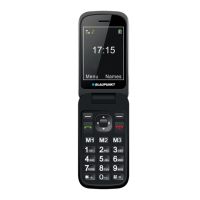

 To Next Page