This document describes the Blaupunkt Full HD Digital Set Top Box, model BTV3TB, a device designed to receive and process digital television signals, providing users with a range of viewing and recording functionalities. The set-top box acts as an intermediary between your antenna and your television, converting digital broadcast signals into a format your TV can display, particularly useful for older televisions or those without an integrated digital tuner.
Function Description
The primary function of the Blaupunkt BTV3TB is to enable the reception of Full HD digital terrestrial television (DVB-T) broadcasts. It decodes these signals, allowing users to watch digital channels on their television. Beyond basic viewing, the device offers advanced features such as an Electronic Program Guide (EPG) for navigating channel schedules, and Personal Video Recorder (PVR) capabilities for recording live television. The set-top box is equipped with various input and output ports to facilitate connection to an antenna, a television, and external storage devices.
Usage Features
Initial Setup:
Upon first use, the device guides the user through an "Init Install" process. This involves selecting the OSD (On-Screen Display) language (defaulting to English), setting the country (Australia is the default), and confirming the LCN (Logical Channel Numbering) setting. After these initial selections, the device proceeds with an "Auto Search" to scan for available digital TV and radio channels. This ensures that all local broadcasts are detected and organized for easy access.
Channel Management:
The set-top box provides comprehensive channel management features. Users can access a "Channel Manager" to organize their channels, potentially reordering or deleting unwanted ones. A "Favorite List" function allows users to create a personalized selection of their most-watched channels for quicker access. The "Channel Filter" option, found within the installation menu, can be set to "All Channels" to ensure all available broadcasts are included.
Electronic Program Guide (EPG) and Recording:
A key feature of the BTV3TB is its EPG, which displays a detailed schedule of all channel programs and their times. This guide allows users to:
- View Program Information: Navigate through daily and weekly schedules using the UP and DOWN direction keys on the remote control.
- Set Reminders: Users can set reminders for upcoming programs.
- Schedule Recordings: By pressing the RED button on the remote while an upcoming program is highlighted in the EPG, users can schedule it for recording. A green "R" icon will appear to confirm a successfully scheduled recording.
- Immediate Recording: Pressing the RED button while watching a live program will initiate an immediate recording. A red "R" icon will appear to indicate that the current program is being recorded.
- Navigate EPG Days: The YELLOW button is used to view the "PREVIOUS DAY" schedule, while the BLUE button navigates to the "NEXT DAY."
PVR Functionality (Recording):
To utilize the recording features, a USB drive (formatted to FAT32) must be inserted into the front USB port of the set-top box. The device supports recording live TV and scheduled programs.
- Schedule List: The "TIMER" button on the remote control brings up the "SCHEDULE LIST," where users can view, manage, edit, or delete all upcoming scheduled recordings.
- Record List: The "USB" button on the remote allows access to the "Record List," which displays all completed recordings stored on the connected USB drive. Users can then select and play back their recorded content.
The "Media Centre" menu provides access to multimedia files stored on a connected USB drive. This includes:
- Multimedia: Allows users to play videos, view photos, or listen to audio files directly through the set-top box.
- PVR Config: This option allows users to adjust settings related to their PVR recording options, such as recording quality or storage preferences.
The device's settings and features are organized into a user-friendly menu system, accessible via the "MENU" button on the remote control. Navigation within the menus is done using the LEFT, RIGHT, UP, and DOWN direction keys, with "OK" to select an option and "EXIT" to return to the previous menu or live TV.
Preference Settings:
The "Preference" menu allows users to customize various display and audio settings:
- OSD Language: Changes the language of the on-screen display.
- OSD Timeout: Adjusts how long menu items (like volume indicators) remain on screen.
- OSD Transparency: Controls the transparency level of the on-screen menus.
- Subtitle Preferences: Sets default languages for primary and secondary subtitles.
- Hard Hearing: Enables special subtitle settings for users with hearing impairments, if supported by the broadcast.
- Audio Preferences: Sets default languages for primary and secondary audio tracks.
System Settings:
The "Setting" menu provides access to system-level configurations:
- Timers: Manages countdown timers.
- Child Lock: Allows users to lock the set-top box with a password to prevent unauthorized use. It is crucial to record this password in a safe place.
- Date Time: Sets the date and time, which is essential for accurate PVR and EPG functionality.
- Factory Reset: Resets the device to its factory default settings. This should only be used if advised by customer support, as it will erase all saved configurations.
- Upgrade: This option is reserved for software upgrades provided by customer service.
- Auto Standby: Configures the device to automatically turn off after a selected period of inactivity.
- BootVideo: Controls whether a video plays upon startup.
AV (Picture) Settings:
The "AV (Picture)" menu allows users to configure video and audio output settings:
- SPDIF: Configures the digital audio output.
- Aspect Ratio: Adjusts the screen aspect ratio (Full Screen or 16:9 are recommended).
- Video Output: Selects the type of video cable output connected to the TV (e.g., CVBS).
- TV Format: Sets the television signal format (e.g., PAL).
- Video Resolution: Allows users to match the video output resolution to their TV's capabilities (up to 1080p).
- HDMI Audio: Configures audio output via HDMI (e.g., HDMI PCM).
Remote Control:
The remote control provides dedicated buttons for various functions, including power on/off, mute/unmute, channel navigation (CH+/CH-), volume control (VOL+/VOL-), EPG access, media playback controls (play/pause, stop, rewind, fast forward), direct access to scheduled recordings (TIMER), and USB mode for accessing recorded content. Numeric input buttons allow for direct channel selection.
Maintenance Features
Troubleshooting:
The manual includes a troubleshooting section to help users resolve common issues:
- No picture: Check power connection, ensure the power switch is on, and verify DVB-T and aerial cable connections.
- "No Signal" message: Confirm DVB-T cable is plugged in and aerial cable is not faulty.
- No sound: Check audio cable connections, ensure the device is not muted, and confirm the correct audio mode.
- Sound but no image: If the resolution is not supported by the TV, use the V-FORMAT button to change it. Also, check AV cable connections and ensure the program is not a radio broadcast (use TV/RADIO key to switch to TV mode).
- Remote control not responding: Replace batteries and ensure the remote is pointed directly at the set-top box and within range.
- Picture breaking up: This often indicates a weak signal; check aerial cable and connections.
General Safety and Care:
The manual emphasizes several safety precautions to ensure the longevity and safe operation of the device:
- Environmental Conditions: Avoid exposing the device to rain, moisture, splashing water, or direct sunlight. Ensure it is placed in a well-ventilated area, away from heat sources (radiators, stoves) and excessive dust or grease.
- Placement: Do not place the product in confined spaces or on unstable furniture. Ensure it does not overhang the edge of supporting furniture. Avoid placing objects filled with liquids (like vases) or small metallic objects on top of the unit, as these can cause short circuits or electric shock.
- Power Cord: Do not use damaged power cords, plugs, or loose outlets. Avoid bending, twisting, or kinking the power cord excessively. Ensure the power outlet is easily accessible. Unplug the product during lightning storms or when unused for long periods.
- Ventilation: Do not cover ventilation openings with items like newspapers, tablecloths, or curtains, as this can lead to overheating and fire. Do not insert objects into the slots.
- Servicing: The cover (or back) of the unit should not be removed by users. Servicing should only be performed by qualified service personnel.
- Batteries: Danger of explosion if batteries are incorrectly placed. Replace with the same or equivalent type.
- Double Insulation: The device features double insulation for safety, indicated by a specific symbol. For repairs, only identical spare parts should be used.
By adhering to these guidelines, users can ensure the optimal performance and safe operation of their Blaupunkt BTV3TB Full HD Digital Set Top Box.

 Need help?
 General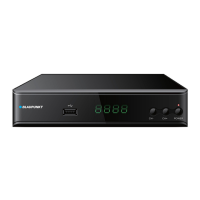

 To Next Page
