7. CYCLING COMPUTER OPERATIONS (MODEL-SPECIFIC)
LC- CONTROL DISPLAY (Computer model no. 1)
The control unit is integrated with the LC-
Display and operates the drive system. It is
located on the handlebar.
Control Unit Function Overview
1.1 Power Button ON/ OFF
Hold button for 2 seconds to switch
on/o the LED control unit and electric drive
system.
The system will automatically turn o if left
idling for more than 10 minutes.
1.2 Assist mode
Hold or
buttons to select the
desired assist level for electric system. The
lowest is Level 1 and the highest is Level 5.
When powered on, the default is Level 1.
When there is no numeric power level
displayed it means the folding e-bike is in
park or it functions as a standard bike with
no assist from the motor. You will feel the
electric assistance kicking in once selecting
again between Levels 1 up to 5.
SAFETY NOTE: When you mo
ve the pedals, the
engine can start if you are not yet safely on the
bike. Do not switch on the computer until you
have taken a seat on the folding e-bike or set
the support level to 0. Set the support to 0
before getting o the bike.
1.3 Lights/ Backlit Button ON/ OFF
With the display switched on, hold the
button for 2 seconds to turn on/ o the
headlight, taillight (model specic) and the
display backlight. There are ve levels of
backlight brightness that can be se
lected by
user.
1.4 Walk Assist
The folding e-bike comes equipped with
walk assist function. This feature propels
forward your folding e-bike with a constant
speed of 6km/h without pedaling and
requires nothing but to hold it balanced
when walking along side it. It comes very
handy when needing to push it up a steep
incline.
Hold the button to activate the walk
assist. This function remains activated as
long as you hold the button and
deac
tivates the moment you stop holding it.
SAFETY NOTE: Push Assist function should only
be used when the wheels are in contact with
the ground. Danger onjury may occur if push
assist function is activated since the wheel will
start spinning.
SAFETY NOTE: When you move the pedals, the
engine can start if you are not yet safely on
the bike. Do not switch on the computer until
you have taken a seat on the folding e-bike or
set the support level to 0. Set the support to 0
before getting o the bike.
SAFETY NOTE:
Only operate settings in case of parking the
folding e-bike.
23_06_2021 Anleitung-E-Bikes.indd 36 23.06.2021 10:11:10
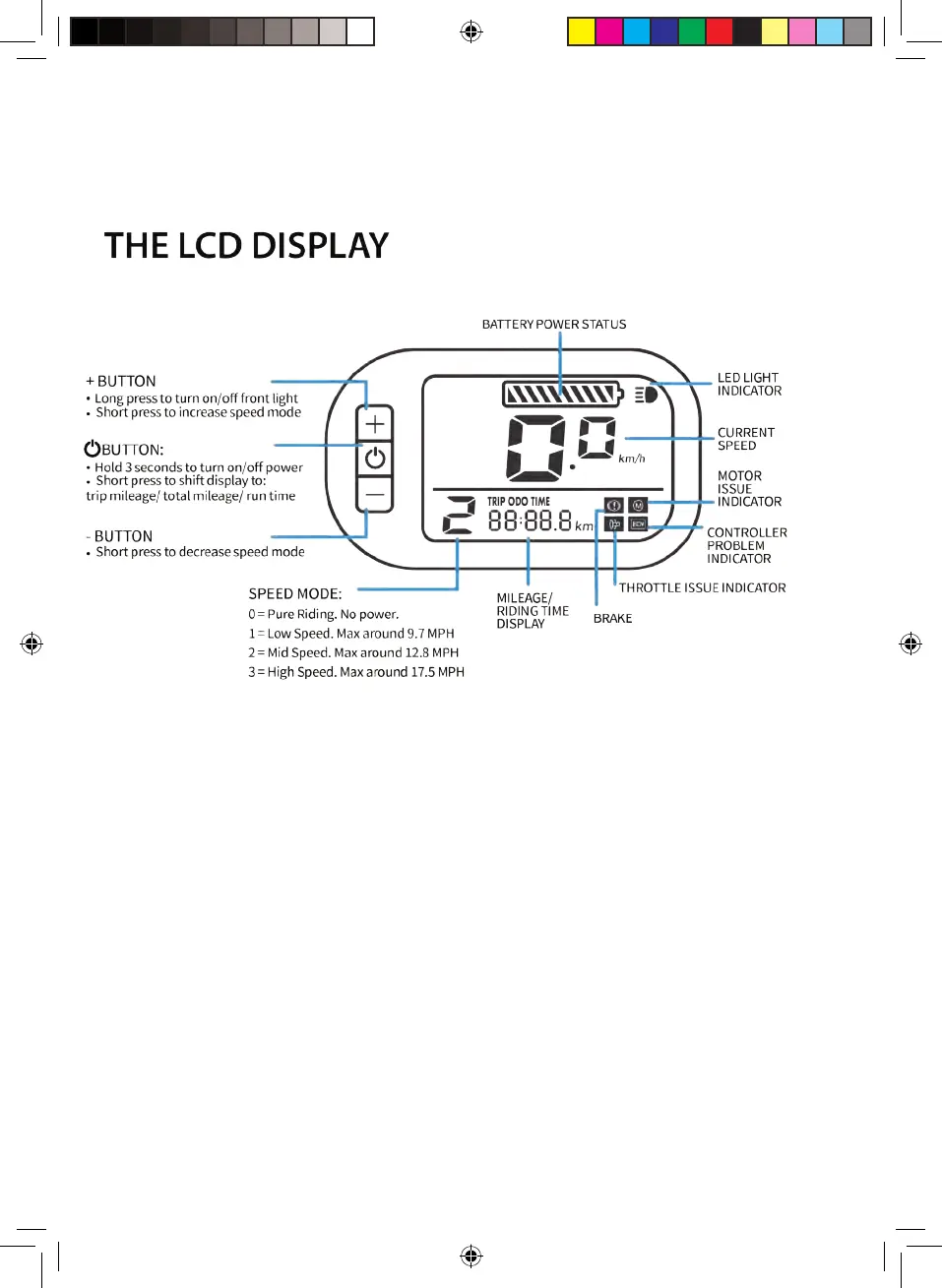
LC- CONTROL DISPLAY (Computer model no. 2)
Control Unit Function Overview
1.1 Power Button ON/ OFF
Hold button for 2 seconds to switch
on/o the LED control unit and electric drive
system.
The system will automatically turn o if left
idling for more than 10 minutes.
1.2 Assist mode
Hold or buttons to select the
desired assist level for electric system. The
lowest is Level 1 and the highest is Level 3.
When powered on, the default is Level 1.
When there is no numeric
power level
displayed it means the folding e-bike is in
park or it functions as a standard bike with
no assist from the motor. You will feel the
electric assistance kicking in once selecting
again between Levels 1 up to 3.
SAFETY NOTE: When you move the pedals, the
engine can start if you are not yet safely on the
bike. Do not switch on the computer until you
have taken a seat on the folding e-bike or set
the support level to
0. Set the support to 0
before getting o the bike.
1.3 Lights/ Backlit Button ON/ OFF
With the display switched on, hold the
button for 2 seconds to turn on/ o the
headlight, taillight and the display backlight.
There are ve levels of backlight brightness
that can be selected by user.
1.4 Information display
You can toggle between various
information, press button to view: Trip
distance -> Total distance -> Trip duration
(hours)
SAFETY NOTE:
Only o
perate settings in case of parking the
folding e-bike.


 To Next Page