EasyManua.ls Logo

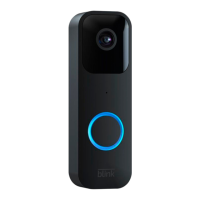
Blink Video Doorbell - User Manual

Blink Video Doorbell
19 pages
Print Icon
To Next Page IconTo Next Page
Loading...
Blink Video Doorbell Setup Guide
Question and Answer IconNeed help?

Do you have a question about the Blink Video Doorbell and is the answer not in the manual?

Summary

Part 1: Getting started in your Blink Home Monitor App

Part 2: Position your doorbell

Turn off your power

Crucial step to turn off the doorbell's power source at the breaker before installation.

Determine your camera location

Guidance on activating live view to find the best position for the doorbell.

Adjust the angle with a wedge (Optional)

Instructions on using an optional wedge to angle the doorbell for optimal viewing.

Select your trim cover (Optional)

Information on changing the doorbell's trim color to match home decor.

Part 3: Mount your doorbell

A. Wires, No Wedge

Connects doorbell to existing wiring without needing a wedge.

B. No Wires, No Wedge

Runs on batteries only, no wiring or wedge needed.

C. No Wires, Wedge

Uses batteries, requires a wedge for angle adjustment.

D. Wires & Wedge

Connects to wiring and uses a wedge for angle adjustment.

Important Safeguards

Summary

Part 1: Getting started in your Blink Home Monitor App

Part 2: Position your doorbell

Turn off your power

Crucial step to turn off the doorbell's power source at the breaker before installation.

Determine your camera location

Guidance on activating live view to find the best position for the doorbell.

Adjust the angle with a wedge (Optional)

Instructions on using an optional wedge to angle the doorbell for optimal viewing.

Select your trim cover (Optional)

Information on changing the doorbell's trim color to match home decor.

Part 3: Mount your doorbell

A. Wires, No Wedge

Connects doorbell to existing wiring without needing a wedge.

B. No Wires, No Wedge

Runs on batteries only, no wiring or wedge needed.

C. No Wires, Wedge

Uses batteries, requires a wedge for angle adjustment.

D. Wires & Wedge

Connects to wiring and uses a wedge for angle adjustment.

Important Safeguards

Blink Video Doorbell Specifications

General IconGeneral
Video Resolution1080p HD
Power SourceBattery or Wired
Connectivity2.4 GHz Wi-Fi
AudioTwo-way audio
Operating Temperature-4° to 113° F (-20° to 45° C)
Night VisionInfrared night vision
Battery LifeUp to 2 years
CompatibilityWorks with Alexa
Cloud StorageOptional Blink Subscription Plan
Field of View135 degrees
Motion DetectionCustomizable motion detection zones

Videos

How to Set Up Blink Video Doorbell | Quick and Easy Guide

How To Reset Blink Video Doorbell