40 41
1
3192021 5 18 6 141716 15
2 4 8 9 710 11 11 12 13
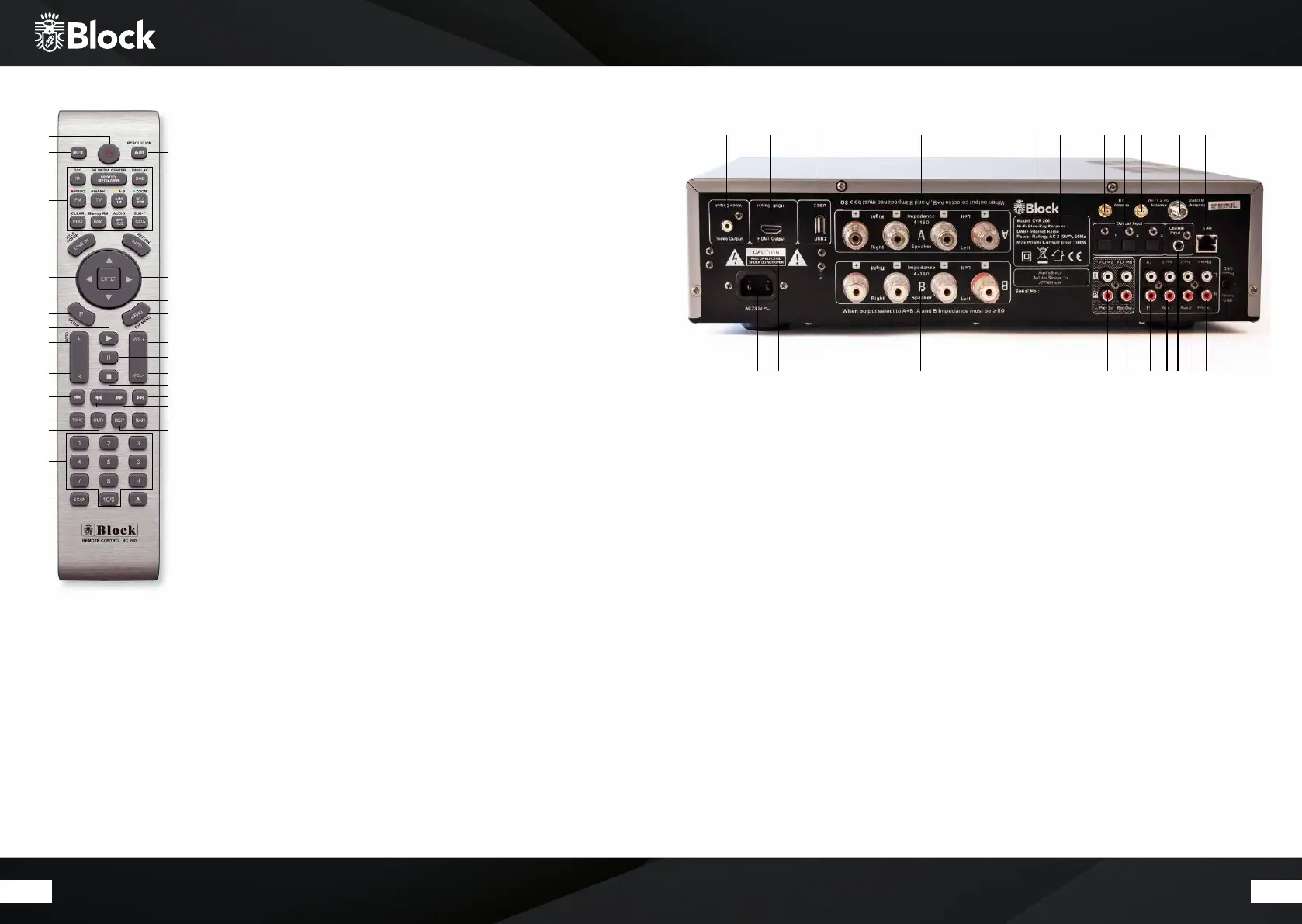
The remote control
1.
„Standby“ button: switches the device to „Clock“ mode, the display will show the
time and the date. To save energy, switch o the device in the net counter.
2. „Mute“ button: switches the sound o.
3. “A/B” button: switches the output to the speaker boxes A, B or both.
4. Operating Mode select button: • IR starts the Internet radio • Media / USB (SPO-
TIFY): starts the media player or USB playback Press it again to switch in the Spotify
mode. • DAB starts the DAB + radio reception. • FM starts the FM radio reception. •
TV / AUX1 AUX2 – his button activates all the external inputs on the rear panel. • BT:
Pressing activates the Bluetooth mode. • Phono: activates the back-sided phono
input (record player) • DISC: starts the Disc modus. • OPT: pressing several times
switches on the optical inputs from 1-3 • COA: activates the back-sided coaxial ent-
rance .
5. „Line-In“ button: activates the front connector behind the magnetic cover.
6. „Info“ button: press this button to select FM, DAB +, Internet radio and media player
additional information can be called up.
7. Arrow upwards: on FM mode to increase the frequency in 0.05 MHz . In menu to
select the dierent points.
8. Arrow to the le: to reach the previous setting in the menu.
9. Arrow to the right: to access selected functions in the menu.
10. Arrow down: in FM mode by the frequency in 0.05 MHz increments to reduce. To
select the dierent points in the menu.
11. „P“ button: recalls or saves pre-set transmitters in radio mode.Taste „Menü“:
12. „Menu“ button: displays the system menu.
13. “Play” button
14. Balance” button: moves the speaker balance to the le
15. “Balance” button: moves the speaker balance to the right
16. „Volume +“ button: increases the volume
17. „Volume“ button: reduces the volume
18. „Pause“ button
19. „Stop“ button
20. „Back“ button: on radio mode, the device searches the previous lower transmitter.
On CD and media player mode, the unit jumps to the previous track.
21. „Forward“ button: on radio mode, the device searches the next higher transmitter.
On CD and Media Player mode, the device jumps to the next track.
22. „Fast backward“ button: only on CD mode.
23. „Fast forward“ button: only on CD mode
24. „Tone“ button: activates the treble and bass settings.To adjust the volume, use the
VOL- / VOL + buttons.
25. „SUR“ button: press this button to switch the dierent digital sound optimization.
26. „RAN“ button: switches the random playback on / o during CD operation.
27. „REP“ button: switches to automatic replay during CD operation.
28. Button „1 - 10“: on radio mode, recalls on the stored transmitters and on CD mode,
it chooses the single pieces of the CD.
29. „SCAN“ button: searches automatically all available stations in DAB + mode.
30. „CD“ button: opens and closes the disc tray.
Connections on the device
1.
Mains connection: the mains connection cable
may show no damages or defects.
2. warnings
3. Loudspeaker connection A: please en sure the
correct connection of plus and minus!
4. Loudspeaker connection B: please en sure the
correct connection of plus and minus!
5. Type designation and electric current specifications.
6. Optical Inputs 1-3: connect here an optical digital
cable.
7. Coaxial input: connect here a coaxial cable.
8. Pre-Out Output jack: to connect another
amplifier or a subwoofer.
9. Rec-Out jack: to connect a recording device.
10. TV input jack: to connect a TV set.
11. AUX1 and AUX2 input jack: to connect an
additional device.
12. Phonon input jack: to connect a record player
with MM system.
13. Ground screw connection: to connect a ground
cable for record player.
14. DAB + / FM aerial connection
15. Lan connector jack for RJ-45 plug (Ethernet)
16. Bluetooth-aerial connection
17. WLAN aerial connection
18. Inspection marks and disposal instructions.
19. USB 2
20. HDMI output
21. Video output
1
2
4
5
8
11
13
14
15
20
22
24
25
28
29 30
27
26
23
21
19
17
18
16
12
10
9
7
6
3


 To Next Page
 Loading...