EN
12
5 Using your refrigerator
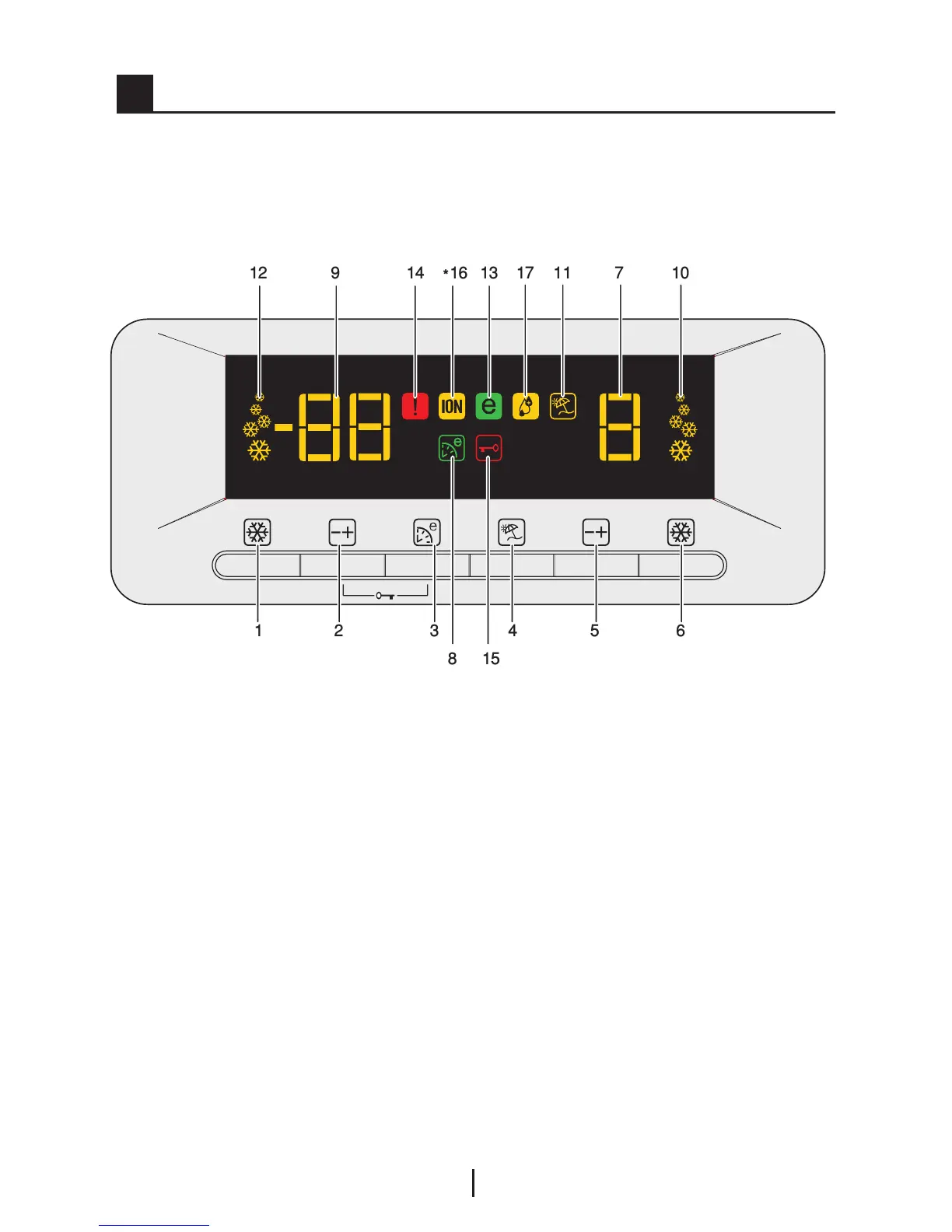
Indicator Panel
This touch-control indicator panel allows you to set the temperature without
opening the door of your refrigerator. Just touch the relevant button with your
finger to set the temperature.
1. Fast Freeze Button
2. Freezer Compartment Temperature
Setting Button
3. Eko-Ekstra Button
4. Vacation Button
5. Fridge Compartment Temperature
Setting Button
6. Quick Cool Button
7. Fridge Compartment Temperature
Indicator
8. Eco Extra Function Indicator
9. Freezer Compartment Temperature
Indicator
10. Quick Cool Function Indicator
11. Vacation Function Indicator
12. Quick Freeze Function Indicator
13. Economy Mode Indicator
14. Error Status Indicator
15. Key Lock Indicator
16. Ionizer Indicator Light
17. Humidity Indicator
C Figures that take place in this instruction manual are schematic and
may not correspond exactly with your product. If the subject parts are not
included in the product you have purchased, then it is valid for other models.



 To Next Page