24
Dishwasher / Instruction Manual
/39 EN
Operatng the product
5
Keys
On/Off key
When you press On / Off key, indicator
lights illuminate on the display for ON
position. The lights turn off in OFF position.
Programme Selecton /
Programme Cancel key
Press this key until the desired programme
appears in the programme indicator.
To cancel the running program, keep the
Programme Selection /Programme Cancel
key pressed for 3 seconds.
Functon keys
If you press any of the Function keys
during programme selection or time delay
selection, an affirmative key signal will be
heard provided that the relevant function
is supported by the selected programme.
Function will be deemed selected when the
indicator of the selected function is lit.
To cancel the selected function, keep the
function key pressed until the function
indicator disappears.
Preparng the machne
1. Open the door of the dishwasher.
2. Place the dishes in accordance with the
instructions in the user manual.
3. Make sure that the upper and lower
impellers rotate freely.
4. Put adequate amount of detergent
into the detergent dispenser.
5. Check if the Salt and Rinse Aid
indicators light and add salt and/or
rinse aid if needed.
Programme selecton
1. Press On/Off key to turn on your
machine.
2. Refer to the table of "Programme data
and average consumption values"
to determine a washing programme
suitable for your dishes.
3. Selected programme will start when
you close the door of your machine.
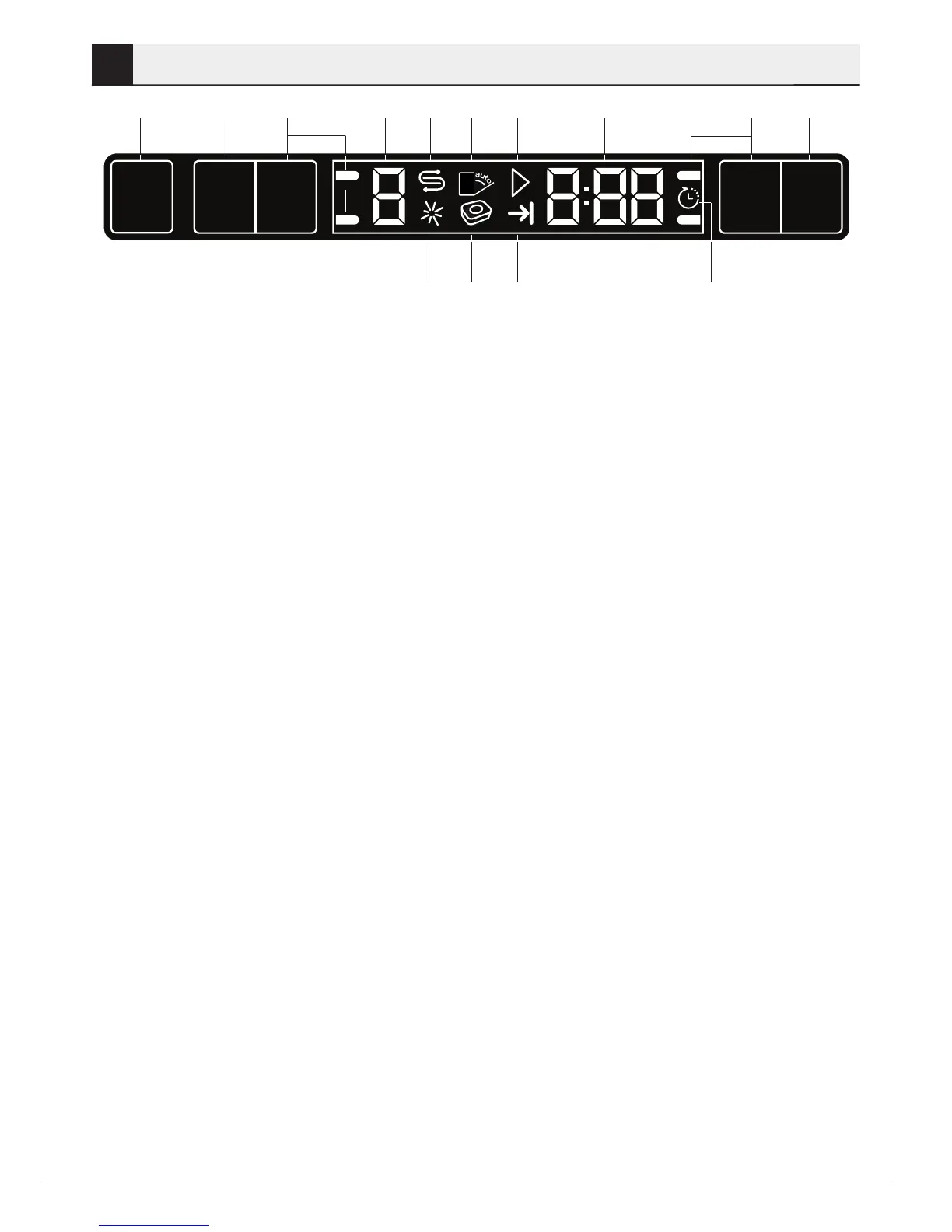
1. On/Off key
2. Programme Selection / Programme
Cancel (3 seconds) key
3. Function keys
F1
F2
F3
F4
4. Programme indicator
5. Salt indicator
6.
7. Start / Cancel indicator
8. Time Delay / Programme Time indicator
9. Time Delay key
10. Time Delay indicator
11. End of Programme indicator
12.
13. Rinse Aid indicator
1
10
2 4 5 6 7 8 3 9
111213
3
Not in use
Not in use
Half Load Function
Rapid Clean
Super Gloss function
Intense Wash



 To Next Page