
 Need help?
Do you have a question about the BLUE CHIP Adapt Pro Elite 9200 and is the answer not in the manual?
Unpack the system, inspect all items for damage that may have occurred during shipping, and contact dealer if damage is found.
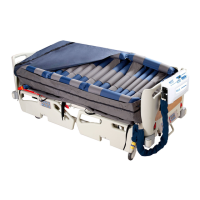
Place the mattress on the bed frame, noting the foot symbol indicates the foot end location.
Secure the mattress onto the bed frame using the elastic straps or binding side straps.
Ensure the CPR valve is in the CLOSED position before turning on the power.
Position the Pump by its spring-loaded hanger brackets over the footboard of the bed.
Remove the Transport Cap and connect the hose connector to the Pump unit securely.
Details the indicators and controls on the pump's control panel, including alarms and mode selectors.
Press the alarm mute button to temporarily suspend alarms; alarms resume if conditions persist.
Allows selection of alternate cycle times ranging from 10 to 30 minutes by pressing the Cycle button.
Use this button to start operation or switch the unit to standby mode.
Inflates the mattress to maximum pressure for patient transfers or support.
Selects between Alternate, Static Care, and Static modes for patient support.
Locks the panel settings to prevent accidental changes; unlock by holding the button.
Controls air pressure output; press Firm for increased pressure to support heavier patients.
Automatically sets appropriate pressure by sensing patient comfort level; adjusts for Fowler mode.
Instructions for turning on the unit, operating modes, standby, and shutdown procedures.
Quickly rotate CPR & BOLSTER RELEASE valves to OPEN for rapid air release during CPR.
Details Power Failure, Low Pressure, and Service (Malfunction) alarms with indicator and buzzer alerts.
Mutes buzzers temporarily; for power failure alarms, it silences all alerts and turns off the system.
Includes checking power cord, plug, mattress cover for wear, and air hoses for kinks or breaks.
Procedure for safely replacing a blown fuse in the pump unit.
Guidance on replacing the air filter, its reusability, and cleaning frequency.
 General
| Brand | BLUE CHIP |
|---|---|
| Model | Adapt Pro Elite 9200 |
| Category | Medical Equipment |
| Language | English |

 To Next Page