The Blue Demon PANO V2 True View Auto Darkening Welding Helmet is designed to protect the eyes and face from sparks, spatter, and harmful UV/IR radiation during welding. It offers a "TRUE COLOR" vision on the workpiece, enhancing quality and efficiency both before and during welding. The helmet is equipped with a lithium battery and solar cells to extend battery life and conforms to ANSI, CE, CSA, and AS/NZS safety standards.
Function Description:
The PANO V2 helmet features an auto-darkening filter (ADF) that automatically adjusts its shade level when an arc is struck, protecting the user's eyes. It is suitable for use with virtually all welding processes, excluding oxy-acetylene, laser, and gas welding. The helmet incorporates a main viewing window and two side windows, each with independent operating modes and parameter settings.
The main window offers three operating modes: GRIND, WELD, and CUT. In GRIND mode, the shade is fixed at 3, with sensitivity at 0, and no delay. In WELD mode, the shade can be adjusted from 8 to 13, sensitivity from 1 to 8, and delay from 0 to 9 (corresponding to 0.06s to 1.0s). CUT mode allows shade adjustment from 4 to 8, sensitivity from 1 to 8, and delay from 0 to 9.
The side windows have two operating modes: GRIND and WELD. In GRIND mode, the shade is 3, sensitivity is 0, and there is no delay. In WELD mode, the shade is fixed at 10, sensitivity can be set from 1 to 4, and there is no delay. When the side window sensitivity is set to 1, it darkens in sync with the main window. At sensitivity 2, it darkens with low sensitivity following the main window. At sensitivity 3, it darkens with high sensitivity following the main window. At sensitivity 4, the side window remains dark.
Advanced functions for the main window include Automatic Shade Number Adjust, Automatic Sensitivity Adjust, Automatic Delay Time Adjust, and Gradual Return. An external one-button grinding feature allows quick switching to GRIND mode and back to the previous working mode. When switching to GRIND, the main window flashes twice; when returning to the previous mode, it flashes once.
The helmet also integrates a built-in headlamp with two brightness levels: high (100lm) and low (50lm). The headlamp has manual and automatic working modes. In manual mode, brightness can be switched between highlight, low light, and off with a short press. A long press enters automatic mode, where the light blinks twice quickly, and the headlamp automatically turns off during welding and lights up immediately after the arc is extinguished. The brightness in automatic mode is determined by the current manual mode setting.
Important Technical Specifications:
- Main Window Viewing Area: 114.5 x 85.5 mm (4.50" x 3.36")
- Main Window Light State: DIN3
- Main Window Dark State: DIN 4-8/8-13
- Side Window Viewing Area: 2(pcs)x36.2(Top)/81.8(Bottom)x68.6(Height) mm (2(pcs)x1.42(Top)” /3.22(Bottom) x2.70(Height)")
- Side Window Light State: DIN3
- Side Window Dark State: DIN 10
- Sensors: 7
- Optical Class: 1/1/1/1
- True Color: YES
- TIG Capability: >2A
- Control: Digital
- Shade Control: Auto / Manual
- Shade Deviation of Auto Shade: -2.0 - +2.0
- Sensitivity: 1-8, Automatic
- Delay: 0.06 - 1.0S
- Manual Mode: YES
- Auto Mode: YES (-/+9 steps adjustment)
- Gradual Return: YES
- TAC Welding: YES
- Gradual Shade Return to Clear State: YES
- Switch Time: 1/10000S
- Modes: CUT/WELD/GRIND
- Power Supply: Auto ON / OFF
- Power Backup: Solar panel & battery 2*CR2032
- Test Function: YES
- UV & IR Protection: Up to shade 16
- Headlamp Brightness: High (100lm), Low (50lm)
- Charging Interface: Standard TYPE-C
- Operating Temperature: -5°C (+23°F) to +55°C (+131°F)
- Storage Temperature: -20°C (-4°F) to +70°C (+158°F)
Usage Features:
- Headgear Adjustment: The headgear can be adjusted for a secure and comfortable fit, covering the eyes and face effectively. This includes adjusting the forehead band, rear headband, and tightness via a gear mechanism.
- Headgear Depth: The depth can be adjusted using two slotted straps to position the headgear correctly above the brow.
- Distance between Lens and Face: Five distance positions are available, adjusted by pressing side pins and moving sliders simultaneously.
- Angle Limitation Position: Seven angle limitation positions allow the helmet to be set so the eyes are at a 90° angle behind the lens, adjusted by side buttons and sliders.
- LCD Display: The display shows current work mode (GRIND, WELD, CUT), shade number, sensitivity, and delay time. It also indicates low battery with a flashing low-power icon and a red LED light.
- Sleep and Wake-up: To conserve battery, the ADF enters a dormant state in low light conditions (less than 1lx) without an arc for a long time. It wakes up and functions normally within 10 seconds when environmental light intensity exceeds 1lx.
- Headlamp Charging: When the low battery indicator is steady red and the display shows low charge, the headlamp battery needs charging via the TYPE-C interface. A red light indicates charging, and a green light indicates completion.
- Low Battery Protection: The headlamp automatically turns off when the battery is low to ensure the ADF can still function for more than 7 days.
Maintenance Features:
- Regular Checks: Regularly inspect the helmet for damaged parts and replace them as needed.
- Filter Protection: Replace external/internal transparent filter protection if damaged.
- Cleaning: Keep the filter, sensors, and solar cell clean. Clean the cartridge and front cover lens regularly with clean cotton, a soft cloth, or a special lens rag. Do not use strong cleaning agents or solvents. Clean the inside and outside of the helmet with a neutral disinfectant.
- Handling: Do not immerse the filter in water or other liquids. Avoid placing heavy tools or objects on the helmet. Keep the helmet away from flames and do not drop it. Do not place it too close to the welding area.
- Battery Management: Remove batteries when the helmet is not in use for long periods.
- Filter Integrity: Do not open the filter container or use sharp objects to remove components.
- Replacement Parts: Use only original replacement parts to maintain warranty and ensure safety. Unauthorized modifications or parts will void the warranty and pose a risk of personal injury.
- Troubleshooting: A troubleshooting guide is provided for common issues like the filter not darkening, slow switching, poor visibility, or filter darkening without an arc. If problems persist, stop using the helmet and contact Blue Demon Welding Products.

 Need help?
 General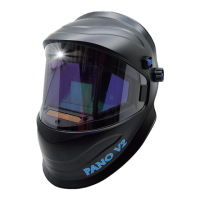

 To Next Page