EasyManua.ls Logo

Blue Satellite - User Manual

Blue Satellite
23 pages
Print Icon
To Next Page IconTo Next Page
Loading...
SATELLITE
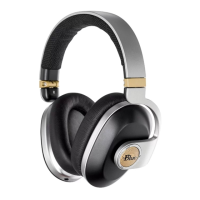
Premium Wireless Noise-Canceling Headphones with Audiophile Amp
Question and Answer IconNeed help?

Do you have a question about the Blue Satellite and is the answer not in the manual?

Summary

Do You Really Want to Hurt Me?

Use Satellite as Intended

Safety Dance

Important Regulatory Information

Register at Bluemic.com;register

A New Benchmark for Listening

Satellite Key Features

4-Driver System

Describes the headphone's proprietary 4-driver system for audio and ANC.

Built-in Audiophile Amplifier

Highlights the amplifier for rich, dynamic, and detailed sound.

Battery Life and Wired Playback

States battery life and continued playback via audio cable when depleted.

Bluetooth Connectivity & Profiles

Smartphone Interaction Profiles (HFP;HSP)

Describes HFP and HSP for smartphone interaction.

Audio & Music Control (A2 DP;AVRCP)

Covers A2DP for audio and AVRCP for music control.

AptX Technology

Details the AptX technology for enhanced audio quality.

Power to the People

Dual Driver Technology Explained

Package Contents

Left Earcup Controls & Ports

Function Buttons

Details the Amp, Bluetooth, ANC, and Power buttons for device operation.

Indicator and Ports

Describes the Left logo LED and the USB port for status and charging.

Charging Satellite

Powering On and Off

Right Earcup Controls & Ports

Audio and Call Controls

Explains the Play/Pause button, Volume controls, and Voice mic for media and calls.

Connectivity and Indicators

Covers the Audio cable port and the Right logo LED for connectivity and status.

Volume Control

Media Playback Controls

Call Management

Wired Listening Connection

Electric Avenue: Charging Guide

Power Up Satellite

Initial Bluetooth Pairing

Manual Pairing Procedure

Clearing the Pairing List

Using Satellite with Audio Cable

Adjusting the Headband & Earcups

Fitting Instructions

Covers headband placement, side identification, and earcup angle for optimal comfort and fit.

Wireless Range

Help! (FAQ & Troubleshooting)

Satellite Doesnt Power On

Provides steps for when the headphones do not power on.

Satellite Doesnt Connect to Bluetooth

Offers solutions for Bluetooth connectivity problems.

Sound or Audio Level Low (Bluetooth Mode)

Addresses issues with sound output or low audio levels in Bluetooth mode.

Sound or Audio Level Low (Wired Mode)

Satellites Battery Wont Charge

Satellite Battery Life Details

Making Calls with Satellite

Dedicated Noise-Cancelling Drivers

Built-in Amplifier Benefit

Sounds of Science: Specifications

Headphone Specifications

Lists technical specifications for the headphones, including drivers and response.

Amplifier Specifications

Lists technical specifications for the built-in amplifier.

Cleaning, Maintenance & Storage

Warranty Information

Overview

The Blue Satellite are premium wireless noise-canceling headphones with an audiophile amplifier, designed to deliver high-quality sound for music lovers on the go. They combine the audio fidelity of a custom hi-fi system with the convenience of a mobile device, offering a modern listening experience free from noise and wires.

Function Description

The Satellite headphones are engineered to provide true audiophile sound through a unique dual-driver technology. Unlike traditional noise-canceling headphones that use the same drivers for both music playback and noise cancellation, the Satellite employs a patent-pending 4-driver system. This system features two custom 44mm Blue dynamic drivers dedicated to audio and two separate 30mm drivers specifically for Active Noise Canceling (ANC). This design ensures that your music remains uncompromised by the noise-canceling process, preventing the "scooped hole" effect and general subpar audio experience often found in other ANC headphones.

A key feature of the Satellite is its built-in all-analog audiophile amplifier. This amplifier is designed to bring out new detail in your music, providing a rich, dynamic, and detailed sound regardless of the connected device. This eliminates the need for a separate headphone amp, making it a convenient solution for high-fidelity listening on the go.

The headphones support Bluetooth® 4.1 wireless technology with Enhanced Data Rate & aptX™, ensuring high-quality wireless audio transmission. For devices that support AptX™, the headphones deliver every sonic detail to the 44mm drivers, contributing to a premium wireless audiophile experience.

Usage Features

The Satellite headphones are designed for intuitive operation with onboard controls. The left earcup houses the Amp button, Bluetooth® button, ANC button, Power button, and a USB port for charging. The right earcup features Volume up/down buttons, a Play/Pause button, a Voice mic, and an Audio cable port.

  • Powering On/Off: Press and hold the Power button on the left earcup for 1 second to turn the headphones on or off. The power button LED lights up solid white when on and flashes 5 times rapidly before turning off.
  • Active Noise Canceling (ANC): Press the ANC button on the left earcup to engage Active Noise Canceling. The left logo LED will turn on, then off after 5 seconds. To turn off ANC, press the button again; the logo will flash 5 times rapidly.
  • Built-in Amplifier: Press the Amp button on the left earcup to turn on the all-analog built-in amplifier. The left logo LED will turn on, then off after 5 seconds. To turn off the amplifier, press the button again; the logo will flash 5 times rapidly.
  • Bluetooth® Connectivity: Press and hold the Bluetooth® button on the left earcup for 3 seconds to turn Bluetooth® on or off. The left logo LED will turn on, then off after 5 seconds. For initial use, Satellite automatically enters pairing mode, indicated by the left logo LED blinking until paired. To manually enter pairing mode, press and hold the Bluetooth® button for 3 seconds. The headphones will remain in pairing mode for 5 minutes if no device connects, after which Bluetooth® turns off.
  • Pairing with Devices: Turn on Bluetooth® on your mobile device and select "Blue Headphone" from the list. A series of tones will confirm successful pairing, and the left logo LED will turn solid then off after 5 seconds. The pairing list can store up to 10 different connected devices. To clear the pairing list, enter pairing mode and hold down the 3 buttons on the right earcup until a beep is heard.
  • Volume Control: Use the Volume up/down buttons on the right earcup to adjust music and phone call volume.
  • Music Playback & Calls: The Play/Pause button on the right earcup allows for various controls:
    • Press once (1x) for play/pause.
    • Quickly double-press (2x) for the next track.
    • Quickly triple-press (3x) for the previous track.
    • Press to answer a call.
    • Long press (3 seconds) to end or reject a call. Calls can be made wirelessly or when connected with the audio cable (provided Satellite is charged and powered up). The telephone mic is located at the lower front portion of the right earcup.
  • Wired Listening: The headphones come with a 3-meter audio cable. Connecting this cable to the audio cable port on the right earcup enables wired listening and automatically disengages Bluetooth®. This allows you to continue listening to music even if the battery is powered off or out of charge. If the audio cable is inserted when powering on Satellite, Bluetooth® will not automatically turn on.
  • Adjusting Headband & Earcups: For optimal comfort and sound, the headband should sit flat across the top of your head. Place the unit with the correct Left and Right sides (marked below the pivot point of the arms). Pull or push the earcups up or down to adjust, then adjust their angle to comfortably fit your ears, ensuring they are fully covered.
  • Wireless Range: The Bluetooth® wireless range is approximately 10 meters in a clear line of sight, though environmental elements like building materials and walls can affect its effectiveness.

Maintenance Features

The Satellite headphones are built with high-quality, durable materials that generally make extensive cleaning unnecessary. However, it is recommended to wipe the earpads with a soft, dry cloth to keep them clean. It is important to remember that liquids and electronics do not mix well, so avoid exposing the headphones to moisture.

The product includes a custom-built protective soft-shell carrying case for portability and storage. To store the headphones, place the cups face down as shown in the image in the manual and keep them in their case when not in use. This helps protect the headphones from damage and keeps them in orbit.

Charging and Battery Life

  • Charging: Charge Satellite using the supplied USB cable by plugging the small end into the micro-USB connector on the left earcup and the large end into a USB wall charger or a powered computer. Charging begins whether the unit is on or off. While charging, the power-button LED pulses slowly and turns solid white when fully charged. A complete charge takes approximately 3 hours. It is recommended to fully charge the battery before first use.
  • Battery Life: Satellite offers up to 24 hours of operation with Bluetooth® only, or 8 hours with Bluetooth®, ANC, and the Amp all on. The headphones can continue to play music with the included 3-meter audio cable even with no battery charge.
  • Low Battery Indication: When approximately 10% battery charge remains, the power button LED flashes once per second. This low battery indication continues until the unit is connected via USB for charging, powered off, or the battery fully discharges. An AC to USB adapter is not included for regional regulatory compliance.

Blue Satellite Specifications

General IconGeneral
TypeOver-ear
Bluetooth Version5.0
Noise CancellationActive Noise Cancellation (ANC)
WirelessYes
MicrophoneYes
Driver Size40mm
Frequency Response20Hz - 20kHz
Impedance32 Ohms
Battery Life30 hours (ANC off), 20 hours (ANC on)
Wireless Range10m (33ft)