14
15
Patented HEPASilent
TM
technology makes the
Blueair Pro Series incredibly quiet. The unit
comes with a HEPASilent
TM
lter already installed.
Particle Filter. Includes a particle lter that
removes dust, pollen, bacteria, pet dander, mold
spores and other airborne particles. The particle
lter is made of polypropylene, which mechanically
lters out airborne particles. To maximize lter
effectiveness, particles are negatively charged by
the Blueair unit before reaching the lter.
SmokeStop™ Filter. Includes a combined
particle and active carbon lter to remove
gaseous pollutants such as cigarette and cigar
smoke or other VOCs (volatile organic com-
pounds, including household paints and other
chemicals). Adding activated carbon to a lter
may affect airow and CADR. You may also
notice a slight odor from the carbon when the
lter is rst used; this will quickly dissipate.
Carbon+ Filter. An extra active carbon lter
stage that can be mounted in the Blueair Pro
Series in addition to the main HEPASilent
TM
particle
lter or SmokeStop™ lter. It provides extra
protection against gaseous contaminants such
as formaldehyde, sulphur dioxide and volatile
organic compounds.
For optimal performance, Blueair
recommends that you replace lters every
six (6) months of use.
We offer a convenient Filter Subscription
Program in some countries. Contact your local
dealer or Blueair to nd out whether the program
is available to you.
IMPORTANT! Use only genuine Blueair lters
to ensure proper function of your unit and to
qualify for full warranty coverage.
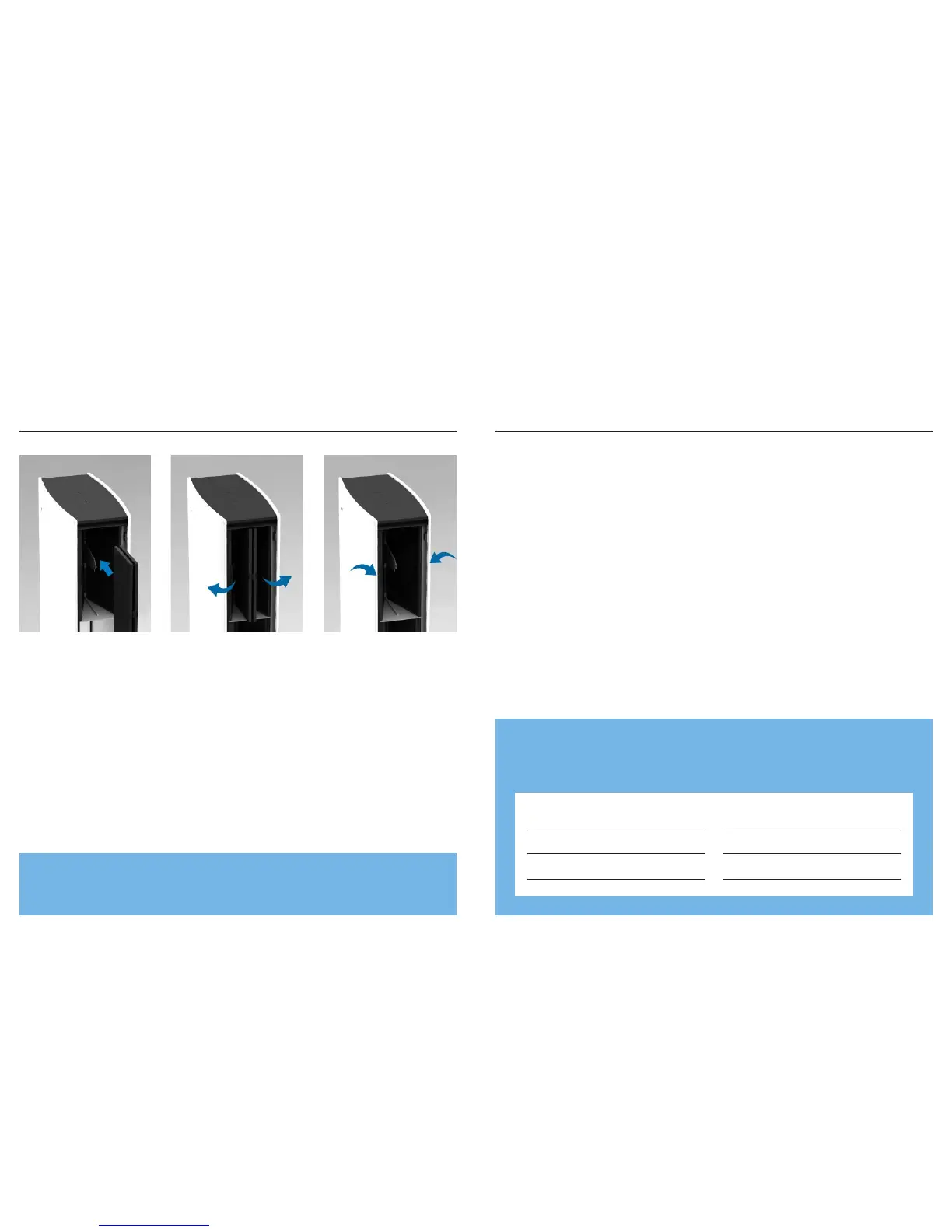
Adding the
Carbon+ Filter
Filters
Keeping the lter sides closed, gently
slide the Carbon+ Filter into the unit.
Push the sides out towards the
main lter.
Snap the Carbon+ Filter to the main
lter frame tab.
1 2 3
Customer’s Record
The model number and serial number of this product can be found on the bottom of
the unit. Please note them in the space provided below and keep for future reference.
Model number Dealer’s name
Serial number Dealer’s address
Date of purchase Telephone number
While the unit is running, the display will slowly disappear after 30 seconds.
To activate the display again, simply touch one of the buttons.





 To Next Page