EasyManua.ls Logo

Blueant X0 - User Manual

Blueant X0
16 pages
Print Icon
To Next Page IconTo Next Page
Loading...
Question and Answer IconNeed help?

Do you have a question about the Blueant X0 and is the answer not in the manual?

Overview

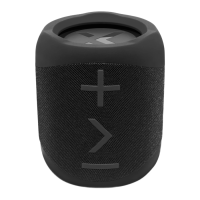
The BlueAnt X0 is a portable Bluetooth speaker designed to deliver great-sounding and loud audio. It offers multiple input options, ensuring your music sounds better than ever. This manual provides detailed instructions on how to get the most out of your BlueAnt X0.

Function Description

The BlueAnt X0 serves as a versatile audio device with several core functions:

  • Power On/Off: A short press of the power button turns the speaker on or off. The indicator light flashes blue when powered on. To conserve battery, the X0 automatically powers off after 10 minutes of no connection.
  • Bluetooth Speaker: The primary function is to act as a portable Bluetooth speaker, allowing wireless audio streaming from compatible devices like smartphones.
  • Aux-in Speaker: For non-Bluetooth devices, the X0 can connect via a 3.5mm Aux-in cable, automatically switching to Aux-in mode when the cable is plugged in.
  • Hands-free Calling: The speaker supports hands-free calling when connected via Bluetooth, allowing users to answer, end, or reject calls directly from the device.
  • Voice Assistant Integration: Double-clicking the play/pause button activates Siri or Google Assistant for voice dialing and other commands.
  • Duo Mode (Wireless Stereo Pairing): This feature allows two BlueAnt X0 speakers to be paired wirelessly to create a wide stereo sound stage, enhancing the audio experience.

Usage Features

The BlueAnt X0 offers a range of features for intuitive and flexible use:

Buttons and Indicators:

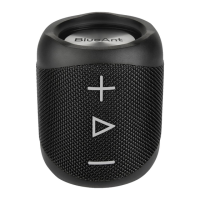
  • Power Button (1): Short press to power on/off.
  • Power On/Off; Bluetooth Indicator (2): Shows the speaker's power status and Bluetooth connection status (flashing blue for pairing, solid for connected).
  • MicroUSB Charge Slot (3): Used for charging the speaker with the supplied USB cable.
  • Aux-in Jack 3.5mm (4): For connecting external audio sources via the supplied Aux-in cable.
  • Volume Down / Skip Backward (5): Short press to decrease volume; long press to skip to the previous track.
  • Play/Pause / Call Control / Voice Assistant (6): Click to play/pause music. Double-click to activate Siri/Google. Click to answer/end a call; double-click to reject a call.
  • Duo Mode Indicator (7): Indicates the status of Duo Mode pairing.
  • Volume Up / Skip Forward (8): Short press to increase volume; long press to skip to the next track.
  • Microphone (9): For hands-free calling.

Bluetooth Mode:

  • Pairing: Power on the speaker, and it will enter Bluetooth mode with the indicator light flashing. Search for "BlueAnt X0" on your smartphone. Once connected, the speaker will announce "connected," and the indicator light will stop flashing.
  • Music Control:
    • + (Volume Up): Click to increase volume.
    • + (Volume Up): Press and hold for 1.5 seconds to skip forward a track.
    • > (Play/Pause): Click to play/pause.
    • - (Volume Down): Click to decrease volume.
    • - (Volume Down): Press and hold for 1.5 seconds to skip back a track.
  • Call Control:
    • > (Play/Pause): Click to answer an incoming call.
    • > (Play/Pause): Click to end an active call.
    • > (Play/Pause): Double-click or press and hold to reject an incoming call.
  • SIRI/GOOGLE: Double-click > (Play/Pause) to activate/cancel Siri/Google voice dialing.
  • Disconnect: Press and hold > (Play/Pause) for 8 seconds to disconnect the current Bluetooth connection. The X0 will prompt "disconnected," allowing other Bluetooth devices to find and pair with it.

Duo Mode:

  • Setup:
    1. Turn on the first speaker.
    2. Press and hold Volume + and Volume - on the first speaker until it says "Duo Mode pairing."
    3. Turn on the second speaker.
    4. Press and hold Volume + and Volume - on the second speaker until it says "Duo Mode pairing."
    5. Wait up to 1 minute for one speaker to announce "Duo Mode connected." This speaker becomes the master speaker, which you should pair with your phone.
  • Call Handling in Duo Mode: Phone calls will only come through the master speaker.
  • Power Management: Powering off one speaker in Duo Mode will power off both. When powering on, speakers need to be turned on individually, and Duo Mode will automatically reconnect.
  • Disconnecting Duo Mode: Press and hold Volume + and Volume - until you hear "Duo Mode disconnected."
  • Clearing Duo Mode Pairing: Press and hold Volume + and Volume - for about 8 seconds until the speaker says "Duo Mode cleared."
  • Range: In direct line of sight, a range of over 40 meters can be achieved between the two speakers. Indoors, range may be affected by walls or obstacles.

Aux-in Mode:

  • Connection: Plug the 3.5mm audio cable into the Aux-in jack. The speaker automatically switches to Aux-in mode. Unplugging the cable switches it back to Bluetooth mode.
  • Music Control:
    • + (Volume Up): Click to increase volume.
    • > (Play/Pause): Click to mute playback.
    • - (Volume Down): Click to decrease volume.
  • Track Control: To change or control tracks, use your music source device.

Maintenance Features

  • Charging: Use the supplied MicroUSB cable to charge the X0. The power light will flash while charging and stay solid when fully charged. A full charge takes approximately 3 hours. Always close the port cover after charging.
  • Waterproof Rating: The BlueAnt X0 features an IPX7 rating, making it waterproof. However, it is only waterproof when the port cover is closed.
  • Cleaning: Do not use household or industrial-grade detergents or cleaners. If the device gets dirty, wipe it with a dry or slightly damp cloth.
  • Storage: Store the device and associated components (ear gels, chargers) safely. Dispose of packaging and unwanted contents thoughtfully. Do not place the product on the floor or in areas where young children can access it, or where someone could trip over it.
  • Temperature Guidelines: Avoid leaving the device in direct sunlight, such as on a car dashboard or console. Do not leave or use the device in areas where temperatures may exceed 60°C (140°F) or drop below 0°C (32°F).
  • Environmental Protection: Do not leave or use the device in areas exposed to humidity, dust, soot, other foreign objects, smoke, or steam, as this may cause malfunction.
  • Charging Precautions: Do not leave the device plugged into a wall or car charger for long periods after it is fully charged. Ensure the AC outlet, adapter, and cable are not damaged before charging. If traveling internationally, verify that your power adapter is approved for the country and that the voltage is suitable.
  • Troubleshooting: If a fault develops, contact BlueAnt for advice. Do not attempt to repair or alter the product yourself.
  • Approved Accessories: Only use accessories approved by BlueAnt. Using non-approved accessories may cause malfunction, exceed RF energy exposure guidelines, and void the device's warranty.

Blueant X0 Specifications

General IconGeneral
BrandBlueAnt
ModelX0
Speaker TypePortable Bluetooth Speaker
WaterproofYes
Bluetooth VersionBluetooth 4.2
Waterproof RatingIPX7
InputBluetooth, AUX

Related product manuals