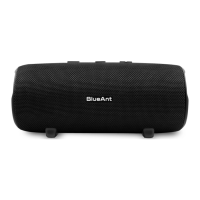
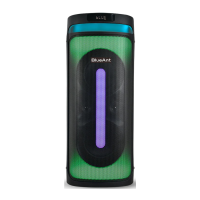
The BlueAnt X4 is a portable party speaker designed to deliver powerful sound and an engaging visual experience, complete with a wired microphone for karaoke and other vocal performances. It's built for ease of use and portability, allowing users to enjoy music and vocal entertainment in various settings.
Function Description
The BlueAnt X4 serves as a versatile audio system, primarily functioning as a Bluetooth speaker for playing music from a connected phone or device. Its core purpose is to provide a robust sound experience, enhanced by a Bass Boost feature for deeper low frequencies. A key differentiator is its integrated karaoke functionality, facilitated by a wired microphone with adjustable volume and echo effects. The speaker also features multiple LED light modes that synchronize with the music, adding a dynamic visual element to the audio experience. For extended use or charging other devices, it includes a power bank function. The X4 supports a "Party Mode," enabling the connection of up to 100 X4 speakers simultaneously to create a larger, synchronized sound system.
Usage Features
- Power On/Off and Bluetooth Pairing: The speaker is powered on or off by pressing the ON/OFF button for 1.5 seconds. Upon powering on, it announces "Bluetooth" to indicate it's ready for pairing. Users can then find "BlueAnt X4" in their device's Bluetooth settings to connect. Once paired, the speaker confirms with "Connected." To conserve battery, the X4 automatically powers off after 10 minutes of no connection.
- Volume Control: A central volume dial allows users to increase or decrease the speaker's output. The speaker's volume resets to 25% each time it's powered on.
- Music Playback Control: Dedicated buttons are available for playing/pausing tracks, skipping back, and skipping forward, offering convenient control over music playback directly from the speaker.
- Bass Boost: A "BASS" button toggles the Bass Boost feature, adding an extra 3dB of bass for a more impactful sound. The speaker defaults to Standard EQ upon each power-on.
- LED Light Modes: The LED button allows users to cycle through five built-in light modes: Revolver, Space, Studio 54, Limelight, Fabric, and Lights Out. These modes provide visual ambiance that can be matched to the mood or music.
- Microphone Usage: The wired microphone connects to a dedicated port on the back of the speaker. It features an ON/OFF switch. Users can adjust the microphone's volume and echo effect using specific buttons on the speaker's control panel. To prevent feedback, it's advised not to point the microphone at the speaker or bring it within 30cm. The speaker provides a "DING" sound when mic or echo levels reach their minimum (0) or maximum (10).
- Party Mode (Multi-Speaker Connection): To initiate Party Mode, users first pair their phone to one X4 speaker (the master). Then, by pressing and holding the Party Mode connection button on the master speaker for about 4 seconds, it announces "Party mode pairing." Subsequent slave speakers are powered on, and their Party Mode connection button is pressed and held until they announce "Party Mode pairing." Once connected, the speakers announce "Party Mode connected." The master speaker's Party Mode button flashes, while slave speakers' buttons remain solid. In Party Mode, the master speaker controls music, volume, EQ, and lights for all connected speakers, while slave speakers can independently control their microphone volume, echo levels, and power.
- Party Mode Disconnection: To disconnect from Party Mode, users press and hold the Party Mode disconnection button on any speaker for about 4 seconds. The speaker announces "Party Mode disconnected," and all speakers will then operate independently.
- Speaker Positioning for Enhanced Bass: The X4's rear-firing port allows for bass reinforcement based on placement. Placing the speaker on the floor can add +6dB of bass. Placing it on the floor near a wall can add +12dB. For maximum bass reinforcement (+18dB), placing the speaker in a corner is recommended. This feature is particularly effective for indoor use.
- Phone/Tablet Slot Holder: The speaker includes a slot on top designed to hold a phone or tablet, providing a convenient viewing angle for lyrics or videos during karaoke or music playback.
Maintenance Features
- Charging: The X4 is charged using the supplied rapid charger, connecting to the "DC IN" port on the rear. A full charge takes approximately 1.5 hours, indicated by four battery lights.
- Power Bank Functionality: The "DC OUT" port on the back of the speaker functions as a power bank, providing a 5V1A output to charge external devices. It's important to note that using the power bank will reduce the X4's overall play time. If the X4's battery is very low, the power bank function will automatically turn off to conserve power for the speaker itself.
- Battery Life Management: The speaker offers around 12 hours of play time at 50% volume and 5-6 hours at 100% volume. For prolonged use at maximum volume, it's recommended to keep the speaker connected to the charger. Battery life can vary based on music type, bass level, and environmental factors.
- Durability and Protection: The BlueAnt X4 is rated IP54 Sweatproof/Splashproof. This protection is effective only when the port cover is closed. Users are explicitly warned not to expose the speaker to liquid while playing or charging, as this can be dangerous and cause permanent damage to the speaker or charger.

 Need help?
 General
 Weight and Dimensions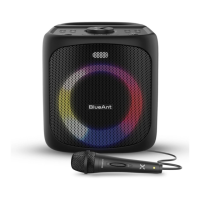

 To Next Page