2. Pairing the speaker to your phone or device (Bluetooth mode)
3. On your phone or device, look for “BlueAnt X4” under the Bluetooth settings menu. Click on “BlueAnt X4” on your phone.
4. Once paired, the speaker will say “Connected”. You are now ready to play some music!
1. Charging the X4
3. Powering the speaker On/Off
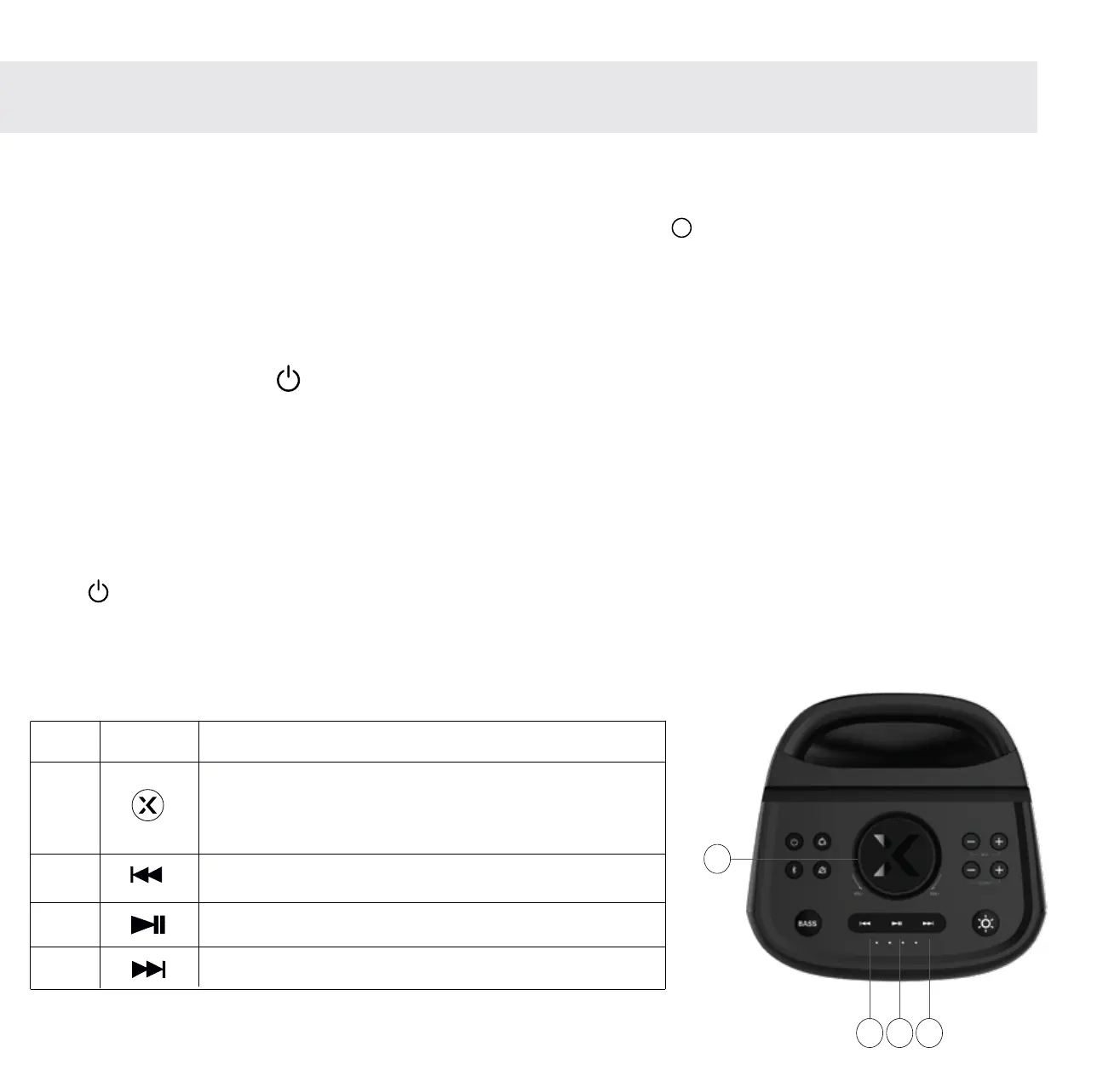
4. Using the buttons for playing music
Turn the volume dial clockwise to increase
volume and anti-clockwise to decrease
volume
Click to skip forward a track
Click to Play/Pause a track
Click to skip back a track
1. Press the ON/OFF button to enter Bluetooth mode.
Press button to power on/off the speaker (1.5 seconds). Each time the speaker powers on, it will reset to 25% volume.
After 10 mins with no connection, the X4 will automatically power off to conserve battery.
2. The speaker will turn on and say “Bluetooth”.
Please use the supplied rapid charger to charge the X4. The charge port can be found at the rear of the speaker.
A full charge will take around 1.5 hours. The four battery indicators will light up during charging.
DC IN
19 20 21
Item
Button Function
19
20
21
18
18
3
N.B. You can also use your phone to control music and volume
Let’s get started


 To Next Page