11. Using the microphone
To avoid feedback, please do not point the microphone at the speaker or bring the microphone within 30cm of the
speaker.
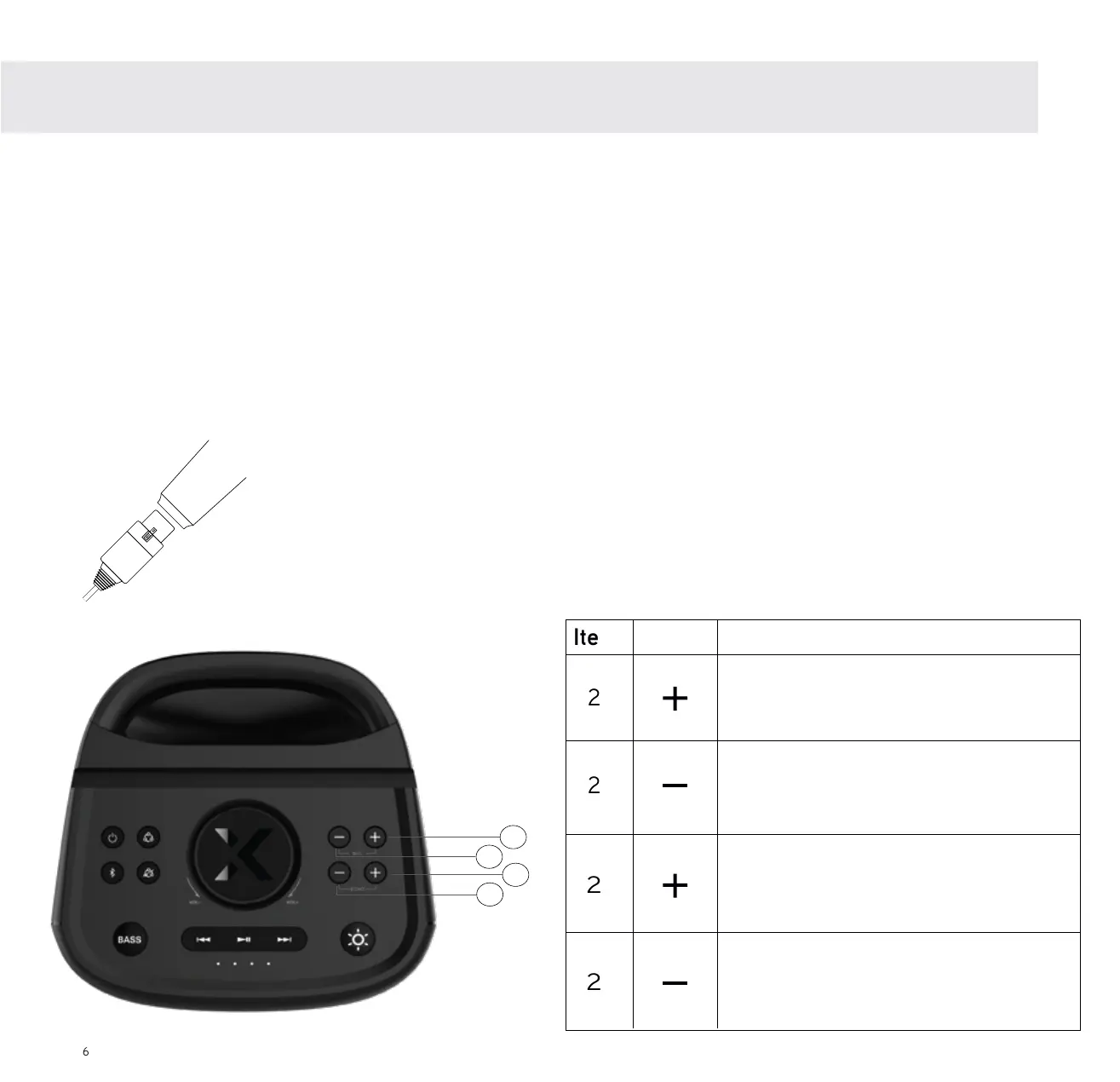
Diagram A
Insert microphone cable into
the microphone as shown in
the diagram. Push until it
clicks into place.
23
25
24
Item Button Function
22
Click to increase the MIC volume
gradually or press and hold to
the MIC volume continuosly.
Click to decrease the MIC volume
gradually or press and hold to decrease
the MIC volume continuosly.
Click to increase the Echo effect
gradually or press and hold to increase
the Echo effect continuosly.
Click to decrease the Echo effect
gradually or press and hold to increase
the Echo effect continuosly.
6
1. Connect the cable to the microphone as per the below, Diagram A.
2. Plug the microphone into the microphone input, on the back of the X4.
3. The microphone features an ON/OFF switch. Please ensure the microphone is in the ON position to use it.
4. Increase or decrease microphone volume and echo, as per the table below.
Using the microphone
N.B. When the Mic and Echo levels reach 0 or 10,
the X4 will make a ‘DING’ sound to notify you.
23
22
25
24



 To Next Page