Pairing mode
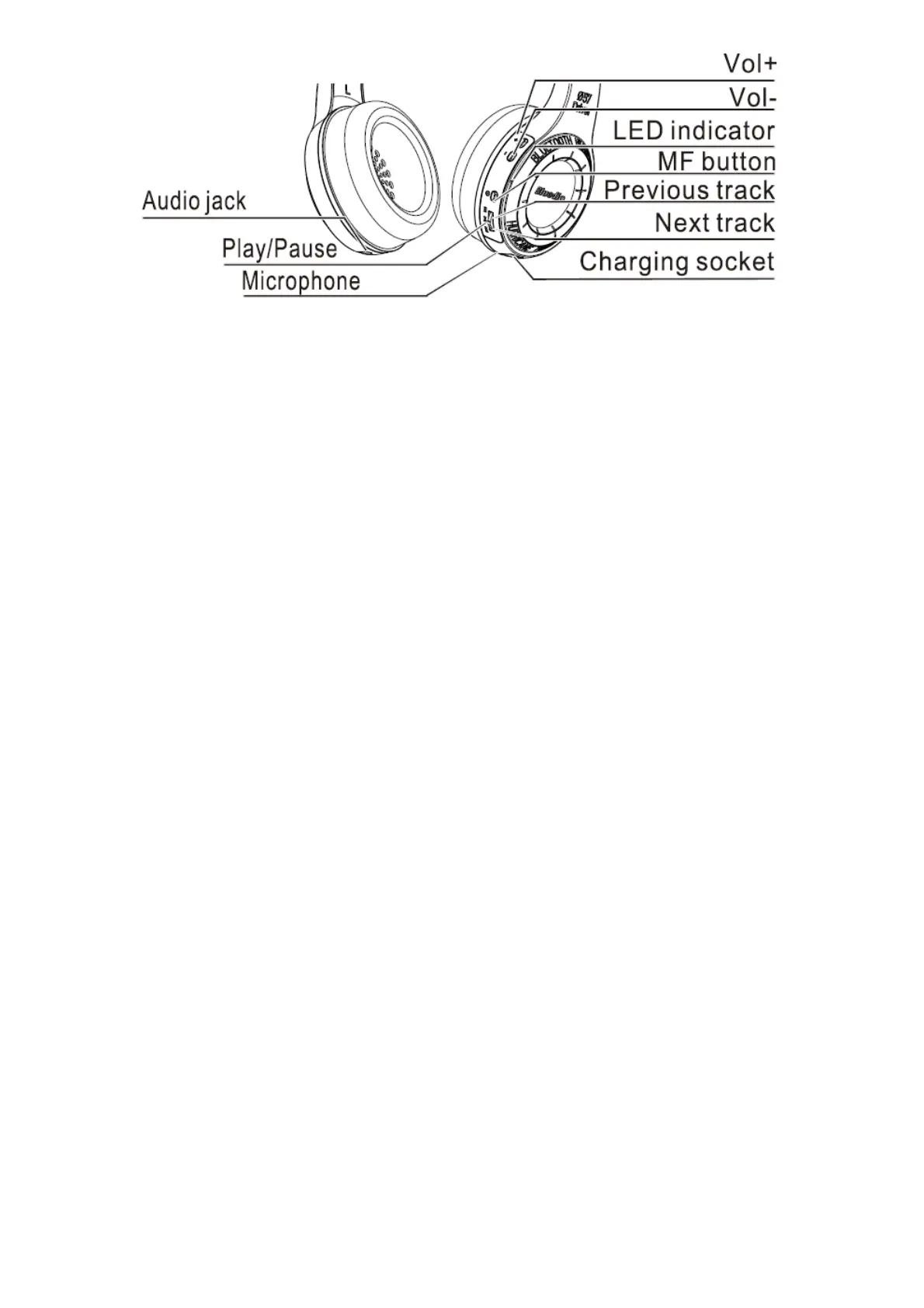
Keep the MF button pressed until the LED remains blue.
Reconnection mode
Keep the MF button pressed until the LED flashes blue.
Switch the headset off
Keep the MF Button pressed until the LED flashes blue then goes off.
Pairing the headset with your mobile phone
1. Keep the distance between the headset and your mobile phone ( or other Bluetooth device)
within 1 meter. The closer, the better.
2. Keep the MF button pressed until the LED remains blue. the headset is in pairing mode.
3. Switch on the Bluetooth function of your mobile phone, on which start a search for Bluetooth
devices.
4. From the found Bluetooth devices, select “Bluedio” to establish a Bluetooth connection to the
headset. If necessary, enter thedefault PIN code “0000′.
5.The headset is paired with the mobile phone.
Attention:
If pairing is not successful within 60 seconds, the LED goes off and the Bluetooth pairing ends. Repeat
the pairing procedure. Headset Overview LED goes off and the Bluetooth pairing ends. Repeat the
pairing procedure.
Disconnect the headset with your mobile phone
1. Switch the headset off.
2. Or switch off the Bluetooth function of your mobile phone.
3. Or take the headset from your mobile phone 20m (60ft) away or even farther.
Reconnect the paired headset to your mobile phone
1. Keep the distance between the headset and your mobile phone( or other Bluetooth device) within
1 meter. The closer, the better.
2. Keep the MF button pressed until the LED flashes blue. The headset is in reconnection mode.
3. Switch on the Bluetooth function of your mobile phone. The headset will automatically reconnect


 To Next Page
 Loading...