This document is an instruction manual for the Bluefin E-Swift 20PSI Air Pump.
Function Description:
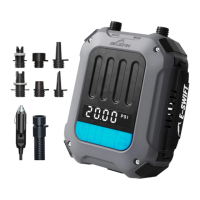
The Bluefin E-Swift is a portable electric air pump designed for inflating and deflating various inflatables, such as stand-up paddleboards (SUPs). It features a digital display for pressure values and buttons for adjusting pressure settings and toggling units. The pump can be powered by a 12V DC socket or directly from a battery using power clips.
Important Technical Specifications:
- Maximum Pressure: 20 PSI
- Power Source: 12V DC
- Pressure Unit Options: PSI, BAR
- Pressure Range: 0 to 20 PSI
Usage Features:
Parts List:
The pump includes the following components:
- Inflation inlet
- Deflation outlet
- Pressure value display
- On/Off button
- Pressure increase button
- Pressure decrease button
- Pressure unit toggle button
- Silicone power cover
- Power input
- Webbing handle
- Pump hose fixing
- Pump hose
- Hose nozzle adapters (multiple included for different inflatables)
- Power connector
- 12V Power adapter
- Battery power clips
Inflation Process:
-
Connecting the Hose:
- Connect the pump hose fixing (11) to the inflation inlet (1) and twist clockwise to tighten it.
- Install the required nozzle adapter (13) to the other end of the hose (12) and twist clockwise to tighten it.
- Insert the nozzle adapter into the inflatable's valve and twist clockwise to secure it. Users should check the manufacturer's guidance for their inflatable to choose the correct nozzle adapter.
-
Connecting the Power:
- Lift the silicone power input cover (8) and insert the power connector (14) into the power input (9) on the pump.
- Option 1 (12V DC Socket): Insert the 12V power adapter (15) into a 12V DC socket.
- Option 2 (Battery Clips): Connect the battery power clips (16) to a battery. The red clip connects to the positive pole, and the black clip connects to the negative pole.
-
Operating the Pump for Inflation:
- Press the pressure unit toggle button (7) to select either PSI or BAR.
- Use the pressure increase button (+) (5) or pressure decrease button (-) (6) to set the desired pressure value, which can range from 0 to 20 PSI.
- Press the On/Off button (4) to start inflation.
- During inflation, the pressure value can be adjusted using the increase/decrease buttons, and the unit can be switched using the toggle button. The On/Off button can be pressed to stop inflation at any time.
- Alternatively, press and hold the On/Off button for 3 seconds to start the pump using the most recently used pressure value.
- Important: Ensure the set pressure does not exceed the maximum limit for the inflatable to prevent damage.
- The pump will automatically stop when the set pressure is reached.
Deflation Process:
- Switching to Deflate:
- Remove the hose from the inflation inlet.
- Connect the pump hose fixing (11) to the deflation outlet (2) on the pump and twist clockwise to tighten it.
- Connect the nozzle end of the hose to the inflatable's valve.
- Press the On/Off button (4) to start the deflation function.
- Once all the air is removed, press the On/Off button again to stop the deflation.
Troubleshooting:
Maintenance Features & Precautions:
- Power Source: The pump must be used with a 12V DC power source.
- Airflow: Do not block the inflation inlet or deflation outlet; ensure they remain clear at all times.
- Disposal: Do not dispose of the product as unsorted waste. It must be collected separately for special disposal.
- Hose Condition: Do not use the product if the hose is damaged; replace it immediately. Avoid pulling out the hose during inflation, as this can cause injury.
- Operating Time: Do not operate the air pump continuously for more than 20 minutes to prevent motor overheating and internal damage. Allow the pump to cool for 30 minutes after 20 minutes of continuous use.
- Damage: If any part of the air pump is damaged, contact Bluefin customer service.
- Safety:
- Do not face the inflation inlet towards your face or body to prevent risk.
- Do not leave the pump unattended during inflation.
- Keep children away from the pump and power wires. Supervise children if they are near the pump.
- Keep the pump away from water and do not submerge it.
- Before moving, maintaining, repairing, or adjusting the product, always disconnect the DC plug from the socket.
- Ensure the power wire is safe and cannot be damaged by other equipment.
- Do not use the pump if the power wire is damaged.
- Avoid using the power cable if you are standing in water or your hands are wet.
- Before inflating, check the maximum bearable pressure of the inflatable product to prevent damage.
- Before using the 12V adapter, check the 12V socket for rust or residue, as poor electrical conduction can cause overheating and damage.
- Use the product responsibly and follow all instructions in the manual.
- Do not use the product near flammable materials.
- Use the product at ambient temperatures no higher than 40 degrees Celsius.
- Ensure the hose, switch, 12V power adapter, and digital display are working correctly before use.
- Keep the pump away from heat sources, humidity, dust, and direct sunlight.
- Do not dispose of the product in fire due to the risk of explosion or other dangers.
Warranty:
As a member of the Bluefin SUP community, users are entitled to lifetime support and an extended warranty. The warranty can be activated by scanning a QR code (refer to "Breakdown cover" section) or by visiting the Bluefin website.


 To Next Page
 General
