
 Need help?
Do you have a question about the BlueHive 035-5406-4 and is the answer not in the manual?
Key safety instructions covering device handling, child safety, and operational warnings.
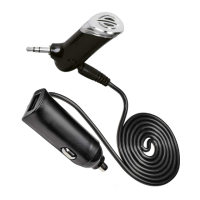
Identification and description of the main physical parts of the Bluetooth receiver and car charger.
Explanation of LED indicator lights for different device states like power, pairing, and charging status.
Details on voice prompts and sounds indicating device status, operations, and alerts.
Instructions on how to properly charge the Bluetooth receiver before its first use.
Detailed guide for pairing your mobile device with the Bluetooth receiver for audio playback.
How to use the function key to answer, end, or reject incoming phone calls.
Instructions for utilizing the USB port to charge other mobile devices and electronics.
Key technical specifications including input voltage, battery, effective range, and charging times.
This document describes a 12 V Bluetooth® Receiver and USB Car Charger, model no. 035-5406-4, designed to provide wireless audio streaming and device charging in a vehicle.
The device serves as a Bluetooth® receiver, allowing users to stream audio wirelessly from their mobile devices (phones, tablets, or other Bluetooth®-enabled devices) to their vehicle's audio system. It connects to the vehicle's audio system via a 3.5 mm Auxiliary (AUX) connection. Additionally, it functions as a car charger, providing a USB port to charge electronic devices. The main unit, the Bluetooth® Receiver, is powered by a rechargeable battery, while the charging functionality for external devices is provided by a 12 V plug that inserts into the vehicle's 12 V outlet.
To power on the Bluetooth® Receiver, a long press of the function key (3) for a few seconds is required. Upon powering on, a blue light will flicker three times, accompanied by a "power on" voice prompt. The device then enters Bluetooth® pairing mode, indicated by blue and red lights flickering alternatively and a "Bluetooth® mode" voice prompt. To power off the receiver, a "power off" voice prompt will be heard.
After plugging the Bluetooth® Receiver into the vehicle's 3.5 mm Auxiliary (AUX) Connection port, users need to access the Bluetooth® settings menu on their phone, tablet, or other Bluetooth® devices. Ensure Bluetooth® is turned on. The device will appear as "035-5406-4" in the list of available devices. Once connected, the blue light on the receiver will flicker, and a "connected" voice prompt will confirm a successful connection, making the device ready for use. If the device disconnects from Bluetooth®, a "disconnected" voice prompt will be heard.
Once connected, audio playlists from the paired device can be played through the vehicle's audio system. The device supports wireless audio streaming, enhancing the in-car entertainment experience.
The device includes features for managing phone calls. Users can answer calls by pressing the function key (3) once. To end a call, the function key (3) should be pressed once again. For rejecting incoming calls, a long press of the function key (3) is required.
The device incorporates a USB car charger. To utilize this feature, the 12 V plug (5) of the car charger must be inserted into the vehicle's 12 V outlet. Electronic devices, such as mobile phones or tablets, can then be connected to the USB port (6) using a compatible charging cable (not provided). The USB port provides a 5 V 2.1 A output, suitable for charging various devices. It is important to note that the USB port is not designed for data transfer; it is solely for charging purposes.
A convenient feature of this device is its ability to allow users to play music and charge their phone/tablet/Bluetooth® devices simultaneously, especially useful when devices have low battery power. This ensures continuous entertainment and power for essential devices during travel.
The device provides clear feedback through an LED indicator and voice prompts.
Before the first use, it is crucial to fully charge the Bluetooth® Receiver's battery. This is done by firmly inserting the Charging connector (8) into the Input port (7) of the Bluetooth® Receiver, and then plugging the 12 V Plug (5) into the vehicle's 12 V outlet. A red charging indicator will light up during charging and turn off once the unit is fully charged. The device takes approximately 2 hours to fully charge.
It is recommended to power off the Bluetooth® Receiver after use to conserve battery life.
For optimal performance, ensure the vehicle's engine is turned on and the vehicle's audio system is active when using the device.
 Battery
| battery capacity | 90 mAH |
|---|---|
| charging time | 2 hours |
| working time | 6 hours |
| standby time | 8 hours |
 Power
Power| input voltage | 12 V |
|---|---|
| car charger USB output | 5 V/2.1 A |
 Operating Environment
| effective range | 10 m |
|---|

 To Next Page