Need help?
Do you have a question about the BlueHive 035-7307-8 and is the answer not in the manual?
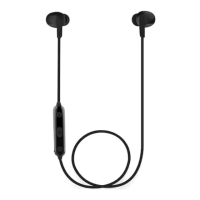
The Blue Hive Bluetooth® Sport Earbuds, Model No. 035-7307-8, are designed for wireless audio and communication, offering a blend of convenience and functionality for active users. These earbuds feature a built-in microphone, enabling hands-free calling and voice commands, making them suitable for various activities, including sports and daily commutes. The design incorporates a control panel on the cable, providing easy access to essential functions without needing to interact directly with the connected device.
The primary function of these earbuds is to provide wireless audio playback from Bluetooth-enabled devices. They connect to smartphones, tablets, and other Bluetooth® devices, allowing users to listen to music, podcasts, or other audio content without the constraints of a wired connection. The Bluetooth® 4.2 technology ensures a stable and efficient wireless connection.
Beyond audio playback, the earbuds facilitate hands-free communication through their built-in microphone. Users can answer, reject, and end phone calls directly from the control panel. The multi-function button (MFB) serves as the central control for call management, allowing for quick responses to incoming calls and redialing the last dialed number. This integration of audio and communication features makes the earbuds a versatile accessory for both entertainment and productivity.
The Blue Hive Bluetooth® Sport Earbuds are designed with user-friendly controls and features to enhance the listening experience.
Volume Control and Track Navigation: The control panel includes dedicated buttons for adjusting volume and navigating tracks. Users can press the "+" button to increase volume and the "-" button to decrease it. To skip to the next track, the "+" button is pressed and held, while holding the "-" button will go to the previous track. An audible indication sound is heard when the maximum or minimum volume level is reached, providing clear feedback.
Power and Multi-function Button (MFB): The MFB is central to controlling the earbuds' power and call functions. Pressing and holding the MFB for 3 seconds powers the earbuds on or off. During an incoming call, a single press of the MFB answers the call, while pressing and holding it for 2 seconds rejects the call. During an active call, a single press ends the conversation. The MFB also supports redialing the last phone number by pressing it twice. For media playback, a single press of the MFB acts as a play/pause toggle, allowing users to pause multimedia and resume playback with another press.
LED Indicator: An LED indicator on the control panel provides visual feedback on the earbuds' status. Different light patterns and colors indicate various states:
Voice Prompts/Audio Tones: The earbuds provide audio cues to inform users about their operational status. These include "Power On," "Power Off," "Power On, Pairing," "Disconnected, Pairing," "Low battery," "Pairing," and "Connected." These voice prompts enhance usability by providing clear, audible feedback on the device's current state.
Micro USB Charging Port: The earbuds are equipped with a Micro USB charging port, allowing for convenient recharging of the internal battery. The charging process is straightforward, requiring connection to a USB charger or a PC.
Magnet Base: A practical feature for storage and wear, the earbuds incorporate a magnet base. This allows users to easily stow the earbuds by wearing them around their neck, as the magnetic ends can connect, preventing them from falling off or getting tangled when not in use.
Earbud Caps: The earbuds come with three pairs of earbud caps (S, M, L), with the medium size pre-installed. This allows users to choose the most comfortable and secure fit for their ears, optimizing both sound quality and comfort during extended wear.
Pairing with Bluetooth® Devices: The pairing process is designed to be intuitive. To enter pairing mode, the power button is pressed and held for 5 seconds until the red and blue LED indicator flickers alternately, accompanied by "Power On" and "Pairing" voice prompts. Users then navigate to their device's Bluetooth® settings, ensure Bluetooth® is enabled, and select "035-7307-8" from the list of available devices. A glowing blue LED light and a "Connected" voice prompt confirm successful pairing.
Connecting Two Bluetooth® Devices Simultaneously: The earbuds support simultaneous connection to two Bluetooth® devices. To achieve this, users first connect to Phone A, then disconnect Bluetooth on Phone A. Next, they connect to Phone B following the standard pairing instructions. Finally, they re-enable Bluetooth on Phone A and reconnect to "035-7307-8." This allows both devices to be connected, enabling seamless switching between audio sources or calls.
Proper care and maintenance are essential for ensuring the longevity and optimal performance of the Blue Hive Bluetooth® Sport Earbuds.
Charging: The earbuds need to be fully charged before first use, which typically takes 2 hours. The charging process is indicated by a red LED light, which turns blue once fully charged. It's important to note that the earbuds cannot be operated during charging. Using the provided USB charging cable with an AC adapter (max. output: 5V, 1A) or a PC is recommended for charging.
General Precautions:
Disposal: The product must be recycled or disposed of properly according to local municipality requirements, ensuring environmentally responsible end-of-life management.
By following these usage guidelines and maintenance tips, users can maximize the performance and lifespan of their Blue Hive Bluetooth® Sport Earbuds.
 Bluetooth Specifications
| Bluetooth version | V 4.2 |
|---|---|
| Bluetooth profiles supported | HFP / A2DP / AVRCP |
| Effective range | Up to 10 m (32') |
 Battery
| battery capacity | 60 mAh |
|---|---|
| charging time | 2 hours |
| working time | 3 1/2 hours |
| standby time | 120 hours |
Operating Environment| working temperature range | -5°C to 35°C (23°F to 95°F) |
|---|---|
| storage temperature range | -5°C to 60°C (23°F to 140°F) |
| frequency response | 20-20k HZ |

 To Next Page