The BlueIOT Anchor BA3000-t is a high-precision Bluetooth Location Anchor designed for indoor positioning and data collection. It utilizes Bluetooth Low Energy (BLE) technology with advanced AOA/AOD algorithms and standards to achieve sub-meter level positioning accuracy. The device is suitable for various indoor applications, including personnel and object tracking, status collection, and data transmission, offering high concurrency, low power consumption, high compatibility, and easy quick deployment.
Function Description:
The primary function of the BlueIOT Anchor is to receive and collect locating and data information transmitted by Bluetooth tags. This information is then processed to provide real-time positioning data. The effective collection area of the anchor is dependent on its on-site deployment, and the number of tags it can collect is related to the frequency of tag data transmission. When a tag moves out of the effective collection area, its locating accuracy may decrease or it may become unlocatable, and data transmission will cease. Conversely, when the tag re-enters the effective collection area, locating and data transmission resume.
The anchor supports two main wiring methods for network connection: direct connection to a server via a network cable, or connection via a network switch or router. It uses a fixed IP address for network access and does not support DHCP. The default factory IP address is "192.168.1.X" at port "48200," where 'X' varies by product and can be found on the information label. Network configuration, including IP address modification, is performed via the "Anchor Configuration" module in the "Server Software."
Important Technical Specifications:
- Frequency: 2.4GHz - 2.485GHz
- Locating Accuracy: Up to 0.1 m
- Interface Type: Ethernet RJ45
- Interface Speed: 10/100Mbps
- Interface Protocol: UDP/TCP
- Interface Connect Distance: Maximum 100m
- Transmission Medium: CAT5+
- Dimensions: 220mm × 220mm × 32mm
- Weight: 620g
- Power Supply Interface: IEEE 802.3af POE
- Voltage/Current: 48V / 0.5A
- Working Temperature: -20°C - 70°C
- Storage Temperature: -40°C - 85°C
- Working Humidity: 10% - 90% non-condensing
- Storage Humidity: 5% - 95% non-condensing
Usage Features:
- Installation: The BA3000-t is primarily designed for ceiling mounting but can also be suspended or installed in other configurations depending on the building's ceiling structure. Before installation, ensure the connecting structure can withstand a downward pull of at least 50 Newtons. The maximum installation height is 20 meters. The anchor should be installed with its front panel facing downwards, not upright or tilted.
- Mounting: The location anchor mount is fixed with wall plugs at specific positions, and the anchor slides into place along the guideway on the mount.
- Environmental Considerations: To ensure optimal performance, the installation location and its surroundings must meet certain standards. Avoid areas with electromagnetic shielding/jamming devices (e.g., mobile phone jammers, WiFi jammers), objects that can cause signal reflection (e.g., large metal surfaces, large screens), and obstructions that could block visual coverage (e.g., above ceiling tiles made of metal or gypsum, low-voltage cable trays, fire ducts, air conditioning ducts, indoor plants).
- Power Supply: The device uses IEEE 802.3af standard Power over Ethernet (POE) and requires a Category 5e (CAT 5e) network cable. It can be powered by connecting to a standard POE Switch or another location anchor. The power indicator will be permanently green when connected. The POE power supply should be within 100 meters, preferably within 80 meters. Easy-to-use circuit breakers should be incorporated into the wiring system.
- Indicator Lights:
- Network Indicator: Green when connected through Ethernet. Permanent OFF indicates no connection or connection failure. Blinking indicates normal network connection.
- Power Indicator: Permanent Green indicates normal power supply. Permanent OFF indicates abnormal power supply.
- Location Indicator: Permanent Green indicates no tag connection or tag connection failure. Flashing Green indicates normal tag connection.
- Reset Button: When powered on, pressing and holding the reset button for 10 seconds will reset the anchor to factory default settings. The three indicator lights on the front panel will flash three times during reset.
- Label Area: This area provides product ID and other information.
Maintenance Features:
- Handling: Handle the BlueIOT Anchor with care during transportation and installation, as it contains sensitive electronic components that can be damaged by dropping, burning, puncturing, or crushing.
- Repairing: Do not open or attempt to repair the BlueIOT Anchor yourself. Disassembly can damage the device and cause injury. For repairs or malfunctions, contact a local distributor.
- Powering Safety: Use the original or specified IEEE 802.3af POE power supply. Ensure the anchor and power adapter are installed in a well-ventilated area. Using a damaged adapter, a third-party solution that doesn't meet specifications, or powering the device when moisture is present can lead to fire, electric shock, injury, or damage.
- Heat Exposure: The BlueIOT Anchor complies with applicable surface temperature standards. Prolonged heat exposure should be avoided.
- Cleaning and Care: Keep the BlueIOT Anchor clean and dry. Avoid damaging it. Do not use chemical cleaners, abrasive materials, or compressed air for cleaning.
- Radio Frequency Exposure: The BlueIOT Anchor meets applicable limits for radio frequency (RF) exposure. Avoid operating the device in areas where RF interference could cause issues.
- Medical Device Interference: The device contains components and radios that emit electromagnetic fields, which may interfere with medical devices such as pacemakers and defibrillators. Consult a physician and medical device manufacturer for information on maintaining a safe distance.
- Disposal and Recycling: The BlueIOT Anchor should not be disposed of with household waste. Dispose of the device and its battery according to local environmental laws and guidelines. Separate collection and recycling help conserve natural resources and protect human health and the environment.
- Limited Warranty: The BlueIOT Anchor comes with a 1-year warranty for the entire product. Accessories like adapters and charging cables have no warranty. The warranty does not cover surface damage, damage from accidents, abuse, misuse, external factors, repairs by unauthorized personnel, or modifications without written consent. For warranty service, contact the local seller or info@blue-iot.com if purchased directly from the manufacturer.
- FCC Compliance: The device complies with Part 15 of the FCC Rules, ensuring that it does not cause harmful interference and accepts any interference received. Users are advised to reorient or relocate the receiving antenna, increase separation between equipment and receiver, connect the equipment into an outlet on a different circuit, and consult a dealer or an experienced radio/TV technician for help if interference occurs. Any changes or modifications not expressly approved by the party responsible for compliance could void the user's authority to operate the equipment. The device has been evaluated to meet general RF exposure requirements and can be used in portable exposure conditions without restriction.

 Need help?
 General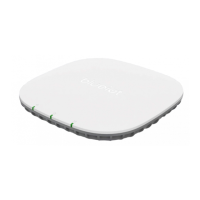

 To Next Page