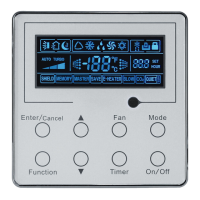
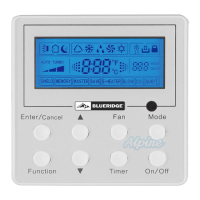
This document serves as an owner's manual for the Blueridge Wired Remote Controller XK19 and Wireless Remote Controller YT1FF, designed for Commercial Air Conditioners. It provides detailed instructions for operation, installation, and troubleshooting.
Wired Remote Controller XK19
The Wired Remote Controller XK19 is a wall-mounted control unit for commercial air conditioners, featuring an LCD display and a set of buttons for various functions.
Function Description
The XK19 controller allows users to manage the air conditioning unit's operations, including:
- On/Off Control: Powering the unit on or off.
- Mode Setting: Selecting between Auto, Cooling, Dry, Fan, and Heating modes.
- Temperature Setting: Adjusting the desired room temperature within a range of 16°C to 30°C. In Auto mode, the temperature is not adjustable.
- Fan Speed Setting: Choosing between Auto, Low, Middle, and High fan speeds.
- Timer Setting: Programming the unit to turn on or off after a set period, ranging from 0.5 to 24 hours.
- Swing Function: Activating or deactivating the air guide louver swing for better air distribution.
- Sleep Setting: Engaging a sleep mode that gradually adjusts the temperature over time (increases in Cooling/Dry, decreases in Heating) for comfort and energy saving.
- Turbo Setting: Enabling a rapid cooling or heating function to quickly reach the set temperature by running the fan at high speed.
- E-heater Setting: Activating auxiliary electric heating in Heating mode to improve efficiency. This function can be set to turn on automatically in Heating mode.
- Blow Setting: Initiating a post-shutdown fan operation to dry the evaporator and prevent mildew in Cooling or Dry modes.
- Lock Function: Locking the controller to prevent unintended operations.
- Memory Function: Allowing the unit to resume its previous settings after a power failure and recovery. This function can be enabled or disabled.
- Temperature Sensor Selection: Configuring whether the indoor ambient temperature is sensed by the return air temperature sensor or the wired controller's sensor, with various options for different modes.
- Fan Speed Level Selection: Choosing between three low fan speeds or three high fan speeds for finer control.
Usage Features
The XK19 controller is designed for straightforward operation:
- LCD Display: Provides clear visual feedback on the current mode, temperature, fan speed, timer settings, and active functions (e.g., Swing, Sleep, Turbo, E-heater, Blow, Shield, Memory, Master, Save, Quiet, Set). It also displays error codes when malfunctions occur.
- Intuitive Buttons: Dedicated buttons for "Enter/Cancel," "Fan," "Mode," "Function," "Timer," and "On/Off," along with up/down arrows for adjustments.
- Combined Button Functions: Certain functions, like Memory, Lock, and commissioning status, are accessed by pressing combinations of buttons for a specified duration (e.g., 5 seconds).
- Temperature Scale Switch: The Celsius and Fahrenheit scales can be switched under the OFF state by pressing "Mode" and the down arrow for five seconds.
- Commissioning Status: Allows for advanced configuration, such as selecting the temperature sensor source or fan speed levels, by entering a specific mode (Function + Timer for 5 seconds under OFF state).
- Automatic Features: E-heater can be set to turn on automatically in Heating mode. The Blow function, when activated, automatically runs the indoor fan at low speed for 2 minutes after shutdown in Cooling or Dry modes.
Maintenance Features
- Error Display: The LCD shows specific error codes (e.g., F0, F1, H3) when a system malfunction occurs, aiding in diagnosis. If multiple errors occur, their codes are displayed circularly.
- User Notice: Emphasizes important precautions such as avoiding moist environments, direct sunlight, physical impact, and operating with wet hands to ensure the longevity and proper functioning of the controller.
- Installation and Dismantlement Instructions: Detailed steps are provided for connecting the signal line, mounting the controller to the wall, and disassembling it. This includes guidance on cable routing, screw fixation, and ensuring proper electrical connections.
- Electromagnetic Interference Prevention: Crucial warnings are given to separate signal and communication lines from power cords by a minimum interval of 20cm and to use shielding twisted pair lines if the installation location is prone to electromagnetic interference, to prevent abnormal operation.
Wireless Remote Controller YT1FF
The Wireless Remote Controller YT1FF is a handheld device offering convenient control over commercial air conditioning units.
Function Description
The YT1FF controller provides a comprehensive range of functions:
- ON/OFF Control: Turning the unit on or off.
- MODE Selection: Cycling through Auto, Cool, Dry, Fan, and Heat modes. Auto mode does not display temperature, while Heat mode defaults to 28°C (82°F) and other modes to 25°C (77°F).
- SLEEP Function: Activating or deactivating sleep mode, which adjusts temperature for comfort. This function is not available in Fan and Auto modes.
- FAN Speed Control: Selecting Auto, Low, Medium, or High fan speeds. In Dehumidifying mode, only Low fan speed is available.
- CLOCK Setting: Adjusting the current time, displayed with a blinking symbol.
- LIGHT Control: Toggling the unit's display light on or off.
- TURBO Function: Activating a rapid cooling or heating function in Cool or Heat modes. This function is canceled if the mode or fan speed changes.
- X-FAN Function: Enabling a post-shutdown fan operation in COOL or DRY mode to dry the indoor unit and prevent mildew. The indoor fan continues for 10 minutes after the unit is turned off.
- Temperature Adjustment: Decreasing or increasing the preset temperature. This is unavailable in Auto mode.
- TEMP Display Selection: Choosing to display either the indoor set temperature or the indoor ambient temperature.
- SWING UP/DOWN: Adjusting the air guide louver's swing angle, with multiple positions and an "OFF" setting.
- AIR Control: Turning the air function on or off.
- TIMER ON/OFF: Setting a specific time for the unit to turn on or off, adjustable in 1-minute increments.
- HEALTH Function: Activating or deactivating a health-related function (default is ON).
- I FEEL Function: Enabling the remote controller to sense and send temperature information to the main controller every 10 minutes, allowing the unit to adjust operation based on the remote's location.
Usage Features
The YT1FF controller is designed for ease of use and flexibility:
- LCD Display: Shows current settings, mode, temperature, fan speed, and active functions.
- Dedicated Buttons: Clearly labeled buttons for each function (e.g., MODE, FAN, SLEEP, CLOCK, TURBO, X-FAN, TEMP, SWING, TIMER ON, TIMER OFF, HEALTH, I FEEL, LIGHT, and temperature adjustment arrows).
- Circular Selection: Modes and fan speeds can be cycled through by repeatedly pressing their respective buttons.
- Quick Adjustment: Holding down temperature adjustment buttons for more than 2 seconds allows for rapid changes.
- Default Settings: The unit powers on with default settings (e.g., Auto mode, Light On, X-FAN Off, Health On).
- General Operation Guide: Provides a step-by-step guide for basic operation, including powering on, selecting modes, and setting temperature and fan speed.
- Optional Operation Guide: Explains advanced features like X-FAN, AFTERHEAT X-FAN (for Heat mode), AUTO RUN (automatic mode selection based on room temperature), and TURBO.
- Remote Controller Notes: Important reminders include ensuring no obstructions between the controller and the unit, avoiding dropping or throwing the controller, preventing liquid ingress, and keeping it away from direct sunlight or very hot places. It also clarifies that pressing unavailable buttons will not alter the unit's current running status.
Maintenance Features
- Battery Replacement: While not explicitly detailed in the provided text, wireless remote controllers typically require battery replacement as a standard maintenance item.
- Durability Precautions: The user notice advises against beating, throwing, or frequently disassembling the remote controller to prevent damage.
- Environmental Protection: Recommendations to avoid direct sunlight and moist circumstances contribute to the controller's longevity.

 Need help?
 General

 To Next Page