Operating Instructions
This charger can take up to 4 batteries and charges them as
follows:
- the channel pair 1-2 (left side of the charger) is independent
from pair 3-4 (right side). The charge is managed
simultaneously between the two pairs.
- within the same pair (1-2 or 3-4), the batteries are charged
sequentially: first available/ first charged
How to proceed:
- Plug the AC power cord provided into the charger AC input
- Plug and switch on the AC mains supply
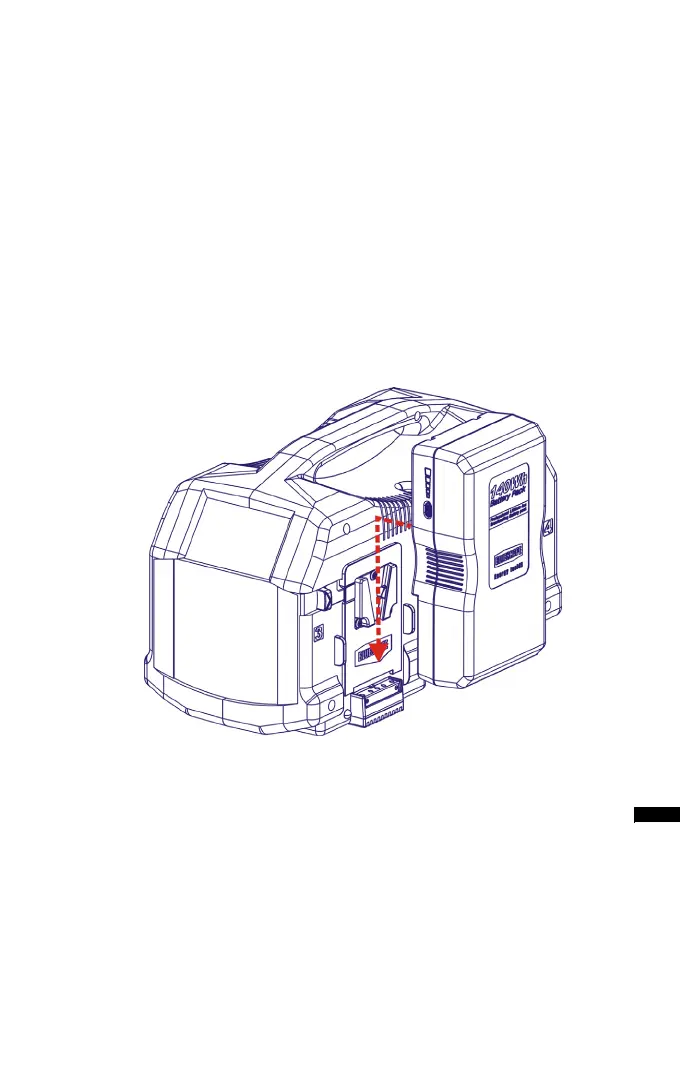
- Insert a battery inside any one of the four V-plate adapters as
shown (see picture)
- Observe the LED. In addition, the charge status may be read in
20% steps through the BLUESHAPE battery LED array.
- Leave the battery to charge for the appropriate time (see table
on page 6)
- Remove the battery when the LED becomes steady green as
shown (see picture on next page)
In the case when you want to charge 2 or more batteries, insert the
additional batteries into the available V-plate adapters.
9
CVS4X
BV070
BV100
BV140
BV175
BV210
Insert in the direction of the arrow


 To Next Page