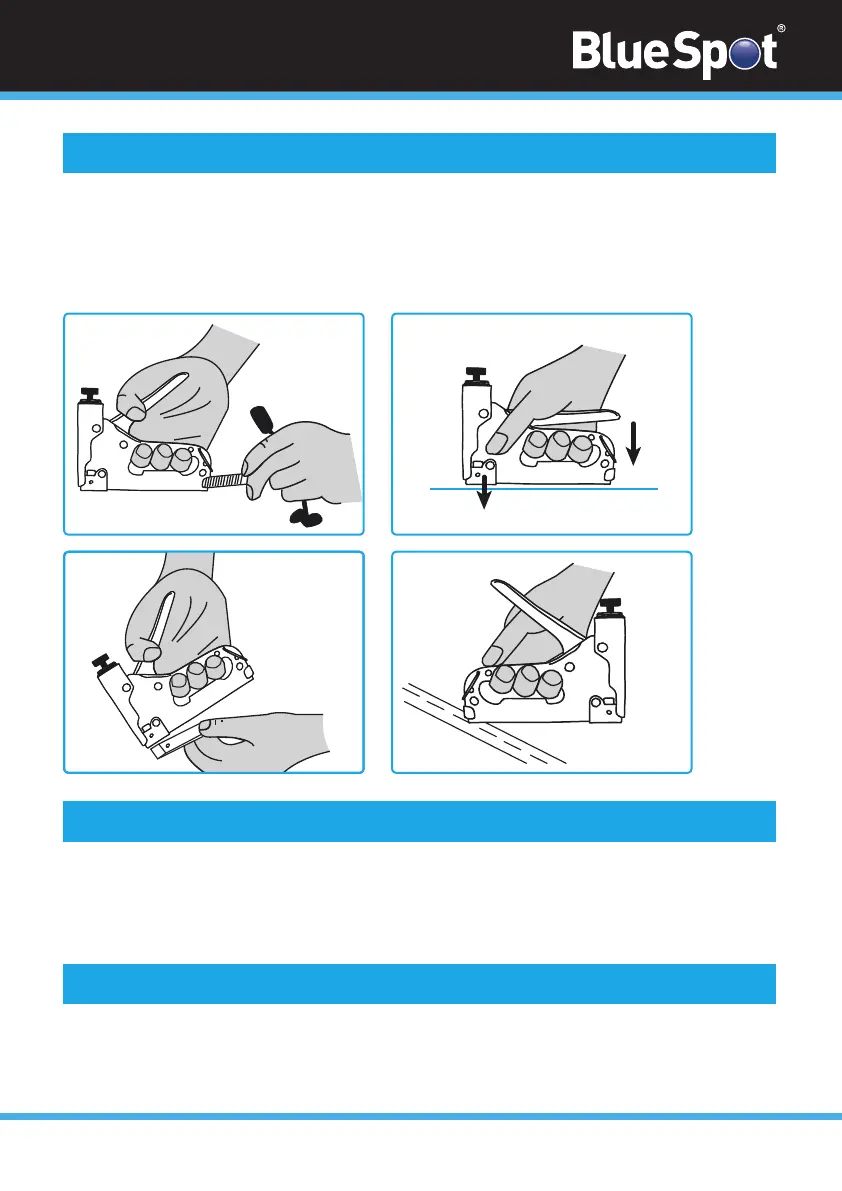
fig.1
STAPLE EXIT PATH
fig.4
02
1. Hold the stapler in one hand and point away from your body.
2. Push in and down on the stapler feed bar and withdraw it from the stapler.
3 Insert the new staples or nails into the guidance track (see fig 1).
4. Reinsert the stapler feed bar and hook it upwards to retain it back into the stapler.
How to Insert New Staples
fig.2
1. The stapling force can be adjusted using the knurled knob in front of the trigger.
2. Turn the knob clockwise to increase the stapling force.
3. Turn the knob anti-clockwise to decrease the stapling force.
Adjusting the Stapling Force
1. Ensure that the stapler is in firm contact with the surface to be stapled and that the
stapler is correctly positioned.
2. Depress the trigger firmly until the stapler gun fires (see fig 2).
How to Use the Stapler


 To Next Page