EasyManua.ls Logo

Bluestone 80-5101 - Page 6

Bluestone 80-5101
17 pages
Print Icon
To Next Page IconTo Next Page
To Previous Page IconTo Previous Page
Loading...
Quick
Start
I. Inslall
baneries.
(See
Figure
A)
2. Insert
cuff
air
plug
inlo Ihe left
side
ofmonilor
unit.
(See
Figure B)
Figure
B
3.
Remo\'e thick clothing from Ihe arm area.
4. Rest
for
several minutes prior
to
testing. Sit duwn comfortably
in
a quiet place.
Rest your
arm
on
8 desk
or
rable. Keep legs crossed with botb feel flat
on Ihe floor.(Sec
Figure
C)
Figure
C
5.
Apply
cufflO
your
lefl arm and middle
oflhe
cuffallhe
level
of
y
our
heart.
Bonom
ofcuft
'
should
be
placed
approximalely
1-
2cm
( W
')
above
elbow
joint.(See
Figure
s D&E)
ot0,
~
Figure
D
Figure
E
6.
Press"
START/
STOP"
BUllOn
10
SlanleSling.
Unit Operation
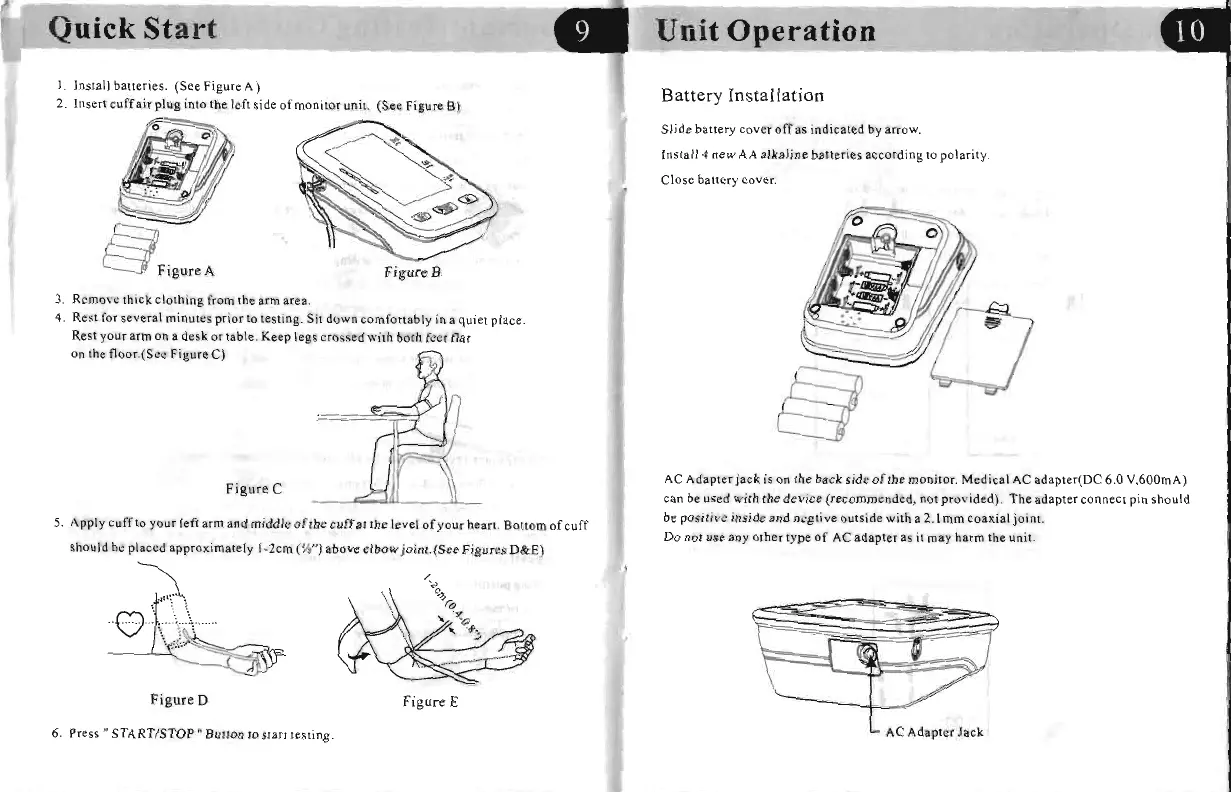
Battery
Installation
Slide battery cOVCr ofras indicated
by
arrow.
Inst.114
new
AA
alkaline
baneries
according
10
polaril
y.
Close
baltery cover.
tfjjj
AC
Adapler
jack
is on Ihe back
side
oflhe
monitor.
Medical
AC
adapler(DC
6.0
V,600mA)
can be used
with
the
device
(recommended,
not provided).
The
adapter
connect
pin
should
be
positive inside
and
ncglive
outside with a
2.l
mm
coaxial joint.
Do
not use any other type
of
AC adapter as
it
may harm the
uniL
~~
AC
Adapler
Jack

Related product manuals