Unit Operation
System Settings
Wilh
power
off,
press
"SET"
bUllon
10
aClivate
Syslem
Sellings.
The
Memory
Group
icon
flashes.
t.
Select
Memory
Group
While
in
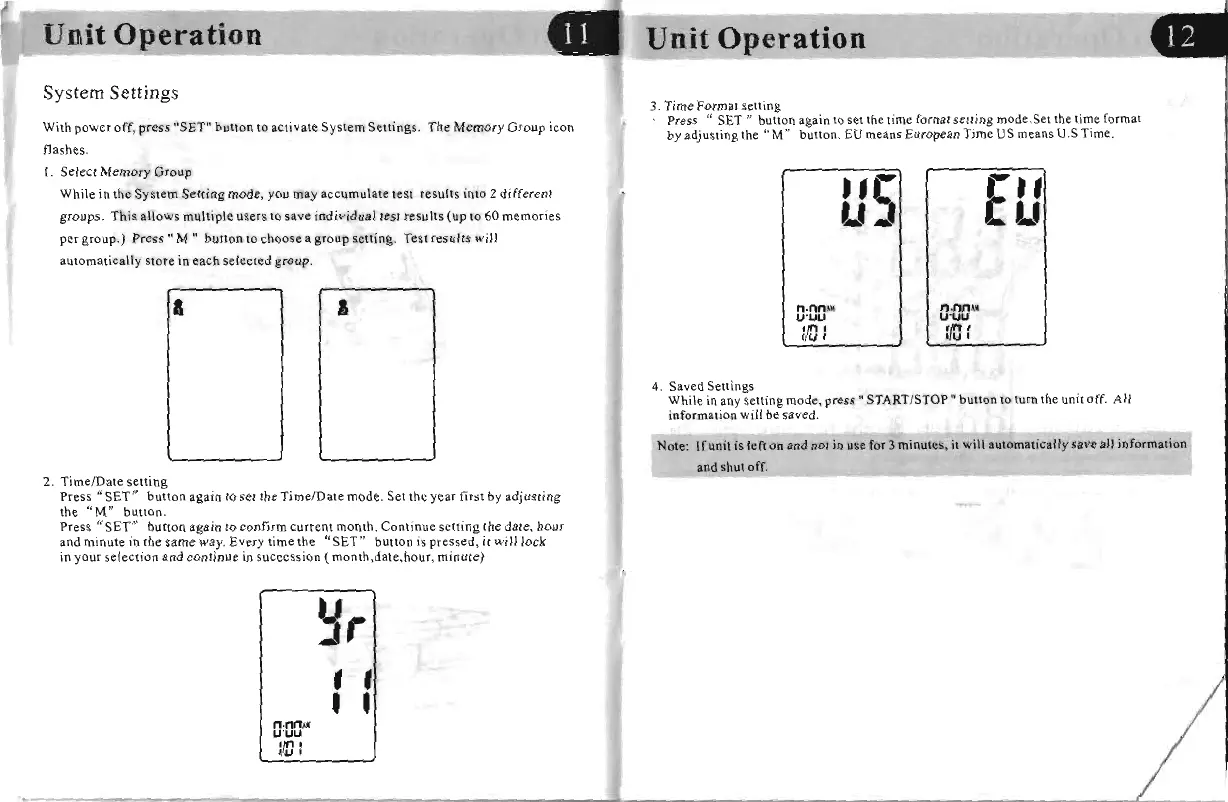
the System Setting mode, you may accumulate
lest
results into 2 different
groups. This allows multiple users
to
save individual
te
st results (up
to
60 memories
per
group.)
Press"
M"
bUllon
10
choose
a
group
selling.
Tesl
results
will
automatically store
in
each selected group.
a
I
2.
TimefDale
selling
Press
~jSETI?
button again
to
set
the
Time/Date mode. Set the year first by adjusting
the
"M
/I
button.
Press "SET" button again
to
confirm current month. Continue setting the date,
bour
and
minute
in
tbe same way. Every time the "SET" button
is
pressed,
it
will lock
in
your selection
and
continue
in
succession (month,date,hour, minute)
~r
, ,
, ,
n·MAlI
U '
UU
1m
:
Unit
Operation
3. Time Format setting
Press
"SET
11 bulton again
to
set
the
time
rOrnal
selling mode.Set
the
lime
format
by
adjusting
Ihe
"M"
button.
EU
means European Time US
means
U.S Time.
•
,e
r.
,
L'"
eL'
n·
nn
,ll{
n·nn"~
U'UU
U-UU
:/0
:
:fJ
:
4. Saved Settings
While in any
selling
mode,
press"
START/STOP"
bUllon
10
lurn Ihe unil off. All
information will
be
saved.
Note: lfunit is lefl on
and
not
in
use
for
3 minutes,
it
will automatical1y save all information
and shul off.
..


 To Next Page
 Loading...