EasyManua.ls Logo

Bluestone 80-5101 - Page 8

Bluestone 80-5101
17 pages
Print Icon
To Next Page IconTo Next Page
To Previous Page IconTo Previous Page
Loading...
Unit
Operation
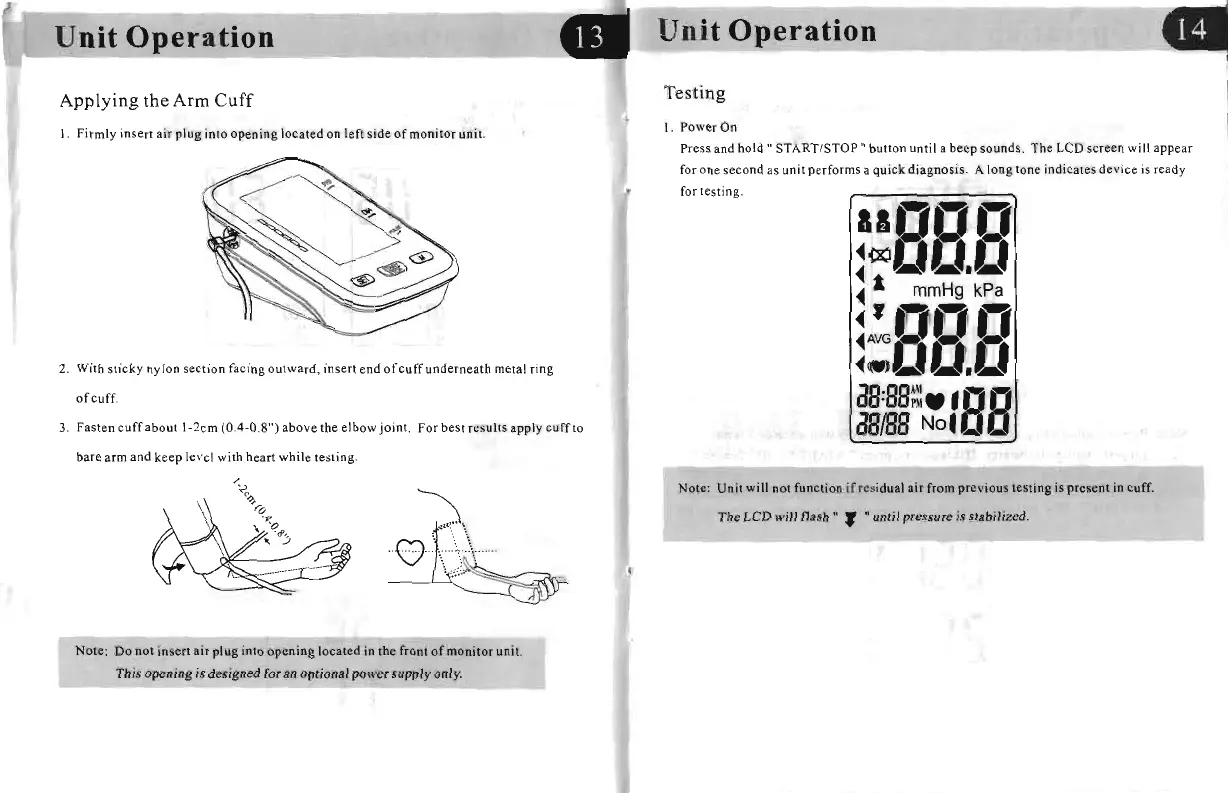
Applying
the
Arm
Cuff
I.
Firmly
insert
air
plug
into
opening
located on left
side
of
monitor
uni
t.
2.
With
sticky
nylon
section
facing
outward
, insert end
of
cuff
underneath
metal ring
of
cuff.
3.
Fasten
cuffabout
1-2cm
(0.4-0.8")
ab
ove
the
elbow
joint.
For
best
results apply
cuff
to
bare arm
and
keep le vel with
hear
t
while
testing.
~~
.
C'::J
..
'
,\
. \ .'
\..J
....
:.;.:.
~
'_,
~
Note: Do not insert
air
plug
into
opening
located
in
the front
of
monitor
unit.
This
opening
is
designed
for an
optional
power
supply
only.
Unit
Operation
Testing
I. Po
werOn
Press and
hold"
START/STOP"
button until a
beep
sounds.
The LCD screen
wi
ll
appear
fo
r o
ne
seco
nd
as unit p
er
forms
a quick diagnosis. A long tone indicates device
is
ready
f
or
testing.
aIB~DB~
~OOaJU.aJ
~
a mmHg
kPa
~A~GnDB~
~.)Do.~
aB:BB~·'BB
aBIBB
No'D
Note: Unit will not function if residual
air
from
previous
testing
is
pre.cnt
in cuff.
The
LCD
wilillash"
, until
pre
ssure is
stabilized
.
..
.

Related product manuals