EasyManua.ls Logo

Bluestream DA11ADE - User Manual

Bluestream DA11ADE
4 pages
Print Icon
To Next Page IconTo Next Page
Loading...
DA11ADE QUICK REFERENCE GUIDE
01
Contact: support@blustream.com.au | support@blustream-us.com | support@blustream.co.uk
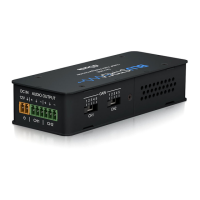
Our DA11ADE has been designed to decode a Dante® digital signal to unbalanced
or balanced 2ch analogue audio. The DA11ADE is a plug & play device that is
powered using either PoE (Power Over Ethernet) from any PoE network switch or
via local 12v power supply input. The DA11ADE also supports AES67 RTP audio
transport.
Introduction
DA11ADE
Quick Reference Guide
Decodes a Dante® digital signal to unbalanced or balanced 2ch analogue audio
Supports 44.1, 48 & 96 KHz sample rates @ 24 Bit
Configurable Dante® device latency (supports 1, 2 or 5ms configurable using Dante® Controller)
Supports AES67 RTP audio transport
Features Class 1 802.3af PoE for powering of product from any PoE switch
Local 12v power supply input for when network switch does not support PoE*
* PS121PH power supply sold separately
FEATURES:
Connections:
1 Dante® Audio Input - RJ45 socket connets Dante® network.
2 DC Input - Connect to +12VDC power supply (not supplied) if
device is not powered via a PoE switch
3 Audio Output - Phoenix Connector accepts balanced or
unbalanced 2 channel audio output.
Front Panel
1
Rear Panel
3
Wiring Configuration
Balanced - XLR
Unbalanced - RCA
+
-
-
+
2
Question and Answer IconNeed help?

Do you have a question about the Bluestream DA11ADE and is the answer not in the manual?

Summary

Introduction

Front Panel Connections

Dante Audio Input

RJ45 socket connects to the Dante® network.

DC Input

Connect to +12VDC power supply if device is not powered via PoE.

Audio Output

Phoenix Connector accepts balanced or unbalanced 2 channel audio output.

Rear Panel

Wiring Configuration

Dante Controller Setup

Network Discovery and Routing

Dante Controller automatically discovers DA11ADE. Create audio routing on the 'Routing' screen.

IP Address Configuration

Device obtains IP automatically or can be manually configured via 'Network Config' in Device Info.

Advanced Dante Settings

Sample Rate Adjustment

Adjust sample rate in 'Device Config'. Mismatched rates can stop audio transmission.

Latency Configuration

Adjust device latency to 1, 2, or 5 milliseconds in the 'Device Config' menu.

Gain Adjustment

Output Sensitivity Settings

Adjust output gain using the 5-pin switch from +18dBu to -10dBV.

Specifications

Audio Input and Output

RJ45 Dante network input, 6-PIN Phoenix balanced/unbalanced analogue audio output.

Power Supply

Class 1 IEEE 802.3af PoE PD or 12V/1A DC 2-PIN Phoenix connector.

Certifications and Compliance

FCC Notice

Complies with FCC Rules for Class B digital devices, designed for residential protection.

Industry Canada Notices

Complies with Canadian ICES-003 Class B digital apparatus requirements.

Correct Disposal

Marking indicates product should not be disposed with household waste; recycle responsibly.

Overview

The Blustream DA11ADE is a Dante® Audio Analogue Decoder designed to convert a Dante® digital signal into either unbalanced or balanced 2-channel analogue audio. This device is a plug-and-play solution, simplifying integration into existing audio systems. It can be powered conveniently via Power Over Ethernet (PoE) from any PoE-enabled network switch, or alternatively, through a local 12V power supply if PoE is not available. The DA11ADE also supports AES67 RTP audio transport, enhancing its compatibility with various network audio standards.

Function Description

The primary function of the DA11ADE is to decode Dante® digital audio signals into analogue audio. This allows for the integration of Dante® network audio into traditional analogue audio systems, such as amplifiers, mixers, or powered speakers that require analogue inputs. The device supports a range of sample rates, including 44.1 kHz, 48 kHz, and 96 kHz, all at a 24-bit resolution, ensuring high-fidelity audio output. Its ability to handle both balanced and unbalanced analogue audio outputs provides flexibility for different professional and consumer audio setups.

Usage Features

The DA11ADE is designed for ease of use and integration.

  • Connectivity: The device features an RJ45 socket for Dante® network input, which also supports PoE for power. For analogue audio output, it uses a Phoenix Connector, accommodating 2-channel balanced or unbalanced audio connections. A DC input is also available for a 12V power supply when PoE is not utilized.
  • Powering Options: The DA11ADE offers dual powering options: Class 1 802.3af PoE from a network switch or a local 12V power supply. This flexibility ensures the device can be deployed in various environments, regardless of PoE infrastructure availability.
  • Dante® Controller Software Integration: Configuration and control of the DA11ADE are managed through the Dante® Controller software. This software, provided by Audinate, allows users to discover the device on the network, create audio routing between Dante® transmitters and receivers, and adjust various device settings.
  • Network Configuration: By default, the DA11ADE obtains an IP address automatically via DHCP. However, users can manually configure the IP address, netmask, DNS server, and gateway through the Dante® Controller's "Network Config" menu, providing granular control over network integration.
  • Sample Rate Adjustment: The device's sample rate can be adjusted via the "Device Config" menu in Dante® Controller. It is crucial to match the sample rate with other Dante® products in the system to ensure proper audio transmission.
  • Latency Configuration: Users can configure the Dante® device latency to 1, 2, or 5 milliseconds, allowing for optimization based on system requirements and minimizing audio delay.
  • AES67 Support: The inclusion of AES67 RTP audio transport support enhances interoperability with a broader range of IP-based audio systems, making the DA11ADE a versatile component in modern audio networks.
  • Output Gain Adjustment: A unique feature of the DA11ADE is its 5-pin switch located on the side of the device, which allows for independent adjustment of the output gain for each channel. This enables users to fine-tune the output sensitivity to match the input requirements of connected analogue audio devices. The available settings range from +24dBu to -10dBV, providing a wide range of adjustment for various professional and consumer audio equipment.

Maintenance Features

While the DA11ADE is largely a set-and-forget device, the Dante® Controller software provides tools for monitoring and basic troubleshooting.

  • Device Monitoring: The Dante® Controller allows users to monitor the status of the DA11ADE, including its clock status and network status, which can help in diagnosing connectivity or synchronization issues.
  • Reset and Reboot Options: Within the Dante® Controller, there are options to reset the device or reboot it, which can be useful for resolving minor operational glitches or applying new configurations.
  • Firmware Updates: Although not explicitly detailed as a user-facing maintenance feature, Dante® devices typically support firmware updates through the Dante® Controller, ensuring the device remains up-to-date with the latest features and bug fixes. Users should consult Audinate's documentation for specific firmware update procedures.
  • Troubleshooting Guidance: The manual emphasizes ensuring the PC running Dante® Controller is on the same network as the Dante® devices and recommends hardwiring the PC to the Dante® network, disabling WiFi during configuration to avoid network confusion. This guidance helps users maintain a stable and reliable connection for configuration and monitoring.

In summary, the Blustream DA11ADE is a robust and flexible solution for bridging Dante® network audio with analogue audio systems. Its plug-and-play nature, versatile powering options, comprehensive configuration capabilities via Dante® Controller, and adjustable output gain make it an adaptable tool for a wide array of audio integration scenarios.

Bluestream DA11ADE Specifications

General IconGeneral
ModelDA11ADE
BrandBluestream
Audio Inputs1 x RCA (L/R)
Digital Audio Outputs1 x Optical (S/PDIF)
Frequency Response20Hz - 20kHz
Signal to Noise Ratio>90dB
Power Supply5V DC