Need help?
Do you have a question about the Bluevua RO100ROPOT and is the answer not in the manual?
Safety guidelines for using the ROPOT system.
Guides the user through the initial setup of the ROPOT system.
Specifies the recommended replacement intervals for each filter.
Guide on how to descale the ROPOT system to maintain performance.
Step-by-step guide for replacing the filters in the ROPOT system.
Solutions for when the system fails to start.
Troubleshooting steps for unstable or slow water flow.
Addresses issues with high or increasing TDS readings.
The Bluevua Reverse Osmosis Drinking Water System is designed to provide clean, healthy drinking water, contributing to a more sustainable future by reducing plastic waste. This countertop RO water purifier is engineered for ease of use and efficient water purification, making it suitable for direct drinking.
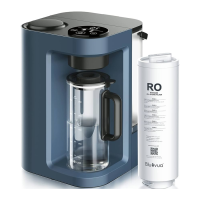
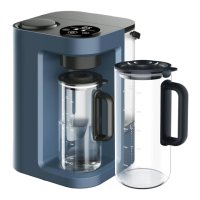
The ROPOT system utilizes a multi-stage filtration process, including Polypropylene Sediment (PP), Coconut Carbon Block (CTO), Reverse Osmosis (RO), and Post Carbon (PCF) filters, to remove dissolved solids, heavy metals, microbes, and other contaminants from tap water. The reverse osmosis technique ensures a significant reduction in Total Dissolved Solids (TDS), typically achieving a 90-95% reduction. The system is designed to produce pure drinking water, with the well-filtered water dispensed into a glass carafe, while the RO reject water, containing concentrated contaminants, is collected in the raw water tank at the back. This reject water should be discarded after each filtration cycle to prevent the accumulation of contaminants and potential damage to the machine and filters.
The device features an On-Screen Display (OSD) function that provides real-time information about water quality (raw and pure water TDS levels), filter life, and selected water volume. When powered on, the system plays a sound, and all button lights and digital functions illuminate. During water-making, the real-time water quality indicators are active, continuously displaying TDS levels. The filter indicator reminds users when it's time to change filters, flashing repeatedly when one or more filters expire. The system also includes a power-saving mode, automatically activating after 5 minutes of inactivity.
Setting up the ROPOT involves a few simple steps. First, the water tank and glass carafe should be washed. The machine is then placed on a flat, stable surface near available power outlets. After plugging in the power adapter and connecting the DC cable, the system is turned on. The raw water tank is filled to the MAX volume line, ensuring both the water tank and glass carafe are stably placed.
Before initial use, and after filter replacement, the system requires flushing. Users should repeat the pure water-making process several times (typically 3-5 rounds) to flush out protective liquid from new filters and activated carbon particles. During these initial flushing rounds, the water is not drinkable. The system automatically fills the filters during the first 1-2 rounds, and it's normal for pure water to appear black or grey during the first 3-5 rounds as the filters clean themselves.
The ROPOT offers selectable water volumes (0.5L, 1L, and 1.7L/full) via a banana-shaped water volume button. The chosen volume is indicated by flashing carafe icons on the display panel. Once a volume is selected, pressing the round water-making button initiates the filtering process.
The system incorporates several safety precautions. It should not be installed under direct sunlight or outdoors, nor exposed to environments below 0°C. Flammable items should not be stored near the machine. In case of a malfunction, the water and power supply should be cut off immediately. Users are advised not to disassemble the machine themselves to prevent water leakage or damage. The water source temperature should be between 5-38°C. If the machine is to be inactive for more than 24 hours, both the water source and power supply should be shut off. Only Bluevua accessories and filter cartridges should be used to ensure smooth operation.
Regular maintenance is crucial for the optimal performance and longevity of the ROPOT system. This includes timely filter replacement, backflushing, and descaling.
Filter Replacement: The system's filters have recommended replacement cycles: Polypropylene Sediment (PP) and Coconut Carbon Block (CTO) filters every 12 months, Reverse Osmosis (RO) membrane filter every 12-24 months, and Post Carbon (PCF) filter every 12 months. Actual filter lifetime may vary based on input water quality, season, and product running time. To replace filters, the power must be turned off, and the raw water tank emptied. The side cover is removed, and the expired filter is lifted to a 45-degree position, twisted clockwise, and pulled out. New filters (PP, CTO, RO, PCF from left to right) are inserted into the filter base, twisted counter-clockwise until a "click" is heard, and aligned with the triangle icon on the filter base. After replacement, the reset toggle switch behind the panel is pulled for 3 seconds to enter filter selection mode. The No.1 filter indicator will flash, and the water volume button is used to switch between filters. Pulling the reset toggle switch again completes the reset process. The system should then be restarted, and the pure water-making process repeated 3 times to flush out protective liquid from the new filters before drinking.
Backflushing: The ROPOT system features both automatic and manual backflushing to maintain filter efficiency.
Descaling: Limescale buildup can clog the machine and disrupt water flow, leading to slow water flow. Descaling is recommended when this occurs. Users can use a commercial descaling solution or a DIY solution (50/50 white vinegar and water, 50/50 lemon juice and water, or 2 tablespoons of citric acid per quart of water). To descale, the chosen solution is mixed in the water tank and placed back onto the base. The 1.5L total volume is selected, and a filtration cycle is started. The system is turned off midway through the cycle and allowed to soak for 10 minutes. The descaling solution is then poured out. This process should be repeated if there's heavy buildup or if lemon juice or vinegar is used. Finally, three filtration cycles with tap water should be run to rinse the system and remove any odor or taste of the descaling solution. Repeat rinsing until the water tastes clean.
Storage and Unused Periods: If the unit will be unused for a while, to prevent microbial growth, the pre-filters (PP, CTO, PCF) can be hung upside down for 30 seconds to drain water, then twisted back into the filter base. The RO filter should be kept moist and does not require special handling. The first round of filtered water after returning should not be consumed.
The Bluevua ROPOT system is designed for user convenience, providing clear indicators and straightforward maintenance procedures to ensure a continuous supply of pure, healthy drinking water.
 General
| Filtration Technology | Reverse Osmosis |
|---|---|
| Capacity | 100 GPD (Gallons Per Day) |
| Tank Capacity | 3.2 Gallons |
| Operating Temperature | 40-100°F |
| Filter Life | 6-12 months |
| Power Supply | 110V |
| Included Components | RO system, filters, faucet, tubing, installation kit |
| Stages of Filtration | 5-Stage |

 To Next Page