EasyManua.ls Logo

Blueworks BLH Series - Warranty Terms and Conditions; Terms of Sale and Returns

Blueworks BLH Series
31 pages
Print Icon
To Next Page IconTo Next Page
To Previous Page IconTo Previous Page
Loading...
27 | P a g e
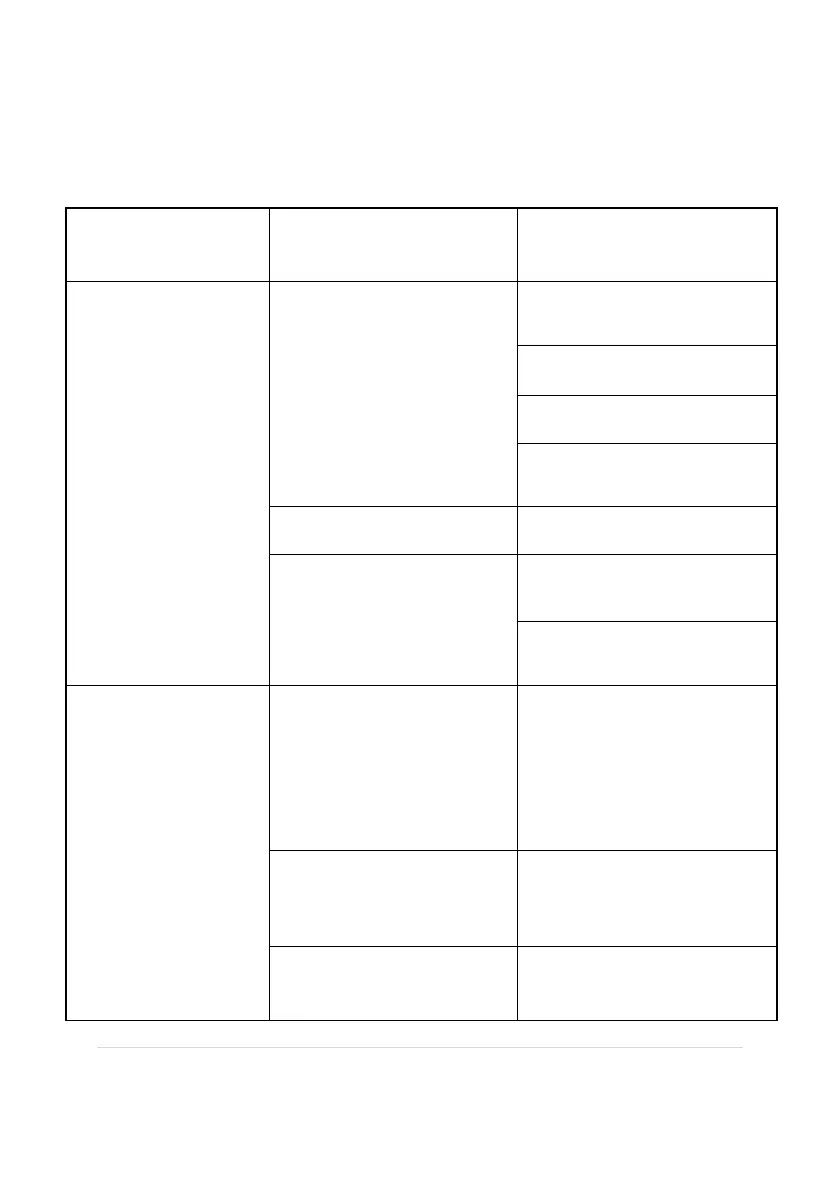
TROUBLESHOOTING
Situation
Possible Cause
Suggestion
Start the BLH
without reaction,
no display
Check the power
connection
Use test pencil to check if
there is electricity
Change the socket
Check the wire connection
Check the overload
protection device
Check the fuse
If fuse blow out,replace it
If the PCB board just be
replaced
Check the connection of
the PCB is right or wrong
Check the transformer to
see it is good or not
"NO FLOW" light
on
No flow or too little low
Check if pump is
connected,if use variable
speed pump,speed up the
water flow.Keep flow rate
at least 25-30 GPM
Wrong flow direction
Remain the flow direction
same as the arrow outside
the flow switch
Flow switch or crystal
plug is broken
Change the flow switch

Other manuals for Blueworks BLH Series