Need help?
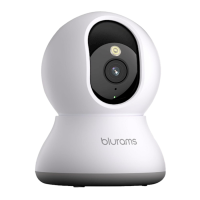
Do you have a question about the blurams Dome Lite II A31 and is the answer not in the manual?
Download the app via App Store/Google Play or by scanning the QR code.
Sign up for an account, log in, and use the '+' icon to add your camera following app instructions.
Access the camera via a web browser after setting up the mobile app and account.
Refer to the 'Mine > Help And Feedback' section in the app or email support@blurams.com for assistance.
Provide feedback or suggestions through the app or by emailing support@blurams.com.
Do not use camera in extreme temperatures (-10°C-50°C) or wet conditions. Use specified charger (5Vdc/1A).
Maintain 20cm distance from device for RF compliance. Operates 2412-2472 MHz.
Product guaranteed for 2 years. Contact seller for repair with proof of purchase.
 General
| Video Resolution | 1080p |
|---|---|
| Two-Way Audio | Yes |
| Storage | MicroSD card (up to 128GB), Cloud Storage |
| Power Source | AC power |
| Motion Detection | Yes |
| Pan/Tilt | Yes |
| Night Vision | Yes |
| Connectivity | Wi-Fi |
| Pan Range | 355° |
| Tilt Range | 90° |
| Compatibility | iOS, Android |


 To Next Page