10 11
NDY-19MA-E NDY-19MA-E
In more detail . . .
In more detail . . .
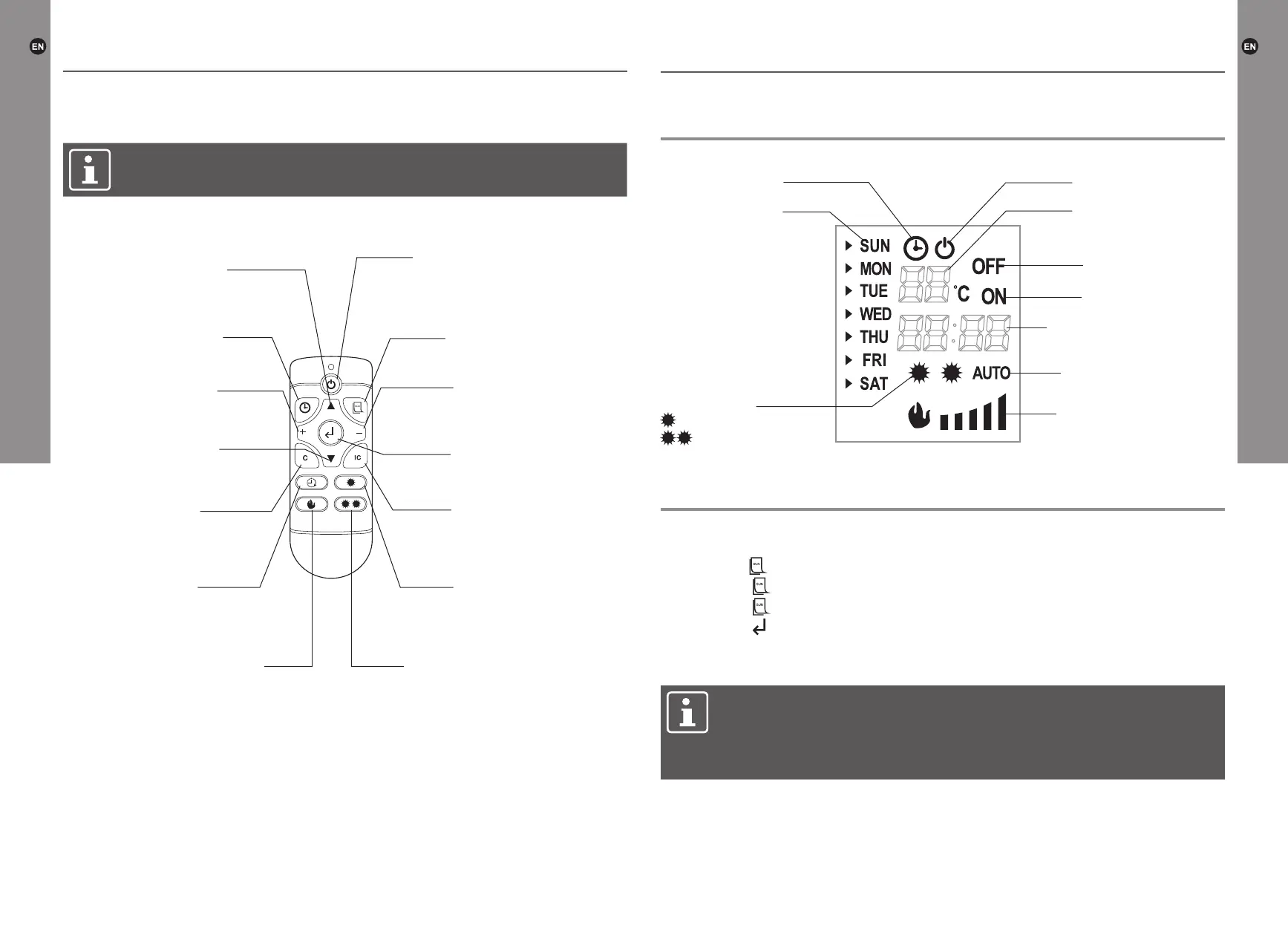
Remote control
NOTE: The appliance should be powered on using the on/off switch before it
can be operated using remote control.
- Switch the appliance on
- Set to standby mode
Go up in menu
(change day)
Set timer key
Cancel key
Timer on/off key
Toggle between 5 different
ame dim levels
Press to activate low
level heating
Press to activate
high level heating
Go down in menu
(change day)
Set day/time
Conrm selection
- Decrease temperature
- Decrease hour/minute
- Increase temperature
- Increase hour/minute
Set automatic heating
mode
> The remote control requires 2x AAA size batteries (not included)
>
Open the battery compartment by sliding the cover down and insert the batteries
noting the polarity indicated in the battery compartment.
> Keep batteries out of reach of children.
> Remote control operations are identical to the functions on the control panel.
> The remote control must be point directly at the sensor on control pad.
Display
Temperature/
timer number
Standby mode icon
Timer off
Timer on
Time/temperature display
Automatic heating mode
Flame dim level
Heating level
- low heating level
- high heating level
Day of the week
Timer icon
Settings
Setting weekday and time
1.
Press the key. When the date is ashing press the “▲” or “▼” key to select the day.
2. Press the key again, then press the “+” or “-” key to set the hour.
3. Press the key again, then press the “+” or “-” key to set the minute.
4. Press the key to conrm the setting.
Setting temperature
NOTE: This setting is only applicable for the temperature in standard heating
mode, not for the temperature in the timer mode. The default set temperature
is 20 °C.
The appliance only starts working, when the set temperature is higher than
the room temperature.
Press the “+” or “-” key to set the temperature, which ranges from 15 to 30 °C.
After the temperature setting has been completed, the display ashes about 5 seconds,
then shows the room temperature.
Operation Operation


 To Next Page