How to pair the two headphones with my phone?
(Prior to first use - Please be sure both the Earbuds and
the Charging Case are fully charged.)
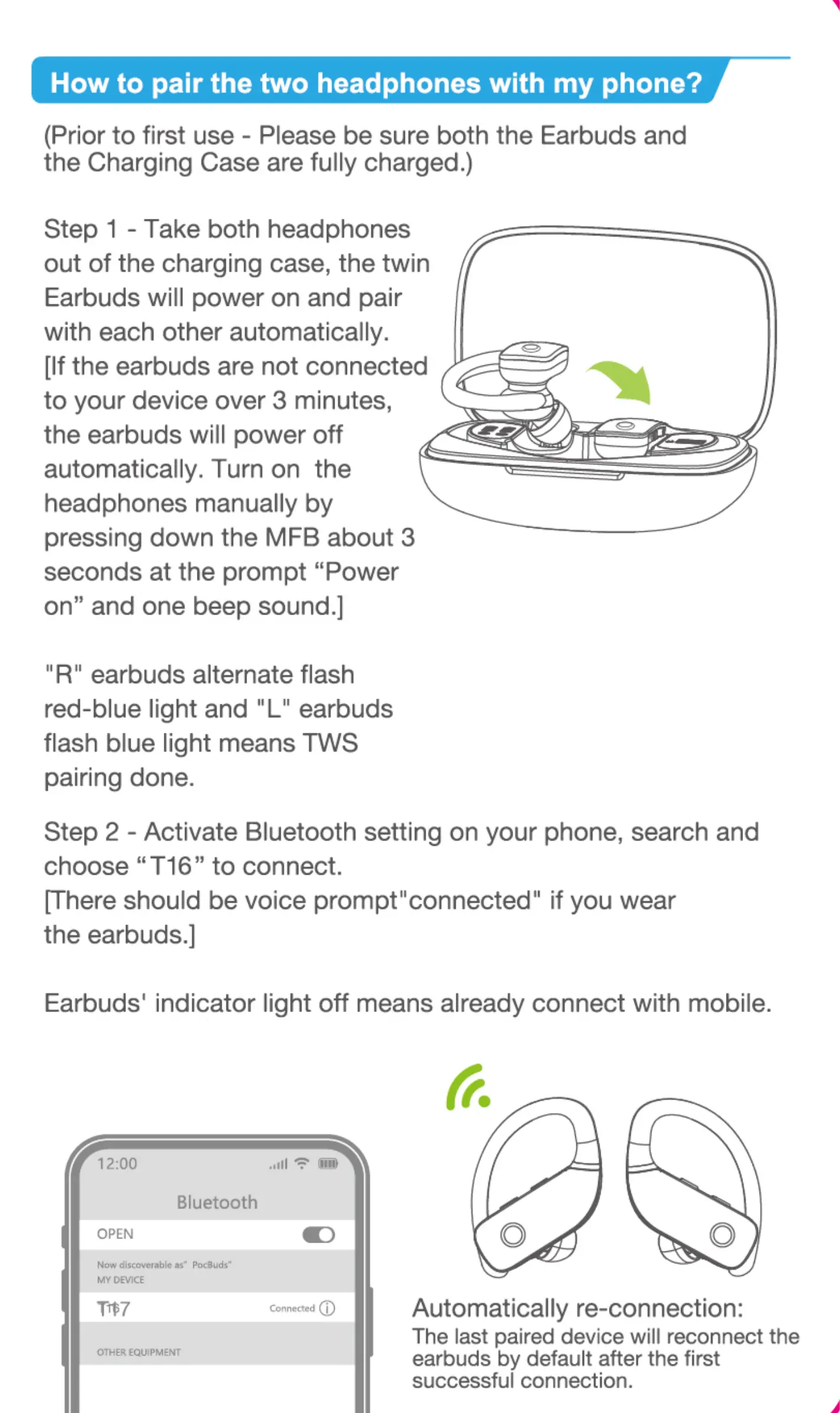
Step 1 - Take both headphones
out of the charging case, the twin
Earbuds will power on and pair
with each other automatically.
(It the earbuds are not connected
to your device over 3 minutes,
the earbuds will power off
automatically. Turn on the
headphones manually by
pressing down the MFB about 3
seconds at the prompt "Power
On" and One beep sound.]
"R" earbuds alternate flash
red-blue light and "L" earbuds
flash blue light means TWS
pairing done.
Step 2 - Activate Bluetooth setting on your phone, search and
choose " T 16" to connect.
[There should be voice prompt" connected" if you wear
the earbuds.)
Earbuds' indicator light off means already connect with mobile.
Tips
1-If there is any issue with pairing both earbuds to your phone,
please put the earbuds back into the charging case and repeat
the above steps.
2.These earbuds not only can be used together, but also can be
used individually. If you want to use single mode, just take one
earbud out of the case and connect to your phone, it will be 0K.
Or when you are using with Dual mode, turn Off one earbud
manually or put one earbud back into the charging case, you will
be able to hang on to the Other one by single mode.
How to wear the earbuds correctly?
Take out "R earbud" to wear on right ear.
O
The ear hooks are adjustable,
you can bend it to fit your ears tighter if in need.
How to place headphones
Functions
For Call
Answer a call
End a call
Reject an incoming call
Click Once
Click Once
Quick Double-Click
For Music
Play/Pause
Previous Song
Next Track
Activate Siri
Volume Up
Volume Down
Power on
Power Off
Charging
Click Once
Quick-Double Click
Quick-Double Click
Quick-Triple Click
Press "+" Button
press " —" Button
Long Press 3 Senconds
Long Press 5 Senconds
MFB
MFB
Charging Case Charging
There is a Type-C usb charging cable
in the package, please use it to charge
the case directly. During charing, the
digital display will flashing and display
battery in real time-After full charge,
the number is displayed as 100.
Charging Warning
1After using a period of time, the earbuds don't charge or even
can't turn on because Of oxidized magnet connector. You can
handle this problem by using alcohol rag to clean the magnet
connector on earbuds and charging case.
2.Earbuds can automatically turn off immediately, meanwhile
start charging when you put back into charging case. Also will
automatically turn on and pairing when pick it up.
Storage and Maintenance
1.1fthe earbuds have been unused for more than 3 months, we
recommend that you charge them.
2.Please use chargers that are FCC(Federal Communications
Commission) approved.
3.Do not disassemble Earbuds.
4.Adult supervision is required for children age 6 and under.
5.Do not expose the earbuds in high or low temperature, do not
use the earbuds in a thunderstorm storm.Av0id falling or violent
impact of the device. Keep the device away from fire,do not put
the device in water.
6.D0 not use Oil or any volatile liquid to clean this product.
FAQ
Q: Why these earbuds can not pair with my mobile phones?
A: 1. Please make sure the earbuds are full charged and power on.
2. Please make sure the bluetooth of your phone is turn on.
3.1f above 2 points have no problem, please put earbuds into
the case again and close the case, hold on for min, then open
the charging case and reconnect earbuds with your phone.
Q Why does the music cut in or cut out.
A: First, please do not let the distance between these earbuds
and your phone be more than 33 feet(without obstacle).
If the distance is less than 33 feet, please take steps as follow:
1. Put earbuds back into case and close it, find T 16 • in the
Bluetooth list and click " Forgetthe device" on your phone.
2. After IOS later, open the case and reconnect these earbuds
with your phone.
Q: When being on a phone call, can I hear voice in both Earbuds?
A: Yes, you can hear the voice in both earbuds when both
earbuds are paired and connected to the same mobile phone.
Q: Are these earbuds sweat proof and waterproof?
A: These earbuds are IPX5, it is sweat proof and slightly
waterproof. As for electronic product, our recommendation
is not to put the earbuds in the water.
Q: How to contact customer service?
A: Email: support@bmani.net
Web: (www.bmani.net Q
If there is any issue with your earbuds, please don't
hesitate to contact us, we will reply within 24hrs and
solve your problem 100%.
12:00
OPEN
o
Automatically re-connection:
The last paired device will reconnect the
earbuds by default after the first
successful connection.
o
R Earbud
O
L Earbud
Earbuds Charging
Earbuds start to charge only
when you put the earbuds into
the charging slot with right
way.(You can charge the
charging case and earbuds at
the same time, or you can
charge charging case first then
to charge the earbuds.
1)When being charged, Earbuds'
LED light will illuminate red.
2)When fully charged, the
charging case will automatically
stop charging and the earbuds'
LED Red light will go off.
support@bmani.net m•vw.bmani.net
Thankyou for purchasingthe
authentic product.
For more latest products, parts and
accessories, please visit:
www.bmani.net
For any assistance please contact
Email:support@bmani.net
C O RoHS g


 To Next Page
 Loading...