Installation and user manual – Dynamicroll® Frigo 2
Electrical connections [DEVICES WITHOUT SPIDER CABLE]
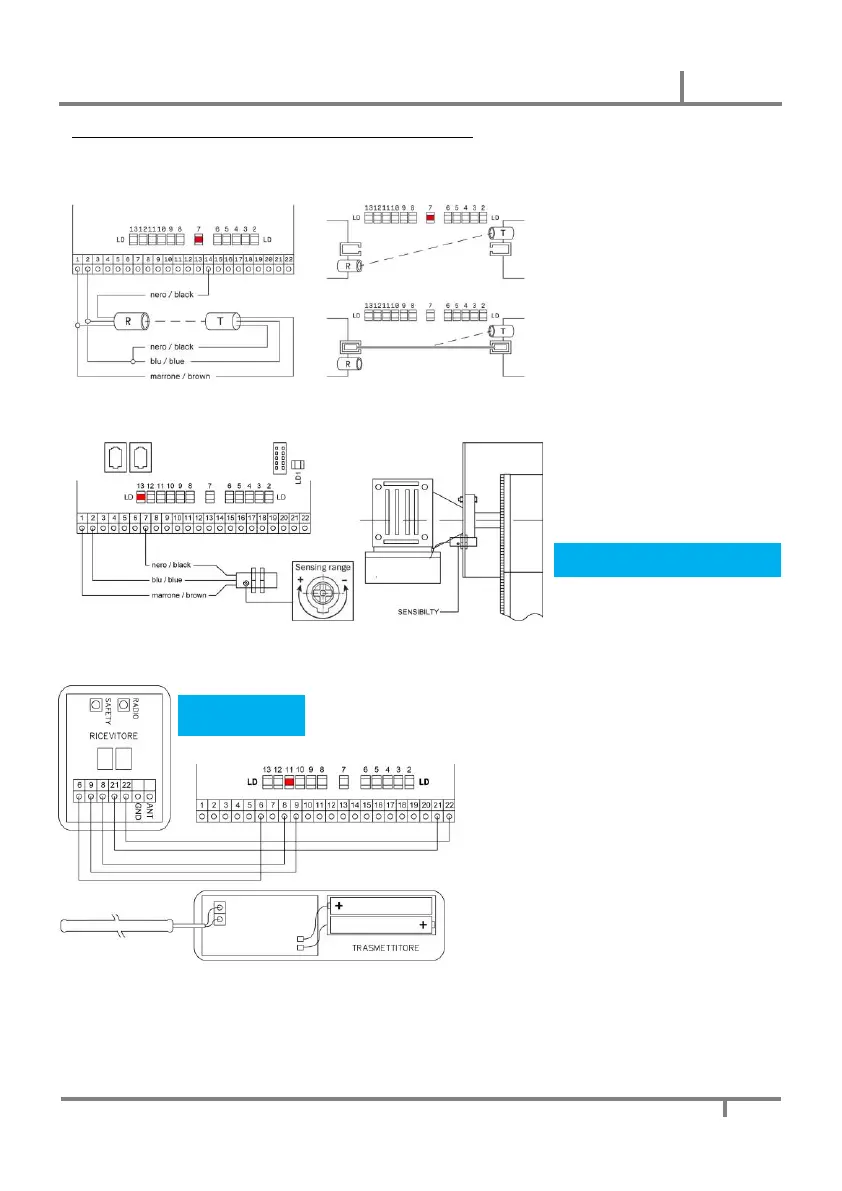
INFRARED PHOTOCELLS
The pair of photocells must be mounted as
shown in the drawing, so that when the
curtain is closed the photocell is engaged.
Visualization through LD7.
CURTAIN TOP SENSOR
The curtain top sensor detects that the
curtain has not slipped during closing.
Adjust the positioning in the slotted hole
and the sensitivity using the appropriate
trimmer (SENSIBILITY).
Visualization through LD13 if top sensor
isn’t expected jumper 7-13.
WIRELESS SAFETY EDGE
1. Apply power (green LED ON) and
insert the batteries in the transmitter.
2. The system is already programmed
from the factory. Test the correct
operation by pressing the edge
(visualization trought LD11).
a. Press SAFETY button on the
receiver. The memory remains
open for 10 seconds (red LED ON)
b. Press the safety edge to memorize
the transmitter code.
c. If correct programming, the red
LED flashes quickly for 3 seconds.
Test the operation by pressing the
safety edge
If safety edge not foreseen, jumper 9-15


 To Next Page
 Loading...