
 To Next Page
S
SergeiSep 6, 2025
Как ввести русский язык

Как ввести русский язык
Introduces the manual, the ConnectedRide Com U1, and its basic features.
Explains symbols, warnings, and provides notes on safe and proper usage.
Details the functionality and differences between Bluetooth and Mesh wireless communication.
Addresses health compatibility, disposal procedures, and technical specifications.
Lists all components included in the product package with item numbers.
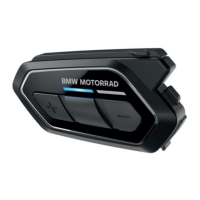
Identifies the buttons, ports, and indicators on the ConnectedRide Com U1 device.
Warns about environmental influences and risks of damage to the device.
Guides on installing software, updating firmware, and charging the device.
Covers turning the system on/off, adjusting volume, and performing device resets.
Details accessing the configuration menu and understanding the priority of different functions.
Offers advice on Bluetooth pairing, device compatibility, and Mesh Intercom recommendations.
Details pairing mobile phones and GPS devices with the ConnectedRide Com U1.
Explains how to delete existing pairing entries from the device.
Explains the concept, range, and user capacity of Mesh Intercom.
Covers switching Mesh Intercom on/off and changing communication channels.
Details setting up Group Mesh and integrating other communication systems.
Explains how to toggle the microphone and reset Mesh Intercom settings.
Introduces Bluetooth Intercom, its user capacity, and comparison with Mesh Intercom.
Guides on pairing multiple Com U1 units and other communication systems via Bluetooth.
Covers starting, ending, and managing two-way, multi-way, and group intercom calls.
Details Universal Intercom for other-make devices and combining Mesh/Bluetooth intercom.
Provides instructions on accepting or rejecting phone calls and managing ongoing calls.
Explains how to use speed-dial numbers and activate smartphone voice assistants.
Explains how to turn the FM radio on/off and adjust the volume.
Guides on changing stations, searching for stations, and saving presets.
Details the process of automatic station searching and temporary saving of found stations.
Details controlling music playback, including starting, pausing, and track skipping.
Explains how to initiate and manage music sharing with other intercom users.
Details settings for device language, audio equalization, and voice-activated functions (VOX).
Covers audio overlay sensitivity, VOX settings, and management of voice prompts.
Provides instructions on how to clean the ConnectedRide Com U1 using a clean cloth.
Lists steps for diagnosing and resolving operational faults, including firmware checks and re-pairing.
Provides a comprehensive list of voice commands for various system functions.
Lists technical data including operating ranges, connection standards, battery capacity, and charging details.
Details speaking time for different intercom modes and FM radio frequency range.
 General
| Brand | BMW Motorrad |
|---|---|
| Model | ConnectedRide Com U1 |
| Category | Motorcycle Accessories |
| Language | English |