This document is a supplementary user guide for the BMW R 1150 RT Radio, providing detailed instructions for its operation, basic settings, and maintenance. The device is a radio cassette combination unit designed for integration into the BMW R 1150 RT motorcycle.
Function Description
The BMW R 1150 RT Radio is a comprehensive audio system offering both radio and cassette playback capabilities. Its primary function is to provide entertainment and traffic information to the rider. The radio component supports multiple wavebands, including UKW (FM), MW, and LW (AM), allowing for a wide range of station reception. A key feature is the Radio Data System (RDS) and Traffic Program (TP) functionality, which enhances the radio experience by providing supplementary information, automatic frequency switching for better reception, and timely traffic announcements. The cassette deck allows for playback of audio cassettes, with features like auto reverse and fast forward/rewind. The unit also incorporates a remote control for convenient operation while riding, ensuring safety by minimizing rider distraction.
Important Technical Specifications
- Tuner: PLL Synthesizer Tuner, ensuring stable and accurate tuning.
- Waveband Frequencies:
- MW: 531 to 1602 kHz
- FM: 87.5 to 108 MHz
- Cassette Player:
- Playback System: Auto reverse, 4 tracks, 2 channels, stereo cassette playback with 2 programs (mono also possible). This allows for continuous playback without manually flipping the tape and supports both stereo and mono recordings.
- General:
- Power Requirement: 14.4 V DC, negative pole to ground. This is a standard power specification for automotive electronics.
- Power Consumption: Less than 6 A (at full power). This indicates a relatively low power draw, which is important for a motorcycle's electrical system.
- Speaker Impedance: 4 Ω x 4. This suggests the unit is designed to drive four 4-ohm speakers, likely providing a stereo sound experience for the rider.
- Fuse: Only a 10 A fuse should be used as a replacement for a faulty fuse, highlighting a critical safety and maintenance detail.
Usage Features
The radio cassette combination unit is designed for ease of use, even while operating a motorcycle.
- Switching On/Off and Volume Control: The ON/VOL rotary button serves multiple purposes:
- Pressing it switches the unit on or off. When switched on, it recalls the most recently used audio source (radio/cassette).
- Turning it clockwise increases volume, while turning it anti-clockwise decreases volume.
- Traffic Program (TP) Volume: The volume for traffic messages can be set independently using the ON/VOL button during a traffic message. This setting is retained even if the radio or cassette volume is adjusted, ensuring important traffic information is always audible.
- Adjusting Sound Quality: The AUDIO button allows access to various sound settings, including Bass, Treble, Loudness, and Balance (right/left). These settings can be adjusted using the up/down buttons to customize the audio output.
- Waveband Selection: Wavebands (FM1, FM2, FM3, AM) are selected by pressing the frequency symbol on the radio/cassette button, cycling through the available bands.
- Station Selection:
- Manual Tuning: In MAN (manual) mode, stations can be selected by pressing the station scan buttons, which changes the frequency incrementally.
- Station Scan (Locating Stations): Pressing or holding down the station scan buttons initiates a scan for stations. The tuner first searches for strong stations (LO displayed) and then, if a second run is initiated, for weaker stations (DX displayed).
- RDS - Radio Data System: This system automatically switches to the best frequency for a broadcast station and displays the station name. It also allows for supplementary information like text messages. The RDS symbol flashes if no RDS data is received, and "NO RDS" is displayed if a station is found but no data is available. RDS can be switched on/off via the TA/RDS button.
- Storing/Recalling Stations (Presets): The unit can store up to 24 stations (18 FM, 6 AM) across different memory levels (FM1, FM2, FM3, MW). Stations are stored by selecting the waveband and station, then holding down one of the station buttons (1-6). Stored stations are recalled by pressing the respective station button.
- Auto Store: This function, available on FM memory level 3, automatically stores the six strongest stations at a given moment, useful for long trips. It can also run in the background during cassette playback, displaying "AST" (Traffic Program off) or "AST TA" (Traffic Program on).
- Regional Programs (REG): Certain FM stations broadcast regional programs. This function can be switched on/off by holding the TA/RDS button for at least two seconds. When on, "REG" is displayed next to "RDS," and the radio will receive the selected regional program within its coverage area.
- Program Type (PTY): This feature allows the listener to select specific program types (e.g., News, Sports, Rock, Jazz). PTY is enabled by holding the TA/RDS button for at least two seconds, displaying "NEWS" and the PTY symbol. Program types can then be selected using station scan or station buttons.
- Cassette Deck Operation:
- Starting Playback: Insert a tape, then press the cassette symbol on the radio/cassette button. "TAPE" and the tape direction are displayed. If no tape is present, "NO TAPE" flashes.
- Stopping Playback: Pressing the FF/REW buttons simultaneously ejects the tape and switches to radio. Alternatively, pressing the frequency symbol on the radio/cassette button stops playback and switches to radio, leaving the tape in the slot. The unit can also be switched off.
- Reversing Tape: The tape reverses automatically at the end of a side. Manual reversal is possible by pressing the tape reverse button.
- Fast Forward/Rewind (FF/REW): Pressing the FF/REW buttons initiates fast forward or rewind. Briefly pressing the opposite direction button or the tape reverse button cancels FF/REW and resumes playback.
- Remote Control: The remote control provides convenient access to functions such as:
- Mute: Briefly pressing MUTE reduces volume to 20dB; pressing it again cancels mute.
- Changing Audio Source: Holding the MUTE button for more than 1.5 seconds switches between radio and cassette.
- Calling Up Stored Stations: Briefly pressing the forward or backward symbol on the VOLUME/SEEK button cycles through stored stations.
- Station Scanning: Holding the forward or backward symbol on the VOLUME/SEEK button for at least 1.5 seconds initiates station scanning.
- Volume Control: Pressing the VOLUME/SEEK button on the + or - symbol adjusts the volume.
Maintenance Features
The user guide includes safety instructions and notes for maintaining the device and its components, particularly the cassette deck.
- Tape Handling:
- Do not attempt to change tapes while driving.
- Store tapes in their plastic boxes when not in use.
- Avoid exposing tapes to excessive heat or direct sunlight.
- Tighten the tape before playing.
- Do not use type C 120 tapes or longer, as these can be thinner and more prone to damage or jamming.
- Damage to tapes due to environmental factors is a primary cause of cassette-player malfunction, emphasizing the importance of careful handling.
- Fuse Replacement: Only use a 10 A fuse as a replacement for a faulty fuse, ensuring electrical safety and proper operation.
The guide also emphasizes that pictures and texts may vary depending on optional extras, accessories, and country variants, and that BMW reserves the right to modify the design.

 Need help?
 General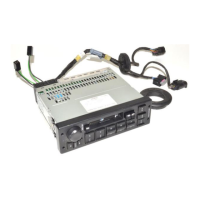

 To Next Page