Everything under control
54
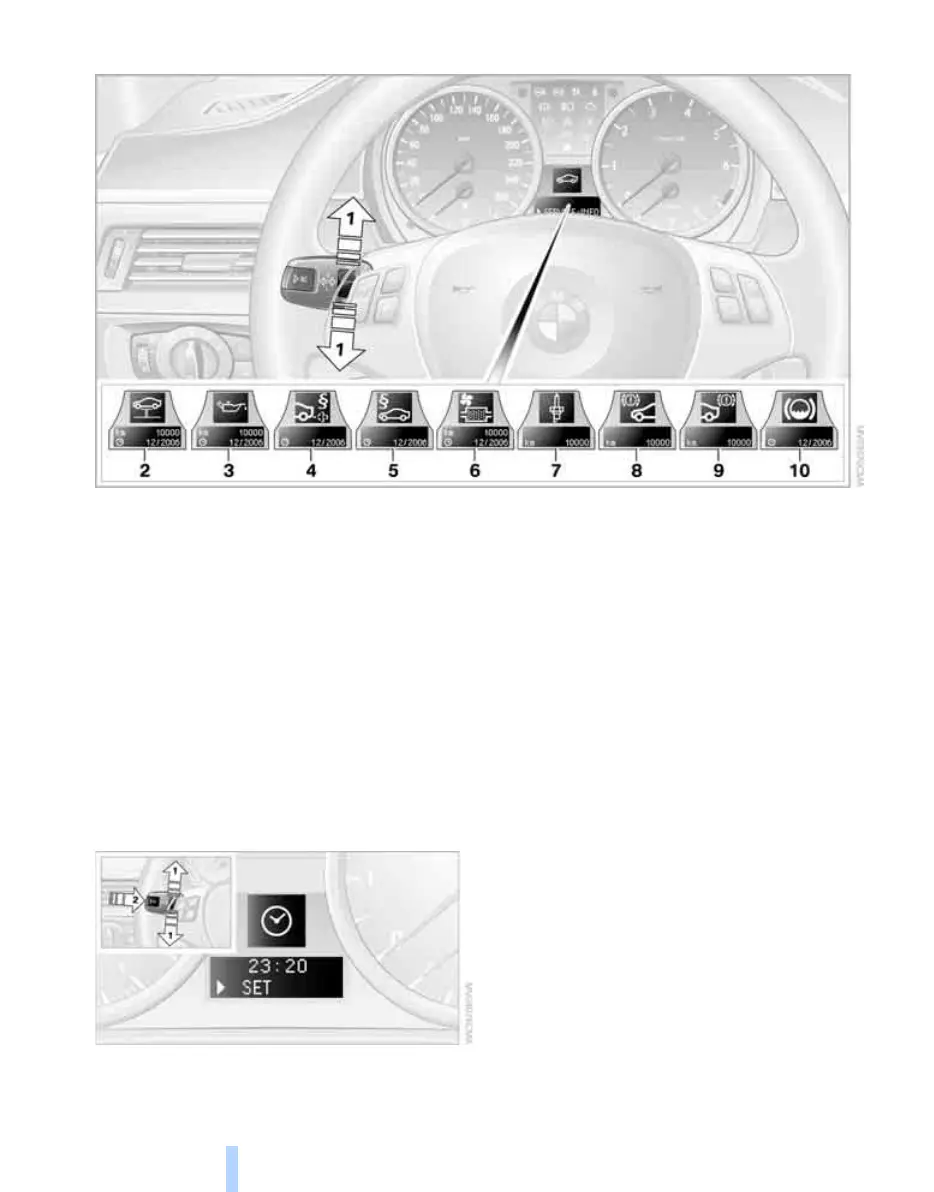
Possible displays
1 Button for selecting functions
2 Viewing Next Service indicator
3 Checking engine oil level
*
4 Exhaust emissions test*
5 Roadworthiness test*
6 Micro-filter
7 Spark plugs
8 Brakes, front
9 Brakes, rear
10 Brake fluid
More information on the BMW Maintenance
System can be found on page 104.
Clock
Setting the clock
To set the 12h/24h mode, see Adjusting for-
mats and units of measure on page 53.
1. Lightly push button 1 in the turn indicator
stalk repeatedly up or down until the appro-
priate symbol appears in the display,
accompanied by the time and the word
"SET".
2. Press button 2.
3. Use button 1 to set the hours.
4. Press button 2.
5. Use button 1 to set the minutes.
6. Press button 2.
The system accepts the new time.
Online Edition for Part-No. 01 41 0 159 204 - © 03/05 BMW AG



 To Next Page