NavigationEntertainment Driving hints
165
Reference OverviewControlsCommunicationMobility
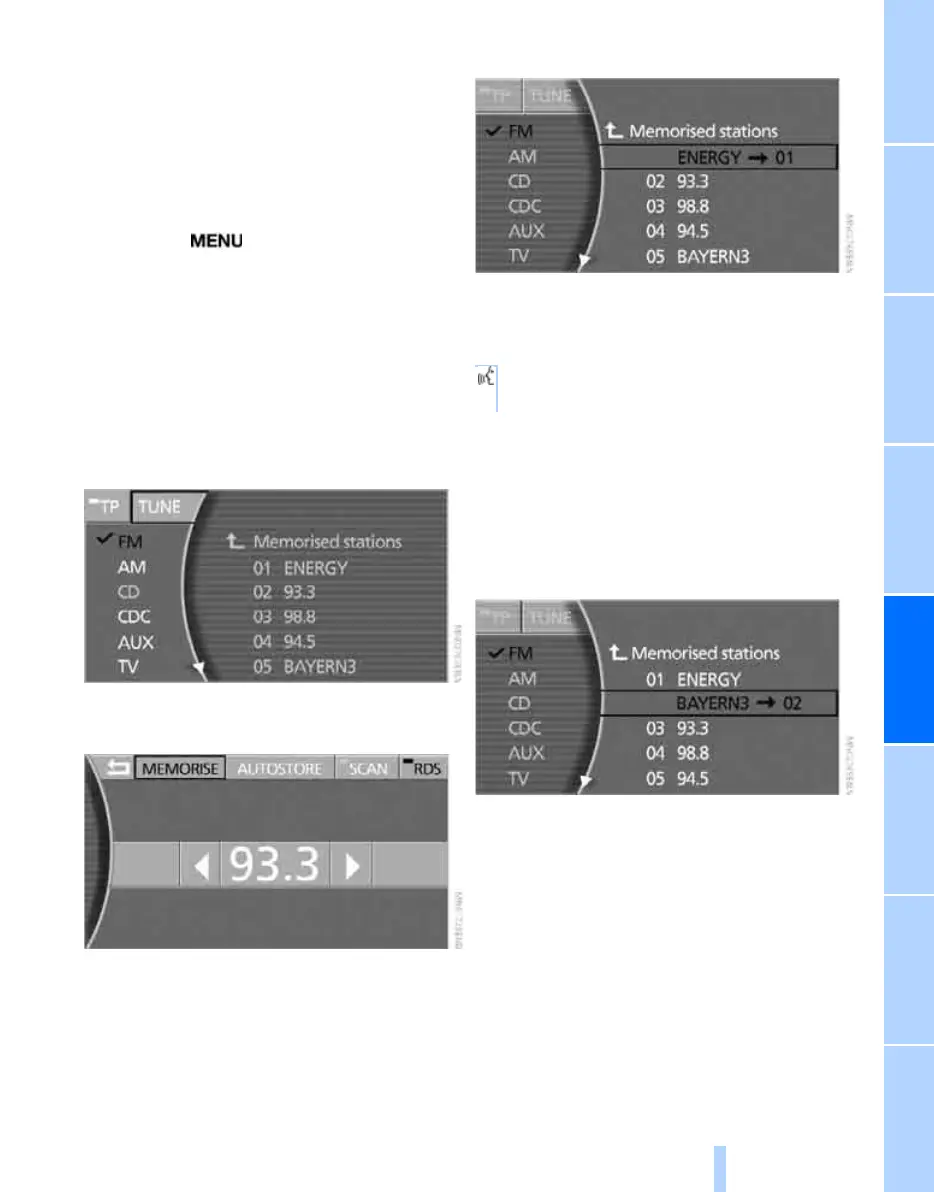
Memorising stations
You can memorise the station you are currently
listening to.
You can also memorise stations manually in the
"Autostore list" if this is selected before memo-
rising them.
iDrive, principle, see page 14.
1. Press the button to call up the start
menu.
2. Move the controller towards "Entertain-
ment".
3. Select "FM" or "AM" and press the control-
ler.
4. Select the selection criterion for "FM" and
waveband for "AM" and press the control-
ler.
5. Select "TUNE" and press the controller.
6. Select "MEMORISE" and press the control-
ler.
7. Turn the controller until the desired mem-
ory location is selected.
8. Press the controller.
The stations are saved for the remote control
currently in use.
Via the voice input system:
Changing memory location
1. Select the required station and press the
controller.
2. Turn the controller until the desired mem-
ory location is selected.
3. Press the controller.
The station is now memorised.
Regional programmes
On the VHF/FM frequency range, certain sta-
tions broadcast regional programmes either all
day or at certain times of day. You can specify
whether or not to switch from the regional pro-
gramme of the current station when you go
beyond its transmission area.
1. {Radio}.
2. {Station 1...12}.
Online Edition for Part no. 01 41 0 013 197 - © 02/07 BMW AG



 To Next Page