Activating/deactivating the functions
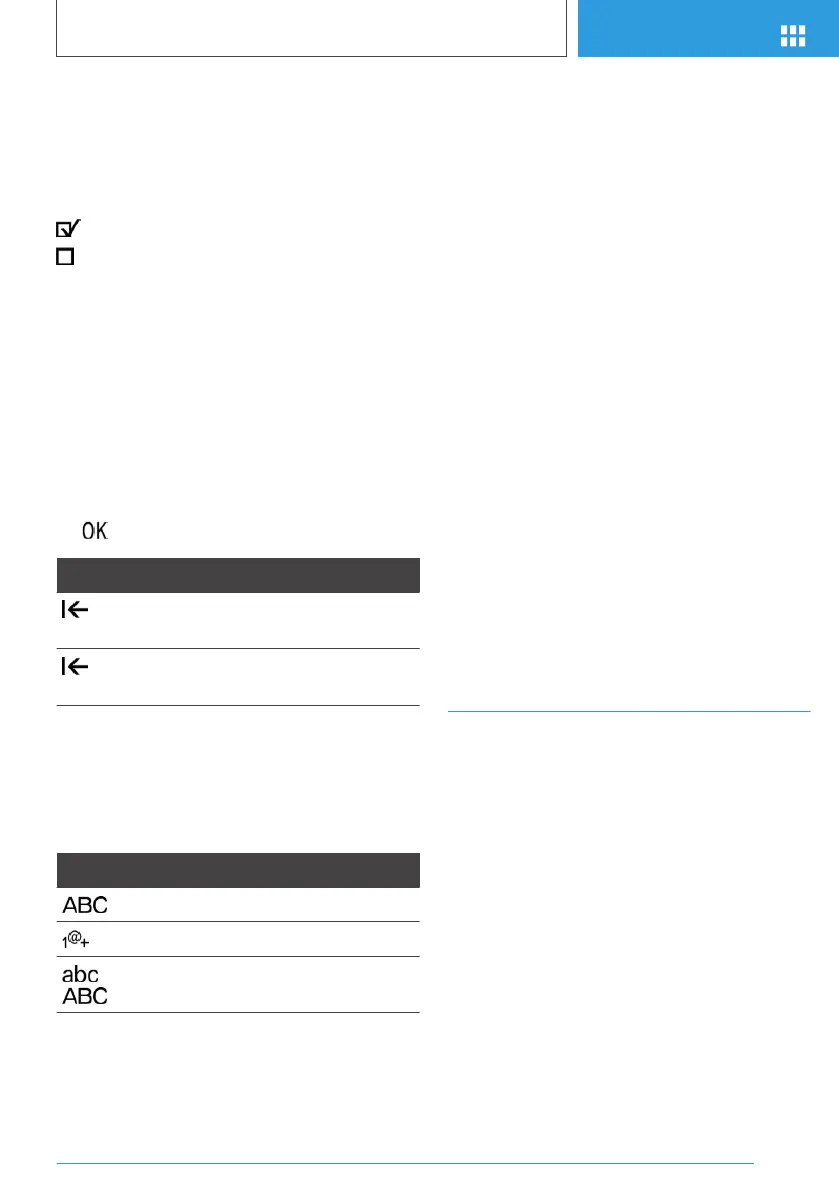
Several menu items are preceded by a check‐
box. The checkbox indicates whether the func‐
tion is activated or deactivated. Selecting the
menu item activates or deactivates the function.
Function is activated.
Function is deactivated.
Entering letters and numbers
General information
Letters and numbers can be entered via the
Controller.
The keyboard's display changes automatically.
Input
1.
Turn the Controller: select letters or numbers.
2. : confirm entry.
Symbol Function
Press the Controller: delete letters or
number.
Hold the Controller down: delete all
letters or numbers.
Switching between upper/lower case,
numbers and characters
Depending on the menu, you can switch be‐
tween entering upper and lower case, letters and
numbers.
Symbol Function
Enter the letters.
Enter the numbers.
or
Change between capital and
lower-case letters.
Entry comparison
When entering names and addresses, the choice
is narrowed down with every letter entered and
letters may be added automatically.
Entries are continuously compared with data
stored in the vehicle.
▷ Only those letters are offered during entry for
which data is available.
▷ Destination search: place names can be en‐
tered in all languages that are available in
iDrive.
Using alphabetical lists
For alphabetical lists with more than 30 entries,
the letters for which there is an entry are dis‐
played at the left edge.
1.
Turn the Controller to the left or right quickly.
All letters for which there are entries are dis‐
played on the left edge.
2. Select the first letter of the desired entry.
The first entry of the selected letter is dis‐
played.
Touchpad
General information
Some iDrive functions can be operated using the
touchpad on the Controller.
Selecting functions
1.
"My Vehicle"
2. "iDrive settings"
3. "Touchpad"
4. Select desired setting:
▷ "Speller": enter letters and numbers.
▷ "Map": using the map.
▷ "Search fields": write letters without se‐
lecting the list field.
Seite 41
iDrive
AT A GLANCE
41
Online Edition for Part no. 01402989267 - II/18



 To Next Page