Trip data
Principle
The trip data display provides various informa-
tion about the trip, e.g., average energy con-
sumption or trip distance.
General information
The trip data can be displayed on the control
display and in the instrument cluster.
Depending on the setting in the Live Vehicle
menu, the trip data is shown on the control
display.
The values can be displayed and reset de-
pending on different intervals.
Display on the control display
General information
The following trip data is shown on the control
display:
▷ Configured interval for displaying trip data.
▷ Average energy consumption depend-
ing on the set interval.
▷ Travel time depending on the config-
ured interval.
▷ Distance traveled depending on the
configured interval.
▷ Counter for energy recovery depend-
ing on the configured interval.
Displaying trip data continuously
1.
Apps menu
2. "Vehicle"
3. "Live Vehicle"
4. "Content"
5. "Trip data"
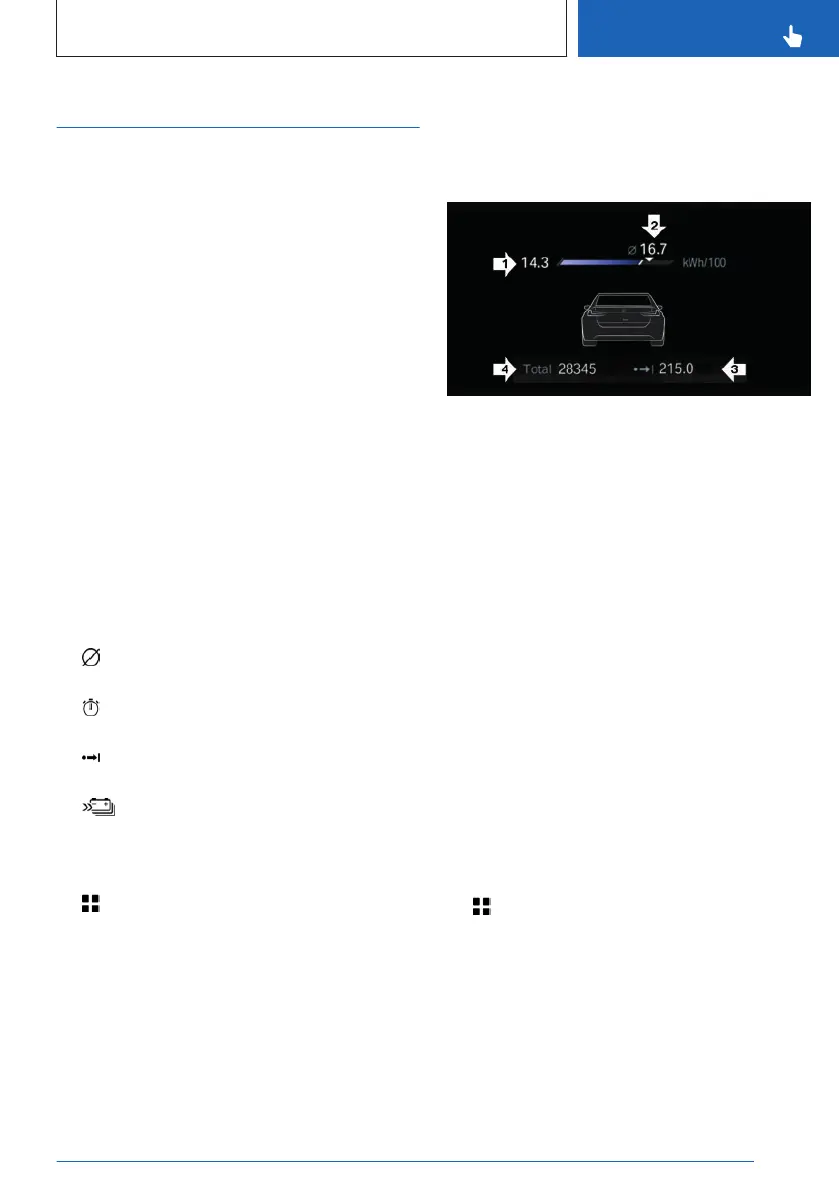
Display in the instrument cluster
Information on energy consumption and dis-
tance covered can be displayed in the instru-
ment cluster.
▷ Current energy consumption, arrow 1.
▷ Average energy consumption, arrow 2.
▷ Distance traveled depending on the config-
ured interval, arrow 3.
▷ Total mileage, arrow 4.
Current energy consumption
The current energy consumption display lets
you check your current energy consumption,
e.g., to drive efficiently.
Average energy consumption
The average energy consumption is deter-
mined on the basis of various distances.
Adjusting the display of the trip data
The intervals for the display of the trip data
in the instrument cluster and on the control
display are adjustable.
1.
Apps menu
2. "Vehicle"
3. "System settings"
4. "Time period for trip data"
5. "Values"
6. Select the desired setting:
Seite 157
Displays
CONTROLS
157
Online Edition for Part no. 01405A88D67 - VI/23



 To Next Page