Button Function
Go to Navigation menu.
Go to previous menu.
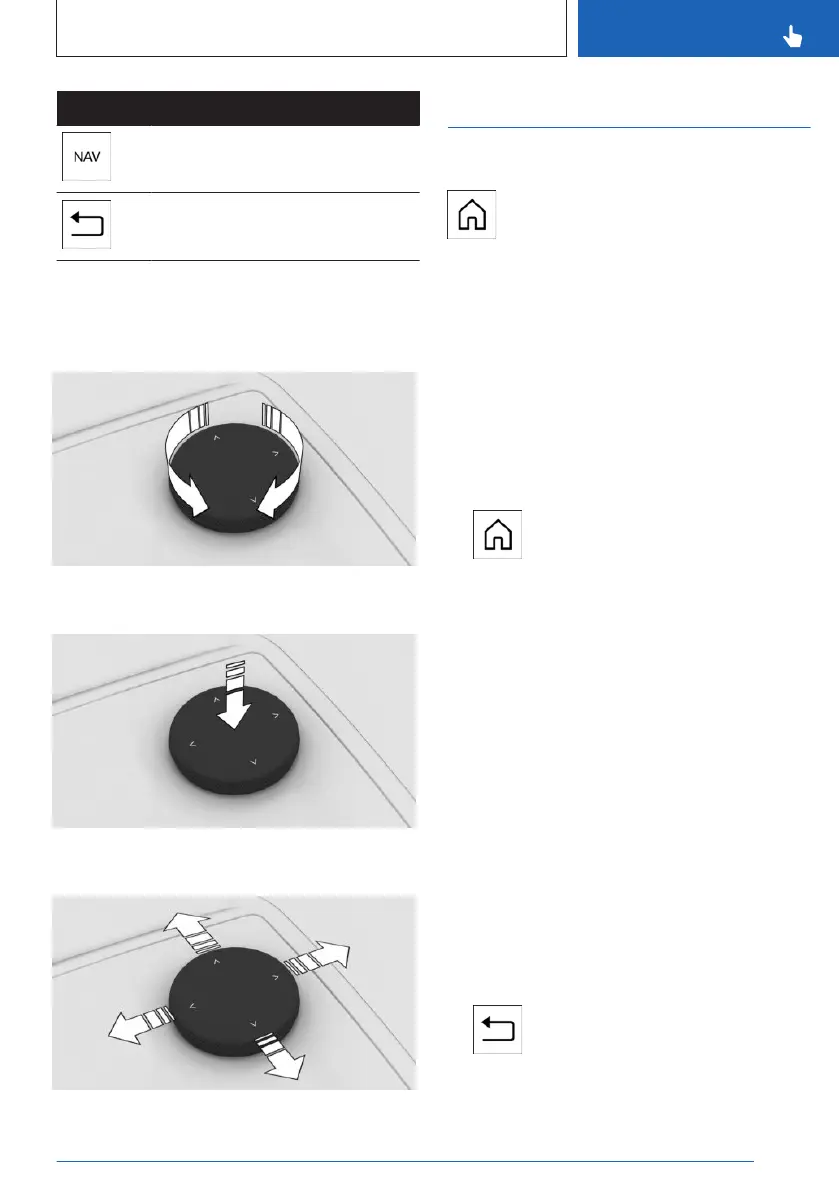
Operation
▷ Rotate the Controller to switch between
menu options, for example.
▷ Press the Controller to select a menu
option, for example.
▷ Slide the Controller in four directions to
switch between menus, for example.
Operating via the Controller
Opening the main menu
Press the button.
The main menu is displayed.
Selecting menu items
1. Turn the Controller until the desired menu
item is highlighted.
2. Press the Controller.
Adjusting the main display
The main display can be adjusted in the main
menu.
1.
Press the button.
2. If necessary, tilt the Controller to select the
main display.
3. Tilt the Controller to the right.
4. Select the desired main display.
Selecting a widget
1.
Use the Controller to select widgets.
2. If necessary, turn the Controller until the de-
sired widget is selected.
3. Press the Controller.
Switching between menus
A new display opens after a menu item is se-
lected.
▷
Slide the Controller to the left.
The current menu closes and the previous
menu is displayed.
▷ Press the button.
The current menu closes and the previous
menu is displayed.
Seite 49
BMW iDrive
CONTROLS
49
Online Edition for Part no. 01405A88D67 - VI/23



 To Next Page