Configuring widgets
Some widgets can be configured individually.
1. "CAR"
2. "Settings"
3. "Displays"
4. "Instrument panel"
5. "Configure widgets"
6. Select the desired setting.
The setting is stored for the driver profile cur‐
rently used.
Information in detail
Distance traveled
The widget for the distance traveled shows the
total distance and traveled distance depending
on the setting for the display of the trip data.
Consumption display
Concept
During energy recovery, the kinetic energy of the
vehicle is converted into electric energy during
coasting. The vehicle battery is partially charged
and fuel consumption can be reduced.
The current consumption displays the current
consumption of fuel. Check whether you are cur‐
rently driving in an efficient and environmentally-
friendly manner.
General information
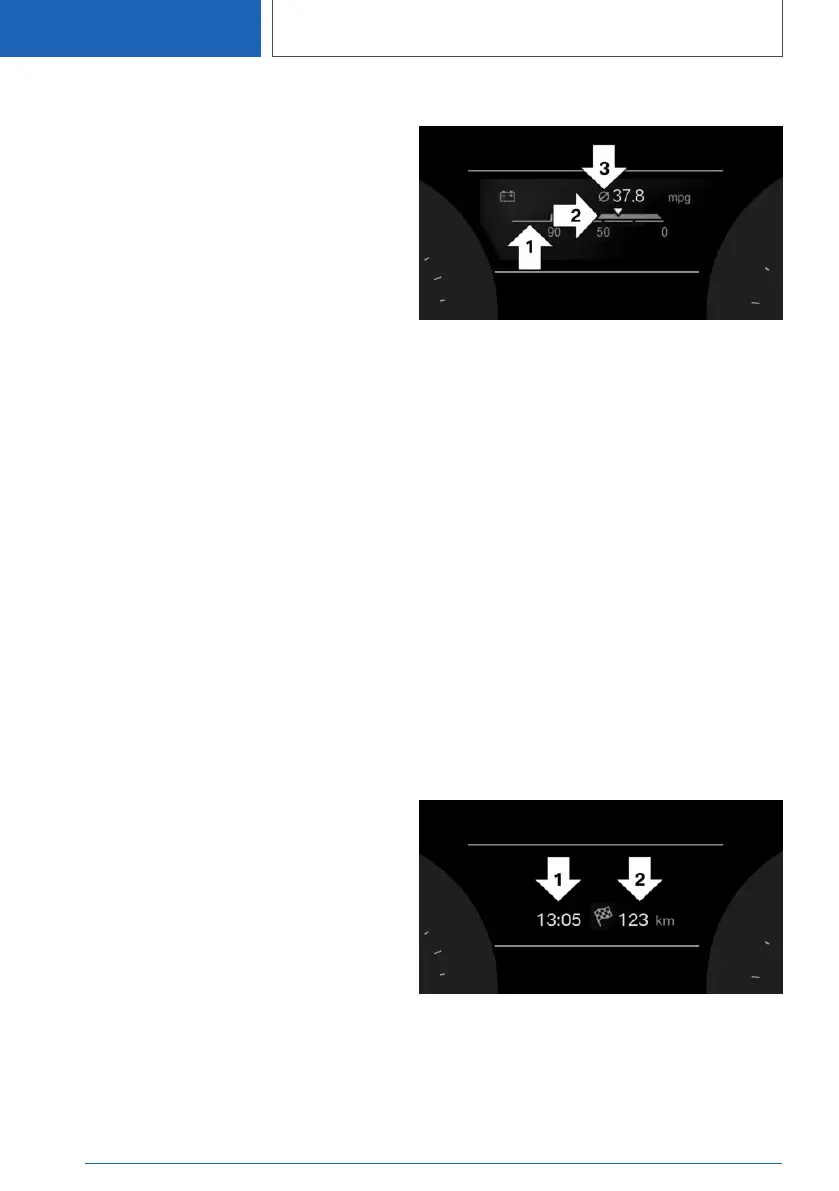
Energy recovery and current consumption can
be displayed as bar displays in the Onboard
Computer.
Display
▷ Energy recovery, arrow 1.
▷ Current consumption, arrow 2.
▷ Average consumption, arrow 3.
Current fuel consumption and
average fuel consumption
The widget shows the current fuel consumption
and average fuel consumption depending on the
setting for the display of the trip data.
Navigation data
General information
The estimated time of arrival and the distance re‐
maining to the destination are displayed if a des‐
tination is entered in the navigation system be‐
fore the trip is started.
Display
▷ Time of arrival, arrow 1.
▷ Distance to destination, arrow 2.
Seite 148
CONTROLS
Displays
148
Online Edition for Part no. 01405A111C1 - VI/20









 To Next Page