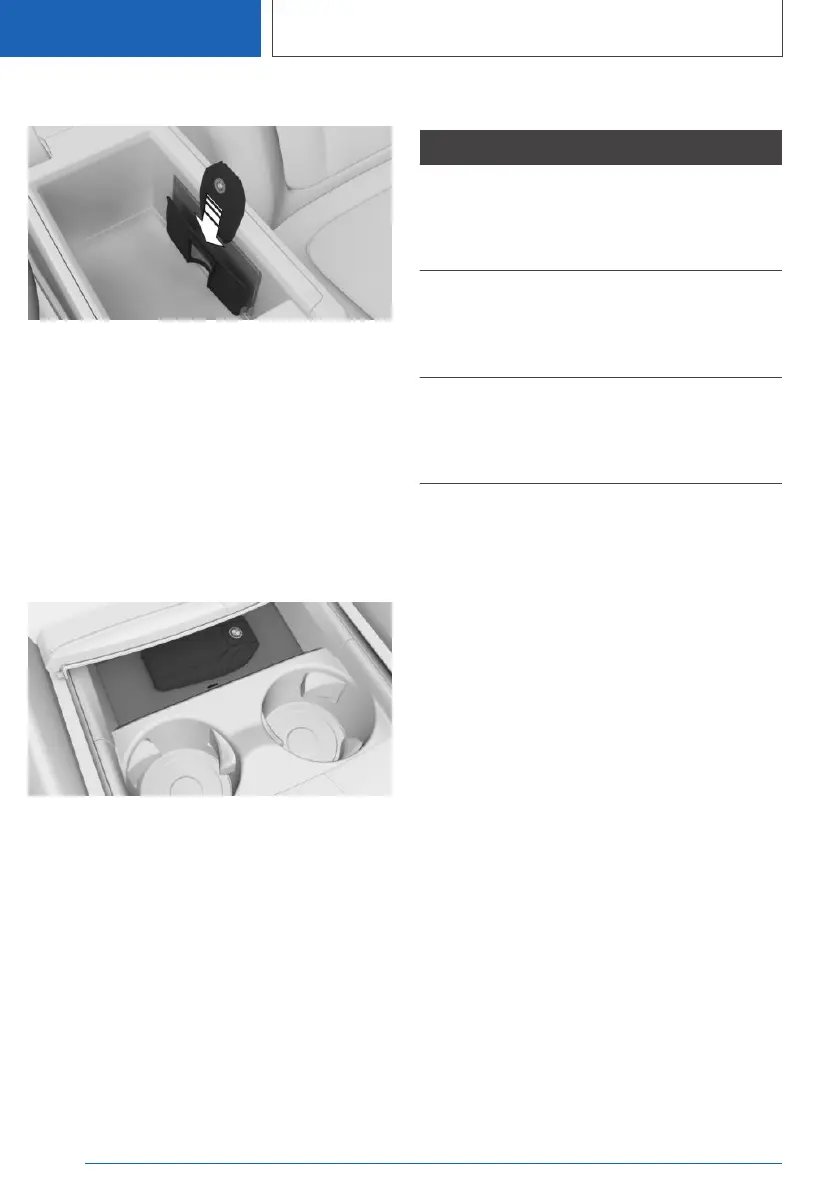
Manual transmission: in the center armrest
1. Open the center armrest.
2. Place the display key into the recess of the
wireless charging tray underneath the center
armrest.
Make sure that the display is on the side of
the clamp and that the lock button points up‐
ward.
3. Close the center armrest.
Steptronic transmission: in the center
console
1.
Open the tray cover.
2. Place the display key into the middle of the
wireless charging tray in front of the cup hold‐
ers.
Ensure that the display is facing up.
3. Close the tray cover.
LED displays
Color Meaning
Blue The display key is charging.
The blue LED stays illuminated once
the inserted display key is fully
charged.
Orange The display key is not charging.
Temperature on the display key pos‐
sibly too high or foreign object in
charging tray.
Red The display key is not charging.
Contact a dealer’s service center or
another qualified service center or re‐
pair shop.
Malfunction
General information
A Check Control message is displayed.
BMW display key detection by the vehicle may
malfunction under the following circumstances:
▷ The battery of the display key is discharged.
▷ Fault of the radio link from transmission tow‐
ers or other equipment with high transmitting
power.
▷ Shielding of the display key due to metal ob‐
jects.
▷ Fault of the radio link from mobile phones or
other electronic devices in direct proximity.
▷ Fault of radio transmission by a charging
process of mobile devices, for instance
charging of a mobile phone.
Do not transport the display key together with
metal objects or electronic devices.
In the case of interference, the vehicle can also
be unlocked and locked from the outside with
the mechanical key.
Seite 90
CONTROLS
Opening and closing
90
Online Edition for Part no. 01405A38097 - VI/21



 To Next Page