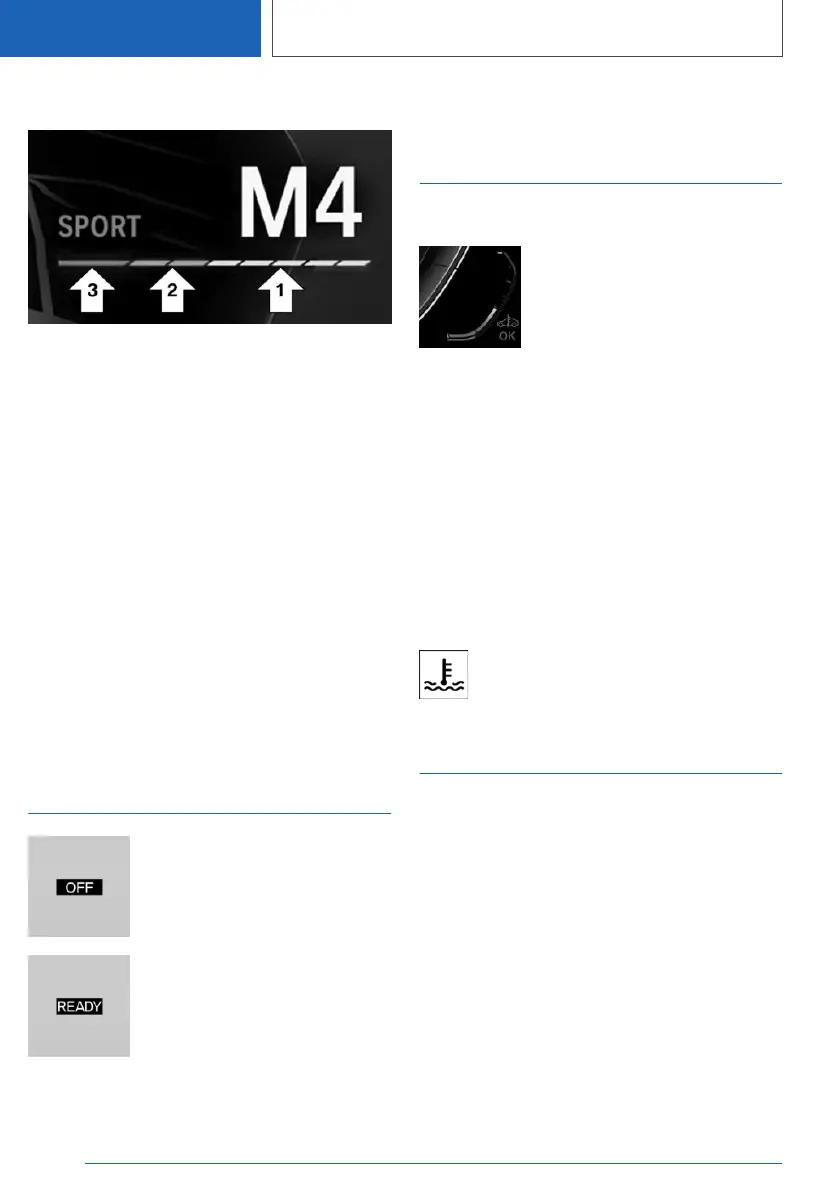
Display
Full Black Panel Display.
Information about the driving
style
▷ Current engine speed is displayed in the
tachometer.
▷ Arrow 1: successive yellow illuminated fields
indicate an increase in the speed.
▷ Arrow 2: successive orange illuminated fields
indicate the upcoming shift moment.
▷ Arrow 3: the field lights up red. Do not wait
any further to shift.
When the maximum speed is reached, the entire
display flashes red and the fuel supply is inter‐
rupted in order to protect the engine.
Standby state and drive-
ready state
The lettering OFF in the instru‐
ment cluster indicates that drive-
ready state is switched off and
standby state is switched on.
The letters READY in the instru‐
ment cluster indicate that the
drive readiness is turned on and
the Auto Start/Stop function is
ready to start the engine automat‐
ically.
Additional information:
Operating state of the vehicle, refer to page 41.
Engine oil temperature
Display
▷ Cold engine: the pointer is at
the low temperature end.
Drive at moderate RPM and
vehicle speeds.
▷ Normal operating tempera‐
ture: the pointer is in the mid‐
dle or in the lower half of the
temperature display.
▷ Hot engine: the pointer is at the high end of
the temperature range. In addition, a Check
Control message is displayed.
Additional information:
Coolant level, refer to page 389.
Indicator light in the instrument
cluster
A red indicator light is displayed.
Outside temperature
General information
If the indicator drops to +37 ℉/+3 ℃ or lower, a
signal sounds.
A Check Control message is displayed.
There is an increased risk of ice on roads.
Seite 170
CONTROLS
Displays
170
Online Edition for Part no. 01405A37D22 - VI/21



 To Next Page