Tone
Vehicle equipment
This chapter describes all series equipment as
well as country-specific and special equipment
offered for this model series.Therefore, it also
describes equipment that may not be found in
your vehicle, for instance due to the selected
special equipment or the country version. This
also applies to safety-related functions and
systems.
General information
The sound settings are stored for the remote
control currently in use.
Treble, bass, balance, and
fader
▷ "Treble": treble adjustment.
▷ "Bass": depth adjustment.
▷ "Balance": left/right volume distribution.
▷ "Fader": front/rear volume distribution.
Setting treble, bass, balance, and
fader
1.
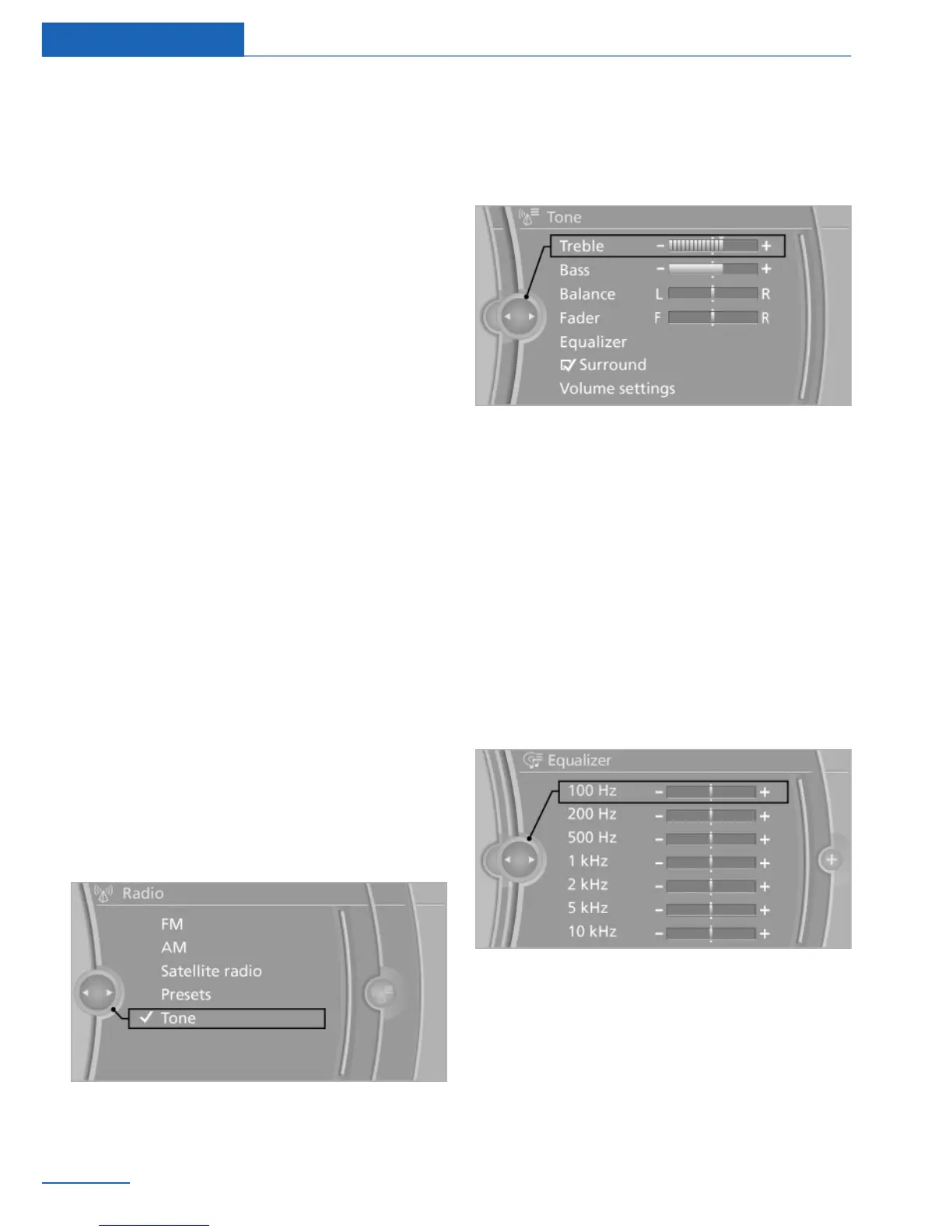
"CD/Multimedia", "Radio" or "Settings"
2. "Tone"
3. Select the desired tone settings.
4. To adjust: turn the controller.
5. To store: press the controller.
Equalizer
Setting for individual audio frequency ranges.
Adjusting the equalizer
1.
"CD/Multimedia", "Radio" or "Settings"
2. "Tone"
3. "Equalizer"
4. Select the desired setting.
5. To adjust: turn the controller.
6. To store: press the controller.
Seite 190
Entertainment Tone
190
Online Edition for Part no. 01 40 2 918 440 - III/13



 To Next Page